
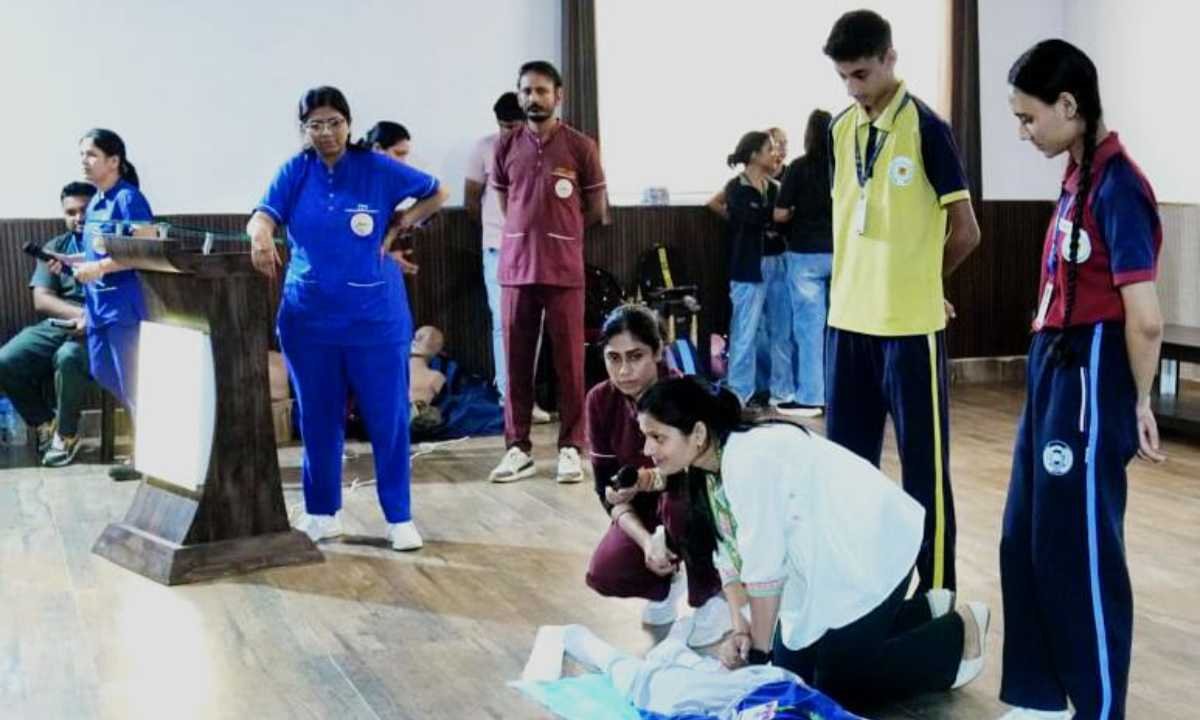
अखिल भारतीय आयुर्विज्ञान संस्थान (एम्स) ऋषिकेश में विश्व आघात सप्ताह विधिवत शुरू हो गया। इस अवसर पर एम्स की निदेशक प्रोफेसर (डॉ.) मीनू सिंह जी ने ट्रॉमा सेंटर के विभागाध्यक्ष प्रो. (डॉ) कमर आजम एवं डॉ. मधुर उनियाल जी के संचालन में ट्रॉमा रथ को हरी झंडी दिखाकर रवाना किया ।
गौरतलब है कि उत्तराखंड प्रदेश की भौगोलिक स्थिति के मद्देनजर आए दिन बढ़ रही आपदाएं और सड़क दुर्घटनाओं से बचाव प्रशिक्षण हेतु
विश्व आघात सप्ताह प्रतिवर्ष 11 से 17 अक्टूबर तक मनाया जाता है। इसके अंतर्गत लोगों को सड़क दुर्घटनाओं एवं आपात स्थितियों में त्वरित ट्रॉमा प्रबंधन, प्राथमिक उपचार और जीवनरक्षा की जानकारी दी जाती है ।
बताया गया है कि ट्रॉमा रथ एम्स की ट्रॉमा टीम के साथ विभिन्न विद्यालयों, कॉलेजों, अस्पतालों और अन्य विभागों में पहुंचेगा,वहां टीम आमजन को यह प्रशिक्षण देगी कि ट्रॉमा की स्थिति में तत्काल क्या कदम उठाने चाहिए और कैसे समय रहते किसी दुर्घटना ग्रसित व्यक्ति की जान बचाई जा सकती है।
कार्यक्रम का उद्देश्य समाज में आघात प्रबंधन के प्रति जागरूकता बढ़ाना और दुर्घटनाओं में होने वाली मृत्यु दर को कम करना है।
इस अवसर पर एम्स की संकायाध्यक्ष अकादमिक प्रो. (डॉ.) जया चतुर्वेदी , एवं चिकित्सा अधीक्षक प्रो. (डॉ.) बी. सत्या श्री, ट्रॉमा सर्जरी एवं क्रिटिकल केयर डिपार्टमेंट की फैकल्टी सदस्य डॉ. नीरज कुमार, डॉ. रूबी कटारिया , रिसर्च कंसल्टेंट डॉ. शांतम पोखरियाल , डॉ. आदित्य चौधरी , वरिष्ठ नर्सिंग अधिकारी अखिलेश उनियाल, दीपिका कांडपाल , दिनेश लुहार , गौरव शर्मा , जितेंद्र वर्मा , नर्सिंग ऑफिसर शशिकांत , वनेपाल ,मेघा भट्ट , अनामिका,शीला , सिक्योरिटी स्टाफ एवं अन्य स्टाफ उपस्थित थे ।



That’s a great point about balancing skill & luck in shooters! It’s interesting how platforms like nino gaming games emphasize verifiable fairness with RNG – transparency builds trust, right? Definitely impacts player experience!
**mind vault**
mind vault is a premium cognitive support formula created for adults 45+. It’s thoughtfully designed to help maintain clear thinking
**glpro**
glpro is a natural dietary supplement designed to promote balanced blood sugar levels and curb sugar cravings.
**sugarmute**
sugarmute is a science-guided nutritional supplement created to help maintain balanced blood sugar while supporting steady energy and mental clarity.
**vitta burn**
vitta burn is a liquid dietary supplement formulated to support healthy weight reduction by increasing metabolic rate, reducing hunger, and promoting fat loss.
**synaptigen**
synaptigen is a next-generation brain support supplement that blends natural nootropics, adaptogens
**glucore**
glucore is a nutritional supplement that is given to patients daily to assist in maintaining healthy blood sugar and metabolic rates.
**prodentim**
prodentim an advanced probiotic formulation designed to support exceptional oral hygiene while fortifying teeth and gums.
**nitric boost**
nitric boost is a dietary formula crafted to enhance vitality and promote overall well-being.
**wildgut**
wildgutis a precision-crafted nutritional blend designed to nurture your dog’s digestive tract.
**sleep lean**
sleeplean is a US-trusted, naturally focused nighttime support formula that helps your body burn fat while you rest.
Với giao diện mượt mà và ưu đãi hấp dẫn, MM88 là lựa chọn lý tưởng cho các tín đồ giải trí trực tuyến.
Với giao diện mượt mà và ưu đãi hấp dẫn, MM88 là lựa chọn lý tưởng cho các tín đồ giải trí trực tuyến.
Tham gia cộng đồng game thủ tại Go88 để trải nghiệm các trò chơi bài, poker phổ biến nhất hiện nay.
搭载智能站群程序,自动化搭建与管理,为SEO项目提供核心驱动力。站群程序
Với giao diện mượt mà và ưu đãi hấp dẫn, MM88 là lựa chọn lý tưởng cho các tín đồ giải trí trực tuyến.
Đến với J88, bạn sẽ được trải nghiệm dịch vụ cá cược chuyên nghiệp cùng hàng ngàn sự kiện khuyến mãi độc quyền.
采用高效谷歌外推策略,快速提升网站在搜索引擎中的可见性与权重。谷歌外推
iwin – nền tảng game bài đổi thưởng uy tín, nơi bạn có thể thử vận may và tận hưởng nhiều tựa game hấp
Tham gia cộng đồng game thủ tại Go88 để trải nghiệm các trò chơi bài, poker phổ biến nhất hiện nay.
Đến với J88, bạn sẽ được trải nghiệm dịch vụ cá cược chuyên nghiệp cùng hàng ngàn sự kiện khuyến mãi độc quyền.
kuwin sở hữu kho game đa dạng từ slot đến trò chơi bài đổi thưởng, mang đến cho bạn những giây phút giải trí tuyệt vời.
Tham gia cộng đồng game thủ tại Go88 để trải nghiệm các trò chơi bài, poker phổ biến nhất hiện nay.
Tham gia cộng đồng game thủ tại Go88 để trải nghiệm các trò chơi bài, poker phổ biến nhất hiện nay.
rufus windows 11 Rufus is known as a small, free, open source utility designed to create bootable USB drives. It is used to prepare a USB flash drive that can set up an operating system, launch diagnostic tools, or boot into a recovery environment. The program works without installation and can be run immediately after downloading.
The primary purpose of Rufus is to create bootable USB media from ISO images fast and reliably. This lets people install or run operating systems directly from a USB flash drive without the need for DVDs. The tool supports a wide range of operating systems and service utilities, which makes the program useful for both regular users and system administrators.
Rufus runs on computers with Microsoft Windows, starting from Windows 7. Both 32-bit and 64-bit versions are supported, and there is also a version available for ARM64 architecture.
The software lets users create bootable USB drives from many different ISO images. It can be used to prepare a USB drive for installing Windows 11, Windows 10, Windows 8.1, or Windows 7, as well as various Linux distributions. Rufus also works with DOS systems and other recovery or maintenance tools commonly used for troubleshooting computers.
One of the built-in features of Rufus is the ability to download official Windows ISO images directly from Microsoft servers. This allows users to obtain original installation images for Windows 8.1, Windows 10, and Windows 11 without searching for them on third-party websites.
In addition to creating bootable drives, Rufus can format USB devices. It supports several file systems including FAT32, NTFS, exFAT, UDF, and ReFS. This flexibility allows the USB drive to be prepared for different use cases and compatibility requirements.
Rufus supports both legacy BIOS systems and modern UEFI environments. Because of this, bootable drives created with Rufus can work on older computers as well as newer systems that use UEFI and Secure Boot.
Another feature included in Rufus is Windows To Go support. This option allows users to run a full Windows environment directly from a USB drive. It can be useful for testing systems, performing maintenance, or working on multiple computers without installing Windows on the internal drive.
Rufus also provides the option to bypass certain Windows 11 installation requirements. When creating an installation USB, the program can disable checks for TPM 2.0, Secure Boot, and minimum RAM requirements. This makes it possible to install Windows 11 on computers that would otherwise not meet the official hardware requirements.
One of the reasons Rufus has become popular is its speed and simplicity. The program is extremely small, about 1.9 MB in size, and runs as a portable application without installation. It is distributed under the GPL v3 open-source license, supports more than 70 languages, and contains no advertisements, bundled software, or tracking components.
Rufus works with a large number of ISO images. These include multiple versions of Windows, Windows Server editions, FreeDOS, and various system tools such as GParted, Hiren’s Boot CD, Parted Magic, and Clonezilla. Because of this wide compatibility, the program can be used not only for installing operating systems but also for disk management, data recovery, and system maintenance tasks.
To use Rufus, a computer running Windows 7 or later and a USB flash drive are required. The program does not need to be installed. Users simply download the executable file, run it, select the ISO image they want to use, and create a bootable USB drive. Due to its simplicity, speed, and reliability, Rufus remains one of the most widely used tools for creating bootable USB drives.
References:
Different types of steroids
References:
https://skriver-lyon-3.hubstack.net/oxandrolon-100-x-10-mg
В этой информационной статье вы найдете интересное содержание, которое поможет вам расширить свои знания. Мы предлагаем увлекательный подход и уникальные взгляды на обсуждаемые темы, побуждая пользователей к активному мышлению и критическому анализу!
Выяснить больше – https://vivod-iz-zapoya-2.ru/
Нарколог на дом в Воронеже с оперативным приездом специалиста, детоксикацией и медицинским наблюдением в наркологической клинике «Частный медик 24»
Получить дополнительную информацию – нарколог на дом воронеж
В Санкт-Петербурге услуга срочного вывода из запоя на дому востребована в ситуациях, когда состояние пациента ухудшается и требуется немедленная помощь. Врач проводит консультацию, оценивает общее состояние, длительность запоя и выраженность симптомов, после чего определяет тактику лечения при алкоголизме. При необходимости помощь оказывается в кратчайшие сроки, без ожидания госпитализации в стационаре. Услугу можно заказать заранее или срочно через сайт клиники.
Изучить вопрос глубже – вывод из запоя на дому круглосуточно в санкт-петербурге
Такие критерии помогают определить, когда необходим более строгий контроль и постоянное наблюдение. В стационаре создаются условия, при которых лечение проходит без внешних факторов, влияющих на состояние пациента. При этом услуга может предоставляться анонимно, а цену лечения можно уточнить заранее по телефону или при обращении.
Детальнее – вывод из запоя капельница на дому в нижнем новгороде
Анонимное лечение на дому ценно ещё и тем, что снижает внутреннее сопротивление самого пациента. Для многих людей первый контакт с врачом происходит именно дома, без дороги, без ожидания, без страха чужих взглядов. Такой формат помогает начать разговор не только о снятии острых симптомов, но и о более широких вопросах: что делать после выхода из запоя, когда требуется кодирование, в каких случаях нужна реабилитация, а когда первичная наркологическая помощь уже должна переходить в полноценный лечебный маршрут. Врач может помочь и в ситуациях, связанных не только с алкоголем, но и с наркомании, если семье нужно понять, что происходит с зависимым человеком и какой следующий шаг будет для него безопасным.
Выяснить больше – нарколог на дом воронеж
Капельница от похмелья — это один из наиболее эффективных методов экстренной медицинской помощи, который позволяет быстро снять симптомы алкогольной интоксикации и восстановить организм после злоупотребления алкоголем. В наркологической клинике «Частный медик 24» в Самаре мы предоставляем услугу выезда нарколога на дом и капельной терапии для пациентов, испытывающих тяжёлые симптомы похмелья. Это удобный способ получить необходимую помощь без лишнего стресса, сохраняя анонимность и комфорт пациента.
Узнать больше – капельница от похмелья в самаре
Для жителей Екатеринбурга наркологическая клиника «Частный медик 24» предлагает платную услугу выезда врача на дом для проведения капельницы от похмелья. Когда человек переживает сильные симптомы похмелья, такие как головная боль, тошнота, слабость, важно не тянуть с лечением и начать восстановление как можно скорее. Капельница от похмелья помогает хорошо облегчить самочувствие пациента, снять головную боль и улучшить общее состояние, восстановив водно-электролитный баланс в организме.
Разобраться лучше – капельница от похмелья на дому екатеринбург
Вывод из запоя в стационаре — это формат медицинской помощи, при котором пациент находится под круглосуточным наблюдением и получает лечение в контролируемых условиях. Такой подход применяется в ситуациях, когда состояние нестабильно или есть риски осложнений. В наркологической клинике «Частный медик 24» в Нижнем Новгороде стационарная помощь выстраивается по принципу поэтапной стабилизации: от первичного осмотра и оценки рисков до достижения устойчивых показателей и перехода к восстановлению.
Получить больше информации – вывод из запоя на дому цена в нижнем новгороде
Анонимное лечение на дому ценно ещё и тем, что снижает внутреннее сопротивление самого пациента. Для многих людей первый контакт с врачом происходит именно дома, без дороги, без ожидания, без страха чужих взглядов. Такой формат помогает начать разговор не только о снятии острых симптомов, но и о более широких вопросах: что делать после выхода из запоя, когда требуется кодирование, в каких случаях нужна реабилитация, а когда первичная наркологическая помощь уже должна переходить в полноценный лечебный маршрут. Врач может помочь и в ситуациях, связанных не только с алкоголем, но и с наркомании, если семье нужно понять, что происходит с зависимым человеком и какой следующий шаг будет для него безопасным.
Углубиться в тему – нарколог на дом анонимно воронеж
В Нижнем Новгороде стационарное лечение используется при наличии факторов, которые увеличивают риск осложнений или делают домашний формат недостаточным, особенно при алкоголизме или тяжёлом состоянии больного. Врач принимает решение на основе осмотра, консультации, анализа данных и оценки симптомов и динамики состояния пациента. Основная цель — обеспечить безопасность человека и создать условия для контролируемого лечения алкоголизма.
Подробнее тут – вывод из запоя капельница в нижнем новгороде
Решение о помещении пациента в стационар принимается на основе объективных медицинских критериев. К показаниям относятся: запой длительностью более 72 часов, выраженная абстиненция с тахикардией и артериальной гипертензией, наличие в анамнезе алкогольных делириев или судорожных эпизодов, сопутствующие хронические заболевания печени, сердца или поджелудочной железы. В тяжелых случаях, когда интоксикация затрагивает несколько систем одновременно, резкое прекращение употребления без медицинской поддержки может спровоцировать отек мозга, острую сердечную недостаточность или желудочно-кишечное кровотечение. При сочетанных расстройствах, когда в анамнезе присутствует наркомании, протоколы адаптируются под специфику психоактивных веществ и включают усиленный нейрологический контроль. Стационар позволяет провести полноценную диагностику, включая ЭКГ, экспресс-анализы крови и мониторинг сатурации, что формирует точную картину состояния и исключает шаблонные назначения.
Получить дополнительную информацию – нарколог вывод из запоя в стационаре санкт-петербург
Затяжной запой перестает быть бытовой проблемой в тот момент, когда организм теряет способность самостоятельно восстанавливаться после интоксикации. Накопление ацетальдегида, нарушение водно-электролитного баланса, истощение запасов витаминов и перегрузка сердечно-сосудистой системы создают состояние, при котором домашние методы перестают быть безопасными. Срочно стабилизировать самочувствие и быстро купировать абстинентный синдром позволяет только контролируемая медицинская среда. Вывод из запоя в стационаре в Нижнем Новгороде становится клинически обоснованным решением, когда требуется не просто снятие симптомов, а комплексная детоксикация под круглосуточным наблюдением врачей. Наркологическая клиника «Стармед» организует процесс лечения в соответствии с актуальными стандартами доказательной медицины, обеспечивая безопасность пациента, прозрачность процедур и плавный переход к противорецидивной терапии. Мы понимаем, что решение о госпитализации часто принимается в состоянии стресса, поэтому наша работа начинается с четкой диагностики, честного объяснения плана лечения и соблюдения строгих протоколов конфиденциальности. Опытные специалисты клиники помогут вызвать доверие к процессу восстановления уже на этапе первого контакта.
Исследовать вопрос подробнее – нарколог вывод из запоя в стационаре в нижнем новгороде
Вывод из запоя на дому в Екатеринбурге с выездом врача — это специализированная медицинская услуга, которая помогает человеку безопасно и эффективно выйти из запойного состояния без необходимости госпитализации. Запой является состоянием, при котором человек не может контролировать потребление алкоголя, и последствия могут быть крайне серьезными, как для физического, так и для психоэмоционального здоровья. В таких случаях помощь врача на дому становится важным и необходимым шагом для восстановления здоровья пациента и предотвращения осложнений.
Получить дополнительные сведения – вывод из запоя на дому
Терапевтический процесс в стационаре строится по принципу последовательного выполнения клинических задач: диагностика, стабилизация, медикаментозная терапия и подготовка к амбулаторному этапу. При поступлении врач проводит детальный осмотр, собирает анамнез, оценивает неврологический статус и при необходимости назначает лабораторные исследования. На основе полученных данных формируется индивидуальный протокол, учитывающий возраст, длительность интоксикации, наличие сопутствующих патологий и переносимость лекарственных компонентов. Мы применяем только сертифицированные препараты, зарегистрированные в РФ, и строго соблюдаем клинические рекомендации Минздрава, исключая псевдонаучные методики. Стандарты оказания медицинской помощи фиксируются во внутренних регламентах и регулярно проверяются независимыми аудиторами.
Выяснить больше – быстрый вывод из запоя в стационаре в санкт-петербурге
Процедура вывода из запоя на дому включает несколько ключевых этапов, которые обеспечивают максимально быстрое и безопасное восстановление пациента. Эти этапы тщательно контролируются врачом, что минимизирует риски и помогает достичь наилучших результатов.
Исследовать вопрос подробнее – вывод из запоя на дому анонимно
Стационарное лечение рассматривают при состояниях, когда после длительного употребления алкоголя сохраняется выраженное ухудшение самочувствия и требуется наблюдение в течение более продолжительного времени. Обычно речь идет о нескольких днях запоя, тяжелой интоксикации, выраженной слабости, дрожи в руках, бессоннице, тревоге, скачках давления, сердцебиении, тошноте и признаках обезвоживания. В таких случаях значение имеет не только снятие острых симптомов, но и контроль общего состояния на протяжении всего периода выхода из запоя.
Подробнее тут – нарколог вывод из запоя в стационаре санкт-петербург
Выбор между домашней помощью и стационарным лечением часто определяется степенью физиологической зависимости и наличием сопутствующих патологий. В условиях клиники исключаются внешние триггеры, обеспечивается изоляция от источников алкоголя и создается контролируемая среда, где медицинские решения принимаются на основе объективных показателей, а не субъективных ощущений пациента. Такой подход критически важен для предотвращения осложнений, минимизации дискомфорта абстиненции и формирования устойчивой базы для дальнейшей противорецидивной работы.
Ознакомиться с деталями – вывод из запоя в стационаре клиника нижний новгород
Эта услуга позволяет людям, которые не могут или не хотят покидать свой дом, получить профессиональную помощь и избавиться от зависимости без госпитализации. К тому же, вывод из запоя на дому позволяет избежать стресса, связанного с нахождением в медицинских учреждениях, при этом можно заказать вызов специалистов с учетом их опыта и лет работы, а также данных больного.
Получить дополнительные сведения – https://vyvod-iz-zapoya-na-domu-ekaterinburg-18.ru
Выбор между домашней помощью и стационарным лечением определяется не удобством, а медицинской целесообразностью. В условиях клиники исключаются внешние триггеры, обеспечивается изоляция от источников алкоголя и создается контролируемая среда, где терапевтические решения принимаются на основе объективных показателей. Такой подход критически важен для предотвращения осложнений, минимизации дискомфорта абстиненции и формирования устойчивой базы для дальнейшей противорецидивной работы.
Узнать больше – стационар вывод из запоя
Решение о помещении пациента в стационар принимается на основе объективных медицинских критериев, а не только по желанию родственников. К прямым показаниям относятся: запой длительностью более 72 часов, выраженная абстиненция с тахикардией, стойкой артериальной гипертензией, профузным потоотделением и тремором, наличие в анамнезе перенесенных алкогольных делириев или судорожных эпизодов. В тяжелых случаях, когда интоксикация затрагивает несколько физиологических систем одновременно, резкое прекращение употребления без медицинской поддержки может спровоцировать отек головного мозга, острую сердечную недостаточность, панкреонекроз или желудочно-кишечное кровотечение. В таких случаях стационар позволяет провести полноценную диагностику, включая ЭКГ, экспресс-анализы крови, ультразвуковое исследование внутренних органов и мониторинг сатурации. Это формирует точную картину состояния, исключает шаблонные назначения и позволяет врачам динамически корректировать дозировки препаратов на основе лабораторных данных в реальном времени.
Детальнее – вывод из запоя в стационаре клиника нижний новгород
Вывод из запоя в стационаре в Санкт-Петербурге: круглосуточное лечение, детоксикация и медицинский контроль в наркологической клинике «Элегия Мед».
Получить дополнительные сведения – наркология вывод из запоя в стационаре в санкт-петербурге
Вывод из запоя в стационаре в Нижнем Новгороде: эффективная помощь при алкоголизме, капельницы и наблюдение врачей в наркологической клинике «Стармед».
Подробнее – вывод из запоя в стационаре клиника
Решение о госпитализации принимается на основе объективных клинических показаний, а не только по желанию родственников. Стационарный формат оптимален, когда амбулаторная помощь не способна обеспечить должный уровень безопасности из-за тяжести состояния или риска осложнений. В условиях клиники исключается доступ к алкоголю, создается терапевтическая среда без бытовых триггеров и обеспечивается возможность динамической коррекции терапии на основе лабораторных данных.
Выяснить больше – стационар вывод из запоя в нижнем новгороде
Запой – это состояние, при котором человек продолжает употреблять алкоголь в течение длительного времени, не в состоянии прекратить употребление самостоятельно, что является проявлением алкоголизма. Это может привести к серьезным проблемам со здоровьем, и в таком случае необходим вывод из запоя с помощью наркологической помощи, при этом в дальнейшем может рассматриваться кодирование.
Подробнее можно узнать тут – нарколог на дом вывод из запоя в екатеринбурге
Лечение алкоголизма в Воронеже у нас проводится на всех стадиях: от первой помощи при запое до кодирования и долгосрочной поддержки. Для пациентов с наркотической зависимостью (включая синтетические каннабиноиды и опиоиды) мы применяем щадящие схемы детоксикации, которые минимизируют болезненные симптомы и снижают риск срывов. Кодирование от алкоголизма и наркомании доступно в нескольких вариантах: медикаментозное (инъекции, импланты, «Двойной блок»), гипносуггестивное и комбинированное. Каждый метод подбирается после тщательной диагностики, чтобы результат был максимально долгосрочным.
Узнать больше – оказание наркологической помощи
Перед началом терапии врач проводит осмотр пациента. Измеряются основные показатели, включая давление и пульс, оценивается выраженность симптомов. На основании этих данных формируется состав капельницы и определяется тактика лечения, что позволяет эффективно провести вывод из запоя.
Исследовать вопрос подробнее – капельница от похмелья
Выезд нарколога на дом в Самаре организован так, чтобы пациент получил помощь без ожидания и без лишней нагрузки на организм. После обращения специалист приезжает по указанному адресу, проводит первичный осмотр, оценивает общее состояние, уровень интоксикации, показатели давления, пульса, дыхания и собирает краткий анамнез. На основании этой оценки врач определяет, можно ли безопасно оказывать помощь на дому, и подбирает подходящую схему лечения, включая возможное кодирование или вывод из алкоголизма. Такой формат позволяет начать медицинские мероприятия сразу после осмотра и быстро перейти к стабилизации состояния.
Подробнее – нарколог на дом вывод
Наркологический стационар с комфортными условиями в Санкт-Петербурге — это специализированное учреждение, которое не только помогает пациентам избавиться от зависимости, но и создает благоприятные условия для выздоровления. В таких стационарах важны не только высококачественные медицинские услуги, но и уютная атмосфера, которая способствует восстановлению физического и психоэмоционального состояния пациента.
Подробнее можно узнать тут – наркологическая помощь стационар
Особое внимание мы уделяем психологической составляющей. Наркологическая помощь в Воронеже в «Клиника Плюс» — это не только физическое очищение, но и работа с мотивацией, разрушение психологических триггеров зависимости. Родственники получают отдельную поддержку: консультации психолога помогают правильно выстроить общение с зависимым человеком и мотивировать его на дальнейшее лечение. Реабилитация может проходить амбулаторно или в стационаре партнёрских центров с комфортабельными условиями, где пациенты находятся под круглосуточным наблюдением.
Изучить вопрос глубже – http://narkologicheskaya-pomoshh-voronezh-2.ru
Клиника «Клиника Плюс» предлагает комплексную наркологическую помощь в Воронеже, включая выезд нарколога на дом, медикаментозную терапию для вывода из запоя и реабилитацию. Мы понимаем, как важно для пациентов и их близких получить поддержку именно в тот момент, когда она нужна.
Ознакомиться с деталями – http://narkologicheskaya-pomoshh-voronezh-4.ru/
Наркологическая помощь в Воронеже становится необходимой в тот момент, когда эпизоды употребления перерастают в клиническую картину алкоголизма или наркомании, а бытовые трудности сменяются устойчивыми симптомами наркозависимости. Для одних семей поводом для обращения становится затяжной запой, сопровождающийся физическим истощением и обезвоживанием. Для других — выраженная тревожность, тремор, скачки артериального давления, агрессия или повторяющиеся срывы после попыток сократить дозировку самостоятельно. Во всех этих случаях важна не разовая процедура, а медицински обоснованная помощь, которая учитывает текущее состояние пациента, минимизирует риски осложнений и определяет дальнейший маршрут восстановления. Когда близкие начинают искать специалиста, они, как правило, хотят решить комплекс задач: стабилизировать самочувствие, понять, достаточно ли домашнего формата или нужна госпитализация, оценить степень сформированной зависимости и выстроить план действий, который не вернет человека в кризис через несколько дней. Именно поэтому профессиональная наркология рассматривается как последовательная система вмешательств — от осмотра и первичной стабилизации до работы с мотивацией, психотерапии и профилактики рецидивов.
Изучить вопрос глубже – narkologicheskaya-pomoshh-voronezh-3.ru/
Дополнительным поводом для обращения становится состояние, при котором больному тяжело вставать, пить воду, есть, спокойно лежать или переносить обычную бытовую нагрузку. В таких ситуациях домашний осмотр помогает быстрее определить, какого объема помощи достаточно на текущем этапе. Если обращение связано не только с алкоголем, но и с подозрением на употребление наркотиков, оценка проводится особенно осторожно, поскольку при наркомании клиническая картина может быть иной.
Подробнее тут – нарколог на дом цена москва
Основные показания для проведения процедуры:
Узнать больше – капельница от похмелья на дом воронеж
Капельница от похмелья в Воронеже с нормализацией состояния и поддержкой организма в наркологической клинике «Похмельная служба»
Углубиться в тему – капельница от похмелья на дом
Нарколог на дом в Москве: срочная медицинская помощь, капельницы и восстановление состояния в наркологической клинике «Клиника доктора Калюжной».
Изучить вопрос глубже – нарколог на дом вывод москва
Выезд специалиста начинается с оценки состояния пациента. Врач измеряет давление, пульс, оценивает общее самочувствие и выраженность симптомов. На основании этих данных формируется план лечения и подбирается состав капельницы. Такой подход позволяет учитывать индивидуальные особенности пациента и эффективно провести вывод из запоя.
Подробнее – капельница от похмелья цена
Наркологическая помощь в Воронеже: профессиональное лечение зависимостей, выезд врача, анонимная помощь в наркологической клинике «Клиника Плюс».
Подробнее – https://narkologicheskaya-pomoshh-voronezh.ru/
Капельница от похмелья в Воронеже с оперативным выездом врача и устранением симптомов интоксикации в наркологической клинике «Похмельная служба»
Получить дополнительную информацию – капельница от похмелья вызов на дом
Не каждое состояние можно безопасно корректировать дома. При признаках тяжелого отравления, судорогах, выраженных нарушениях сознания, риске делирия, серьезных сердечно-сосудистых осложнениях или сочетанном употреблении нескольких веществ врач может рекомендовать срочную госпитализацию. В таких случаях домашний формат не заменяет стационар, а задача специалиста заключается в том, чтобы вовремя распознать угрозу и направить пациента на более интенсивное лечение, включая возможную госпитализацию в центр реабилитации при наркомании для борьбы с ломкой и лечением зависимости от наркотиков.
Выяснить больше – запой нарколог на дом
Ситуации, когда требуется срочный вызов нарколога на дом в Самаре, как правило, связаны с острыми проявлениями алкогольной или наркотической интоксикации, а также с ухудшением общего состояния пациента на фоне длительного употребления психоактивных веществ. Важно понимать, что своевременное вмешательство специалиста позволяет предотвратить развитие тяжелых осложнений, включая нарушения работы сердечно-сосудистой системы, дыхания и центральной нервной системы.
Узнать больше – нарколог на дом вывод
Процедура проведения капельницы от запоя обычно не занимает много времени и проводится в условиях медицинского центра. Во время процедуры пациент может ощущать незначительный дискомфорт при введении иглы, но процесс восстановления организма через вену происходит быстро и эффективно. Капельница помогает снизить уровень алкоголя в крови, улучшить метаболизм и предотвратить ухудшение состояния.
Детальнее – капельница от запоя цена
Наркологическая помощь в Воронеже: срочный выезд нарколога, капельницы и лечение зависимостей в наркологической клинике «Клиника Плюс».
Ознакомиться с деталями – http://narkologicheskaya-pomoshh-voronezh-1.ru
Когда человек или его родственники понимают, что нужна наркологическая помощь в Воронеже, время становится решающим фактором. Запой, ломка, тяжёлая интоксикация — в таких ситуациях промедление может привести к необратимым последствиям для здоровья и жизни. Наша клиника создана именно для того, чтобы оказывать эффективную круглосуточную наркологическую помощь в Воронеже в самых сложных случаях. Мы не заставляем ждать в очередях государственных учреждений, не ставим на учёт и не разглашаем информацию. Всё происходит анонимно, на дому или в комфортных условиях нашей партнёрской клиники. Пациенты из Воронежа, Воронежской области, а также соседних регионов уже более 12 лет выбирают «Клиника Плюс» благодаря сочетанию скорости, профессионализма, полной анонимности и доказанной результативности.
Получить дополнительные сведения – наркологическая помощь анонимно
Клиника «Клиника Плюс» предлагает комплексную наркологическую помощь в Воронеже, включая выезд нарколога на дом, медикаментозную терапию для вывода из запоя и реабилитацию. Мы понимаем, как важно для пациентов и их близких получить поддержку именно в тот момент, когда она нужна.
Выяснить больше – наркологическая помощь в воронеже
Наркологическая помощь в Воронеже становится необходимой в тот момент, когда эпизоды употребления перерастают в клиническую картину алкоголизма или наркомании, а бытовые трудности сменяются устойчивыми симптомами наркозависимости. Для одних семей поводом для обращения становится затяжной запой, сопровождающийся физическим истощением и обезвоживанием. Для других — выраженная тревожность, тремор, скачки артериального давления, агрессия или повторяющиеся срывы после попыток сократить дозировку самостоятельно. Во всех этих случаях важна не разовая процедура, а медицински обоснованная помощь, которая учитывает текущее состояние пациента, минимизирует риски осложнений и определяет дальнейший маршрут восстановления. Когда близкие начинают искать специалиста, они, как правило, хотят решить комплекс задач: стабилизировать самочувствие, понять, достаточно ли домашнего формата или нужна госпитализация, оценить степень сформированной зависимости и выстроить план действий, который не вернет человека в кризис через несколько дней. Именно поэтому профессиональная наркология рассматривается как последовательная система вмешательств — от осмотра и первичной стабилизации до работы с мотивацией, психотерапии и профилактики рецидивов.
Узнать больше – наркологическая помощь анонимно в воронеже
Наркологический стационар с круглосуточным наблюдением — это не просто место для детоксикации, но и пространство для комплексного лечения и реабилитации. Постоянное присутствие медицинского персонала помогает избежать опасных ситуаций, таких как психозы или физиологические сбои, характерные для абстиненции. Прием пациентов может включать кодирование, а также индивидуальные программы лечения, которые разрабатываются в зависимости от состояния пациента и его потребностей на протяжении года.
Подробнее – http://narkologicheskij-staczionar-sankt-peterburg.ru/
Капельница от похмелья в Самаре: быстрое улучшение самочувствия и помощь при интоксикации под контролем специалистов в наркологической клинике «Детокс»
Получить дополнительные сведения – http://kapelnicza-ot-pokhmelya-samara-15.ru/
Капельница от похмелья с детоксикацией и восстановлением представляет собой медицинскую процедуру, во время которой пациент получает инфузии препаратов, направленных на очищение организма от токсинов и восстановление нормальной работы внутренних органов. Применение таких капельниц помогает быстро устранить симптомы похмелья — головную боль, тошноту, слабость и другие неприятные ощущения — и значительно улучшить самочувствие, что особенно важно при тяжелых состояниях, связанных с наркоманией и алкоголем. При этом может проводиться наркологическая терапия, возможен вызов врача на дом, а также учитываются цены услуг и длительность лечения, которая в отдельных случаях может составлять несколько лет.
Ознакомиться с деталями – капельница от похмелья вызов на дом самара
Наиболее частыми причинами обращения становятся выраженная слабость, тремор, нарушение сна, тревога, учащенный пульс, скачки артериального давления, тошнота и признаки обезвоживания. Эти симптомы могут сочетаться между собой и усиливаться после прекращения употребления алкоголя, особенно после нескольких дней запоя.
Детальнее – https://narkolog-na-dom-ekaterinburg-4.ru
Капельница от похмелья в Самаре используется для устранения симптомов алкогольной интоксикации, которые могут включать головную боль, тошноту, слабость, рвоту и обезвоживание. Это достигается за счет введения специальных растворов, которые помогают организму восстановиться и очиститься от токсинов.
Получить больше информации – капельница от похмелья на дом
Основой стационарного лечения является инфузионная терапия, направленная на ускоренное выведение токсинов, коррекцию кислотно-щелочного баланса и восстановление метаболических процессов. Стандартная капельница при выходе из запоя включает кристаллоидные и коллоидные растворы, витаминные комплексы группы B и C, гепатопротекторы, антиоксиданты и симптоматические препараты для нормализации сна и снижения тревожности. Состав, объем и скорость инфузии рассчитываются индивидуально с учетом возраста, массы тела, длительности интоксикации, функции почек и печени, а также наличия аллергических реакций. Мы быстро купируем мучительные проявления абстиненции, восстанавливаем аппетит, устраняем мышечные спазмы и нормализуем суточные ритмы. При необходимости подключаются препараты для стабилизации сердечного ритма, коррекции артериального давления и защиты нейрональных структур от эксайтотоксичности. Все медикаменты сертифицированы, применяются в строгом соответствии с клиническими рекомендациями Минздрава РФ и не вызывают вторичной зависимости. Дозировки ежедневно пересматриваются лечащим врачом на основе лабораторных анализов и клинической динамики, что гарантирует высокий уровень качества медицинской помощи и безопасность пациента. Снятие острых симптомов происходит уже в первые сутки, что значительно улучшает общее самочувствие и возвращает способность к адекватному восприятию действительности.
Углубиться в тему – вывод из запоя в стационаре анонимно в нижнем новгороде
Капельница от похмелья с мягким восстановлением — это метод, направленный на быстрое восстановление организма после алкогольной интоксикации, при котором используется более щадящий подход. В отличие от стандартных капельниц, целью которых является быстрый вывод токсинов из организма, капельница с мягким восстановлением действует постепенно, восстанавливая водно-солевой баланс и поддерживая внутренние органы без перегрузки организма. Эта процедура особенно полезна тем, кто предпочитает не только избавиться от похмелья, но и почувствовать себя восстановленным и энергичным, при этом помощь может оказываться при запое, когда врач выезжает на дом для лечения алкоголизма.
Разобраться лучше – капельница от похмелья цена
Попытки самостоятельно прекратить употребление после нескольких дней непрерывной интоксикации часто сопровождаются резким выбросом стрессовых гормонов, скачками артериального давления, тахикардией и нарушением электролитного баланса. Без инфузионной поддержки и фармакологической коррекции возрастает риск развития такого грозного осложнения, как белая горячка, судорожных состояний, острой печеночной или сердечной недостаточности. Самостоятельные попытки резко перестать пить без медицинского контроля опасен для жизни и может спровоцировать необратимые изменения в работе внутренних органов. Домашние условия не позволяют проводить лабораторный контроль, корректировать дозировки в реальном времени и оперативно реагировать на ухудшение состояния. Стационар решает эти задачи за счет круглосуточного дежурства врачей, наличия реанимационного оборудования и возможности привлечения смежных специалистов при выявлении соматических осложнений.
Получить дополнительные сведения – быстрый вывод из запоя в стационаре
Наша клиника предлагает полный цикл услуг — от экстренного вызова нарколога до долгосрочной реабилитации. Каждый этап разрабатывается индивидуально с учётом возраста, стажа зависимости и сопутствующих заболеваний. Современные протоколы 2026 года позволяют проводить лечение максимально комфортно и эффективно, минимизируя болезненные симптомы и снижая риск срывов. В этом виде деятельности мы используем только проверенные методы медицины.
Получить дополнительную информацию – нарколог на дом вывод
Капельница от похмелья с детоксикацией и восстановлением представляет собой медицинскую процедуру, во время которой пациент получает инфузии препаратов, направленных на очищение организма от токсинов и восстановление нормальной работы внутренних органов. Применение таких капельниц помогает быстро устранить симптомы похмелья — головную боль, тошноту, слабость и другие неприятные ощущения — и значительно улучшить самочувствие, что особенно важно при тяжелых состояниях, связанных с наркоманией и алкоголем. При этом может проводиться наркологическая терапия, возможен вызов врача на дом, а также учитываются цены услуг и длительность лечения, которая в отдельных случаях может составлять несколько лет.
Подробнее можно узнать тут – http://www.domen.ru
Процесс проведения капельницы от похмелья в Самаре включает несколько важных этапов, каждый из которых направлен на быстрое восстановление организма и улучшение самочувствия пациента. В отличие от традиционных методов, таких как прием таблеток или напитков, капельница позволяет сразу получить все необходимые компоненты для восстановления, включая гидратацию, витамины и препараты для снятия токсинов. Эта процедура проводится в медицинских центрах Самары, и часто доступна с выездом на дом, что повышает ее удобство и доступность для пациента.
Углубиться в тему – капельница от похмелья на дом
Капельница от похмелья в Самаре: быстрое снятие симптомов, детоксикация и восстановление организма под контролем специалистов в наркологической клинике «Детокс»
Углубиться в тему – капельница от похмелья на дом в самаре
Выбор между домашней помощью и стационарным лечением часто определяется степенью физиологической зависимости и наличием сопутствующих патологий. В условиях клиники исключаются внешние триггеры, обеспечивается изоляция от источников алкоголя и создается контролируемая среда, где медицинские решения принимаются на основе объективных показателей, а не субъективных ощущений пациента. Такой подход критически важен для предотвращения осложнений, минимизации дискомфорта абстиненции и формирования устойчивой базы для дальнейшей противорецидивной работы.
Подробнее – вывод из запоя в стационаре в нижнем новгороде
Капельница от похмелья является одним из наиболее эффективных методов для быстрого улучшения состояния пациента. Это медицинская процедура, направленная на детоксикацию организма, восстановление водно-солевого баланса и устранение симптомов интоксикации, обеспечивая быстрый вывод токсинов. Важным моментом является то, что капельница оказывает комплексное воздействие на организм, помогая справиться с неприятными симптомами похмелья, при этом может сочетаться с дальнейшей терапией и кодированием.
Углубиться в тему – https://kapelnicza-ot-pokhmelya-samara-14.ru
Длительное употребление алкоголя неизбежно приводит к системному истощению организма, нарушению метаболических процессов и дисфункции центральной нервной системы. Когда компенсаторные механизмы исчерпаны, а домашние методы перестают приносить облегчение, единственным безопасным и клинически обоснованным решением становится профессиональный вывод из запоя в стационаре в Нижнем Новгороде. Наркологическая клиника «Стармед» предоставляет помощь круглосуточно, выстраивая терапевтический процесс на принципах доказательной медицины, индивидуальном подборе препаратов и строгом соблюдении современных стандартов безопасности. Мы понимаем, что кризисные состояния требуют немедленного реагирования, поэтому наши специалисты готовы срочно оценить клиническую картину, организовать безопасную транспортировку и запустить протокол детоксикации без задержек. Все процедуры проводятся в лицензированных условиях, с непрерывным мониторингом жизненно важных показателей и гарантией полной конфиденциальности. Первичная оценка состояния осуществляется дистанционно, что позволяет врачам заранее подготовить необходимое оборудование и медикаменты, минимизируя время между обращением и началом терапии. Квалифицированные наркологи и психиатры работают в единой команде, обеспечивая комплексный подход к каждому случаю.
Получить больше информации – наркология вывод из запоя в стационаре нижний новгород
Дополнительным поводом для вызова врача становится состояние, при котором больному трудно вставать, пить воду, есть, сохранять спокойствие или ориентироваться в самочувствии. В таких случаях осмотр на дому позволяет быстрее определить дальнейший маршрут помощи. Иногда уже первый звонок помогает понять, допустим ли домашний формат или лучше сразу рассматривать вывод в стационаре.
Выяснить больше – нарколог на дом вывод екатеринбург
Наша клиника предлагает полный цикл услуг — от экстренного вызова нарколога до долгосрочной реабилитации. Каждый этап разрабатывается индивидуально с учётом возраста, стажа зависимости и сопутствующих заболеваний. Современные протоколы 2026 года позволяют проводить лечение максимально комфортно и эффективно, минимизируя болезненные симптомы и снижая риск срывов. В этом виде деятельности мы используем только проверенные методы медицины.
Получить дополнительные сведения – запой нарколог на дом
Реабилитация алкоголиков в Москве требует интегрированного подхода, включающего не только медицинское лечение, но и психологическую помощь. Важно, чтобы реабилитационные центры предлагали программы, которые помогают пациентам не только избавиться от физической зависимости, но и наладить их психологическое состояние, а также восстановить их отношения с окружающими.
Детальнее – центр реабилитации алкоголиков в москве
Осмотр на дому особенно важен в тех случаях, когда больному трудно вставать, пить воду, принимать пищу, спокойно лежать или ориентироваться в собственном состоянии. В такой ситуации очная оценка помогает понять, допустим ли домашний формат и достаточно ли его на текущем этапе. При выраженном ухудшении состояния, признаках перегрузки организма или риске осложнений может потребоваться срочный пересмотр тактики.
Получить дополнительные сведения – нарколог на дом цена москва
Поводом для обращения обычно становятся слабость, тремор, тревога, бессонница, учащенный пульс, нестабильное давление, тошнота и ощущение физического истощения. Эти проявления часто усиливаются после прекращения употребления алкоголя или на фоне затянувшегося запоя.
Подробнее тут – врач нарколог на дом москва
Эта услуга позволяет людям, которые не могут или не хотят покидать свой дом, получить профессиональную помощь и избавиться от зависимости без госпитализации. К тому же, вывод из запоя на дому позволяет избежать стресса, связанного с нахождением в медицинских учреждениях, при этом можно заказать вызов специалистов с учетом их опыта и лет работы, а также данных больного.
Получить дополнительные сведения – вывод из запоя на дому круглосуточно в екатеринбурге
Комплексная реабилитация алкоголиков в Москве помогает пациентам не только избавиться от зависимости, но и вернуться к полноценной жизни. Процесс восстановления включает в себя не только лечение алкоголизма как физического заболевания, но и работу с психологическими, социальными и эмоциональными аспектами, которые могут стать причиной или следствием зависимости. Такое подходное лечение, как правило, требует усилий со стороны как специалистов, так и самого пациента.
Узнать больше – реабилитация алкоголиков город
Вывод из запоя на дому требуется в тех случаях, когда человек сталкивается с длительным непрерывным употреблением алкоголя, которое приводит к тяжелым последствиям для организма. Это состояние опасно не только для здоровья, но и для жизни, поэтому быстрое вмешательство специалистов необходимо, при этом можно заказать наркологическая помощь. Врач на дому помогает пациенту выйти из запоя безопасно, минимизируя риски для его здоровья, что является особенно важно для больного, включая случаи наркомании, а также с учетом его данных, возраста (в том числе после 40–50 лет) и актуальной цена лечения для тех, кто не хочет или не может пройти лечение в стационаре.
Получить больше информации – вывод из запоя на дому
Нарколог на дом в Екатеринбурге: срочная медицинская помощь, капельницы и восстановление состояния в наркологической клинике «НЕО+».
Подробнее тут – врач нарколог на дом в екатеринбурге
Помощь на дому рассматривают при состояниях, связанных с острым ухудшением самочувствия после алкоголя. Чаще всего это несколько дней запоя, тяжелое похмелье, бессонница, тревога, дрожь в руках, слабость, отсутствие аппетита, тошнота, сухость во рту и ощущение истощения. В подобных случаях врачебный осмотр нужен для оценки общего состояния и выбора безопасной тактики.
Получить больше информации – нарколог на дом цена в екатеринбурге
Нарколог на дом в Москве: круглосуточный выезд, детоксикация и лечение зависимостей в наркологической клинике «Клиника доктора Калюжной».
Ознакомиться с деталями – нарколог на дом
Каждый из этапов важен для успешного лечения наркомании и требует квалифицированной наркологической медицинской помощи. Реабилитационные программы, предлагаемые в Москве, часто включают в себя все эти компоненты, при этом в ряде случаев консультации могут предоставляться бесплатно, что способствует комплексному подходу к решению проблемы зависимости.
Детальнее – реабилитация алкоголиков
Осмотр на дому особенно важен в тех случаях, когда больному трудно вставать, пить воду, принимать пищу, спокойно лежать или ориентироваться в собственном состоянии. В такой ситуации очная оценка помогает понять, допустим ли домашний формат и достаточно ли его на текущем этапе. При выраженном ухудшении состояния, признаках перегрузки организма или риске осложнений может потребоваться срочный пересмотр тактики.
Исследовать вопрос подробнее – вызвать нарколога на дом
Эта услуга позволяет людям, которые не могут или не хотят покидать свой дом, получить профессиональную помощь и избавиться от зависимости без госпитализации. К тому же, вывод из запоя на дому позволяет избежать стресса, связанного с нахождением в медицинских учреждениях, при этом можно заказать вызов специалистов с учетом их опыта и лет работы, а также данных больного.
Подробнее тут – анонимный вывод из запоя на дому
Вывод из запоя на дому требуется в тех случаях, когда человек сталкивается с длительным непрерывным употреблением алкоголя, которое приводит к тяжелым последствиям для организма. Это состояние опасно не только для здоровья, но и для жизни, поэтому быстрое вмешательство специалистов необходимо, при этом можно заказать наркологическая помощь. Врач на дому помогает пациенту выйти из запоя безопасно, минимизируя риски для его здоровья, что является особенно важно для больного, включая случаи наркомании, а также с учетом его данных, возраста (в том числе после 40–50 лет) и актуальной цена лечения для тех, кто не хочет или не может пройти лечение в стационаре.
Ознакомиться с деталями – вывод из запоя на дому анонимно в екатеринбурге
Нарколог на дом в Екатеринбурге — это формат помощи, который рассматривают в тех случаях, когда после употребления алкоголя больному требуется врачебный осмотр без поездки в клинику. Обычно речь идет о запое, выраженном похмельном синдроме, обезвоживании, слабости, треморе, тревоге, бессоннице, скачках давления, сердцебиении и общем ухудшении самочувствия. В такой ситуации состояние оценивают на месте и определяют, допустима ли помощь дома или нужен другой объем наблюдения.
Исследовать вопрос подробнее – нарколог на дом вывод
Нарколог на дом в Екатеринбурге — это формат помощи, который рассматривают при состояниях после употребления алкоголя, когда больному требуется врачебный осмотр без поездки в клинику. Обычно речь идет о запое, выраженном похмельном синдроме, нарушении сна, обезвоживании, слабости, треморе, тревоге, скачках давления, сердцебиении и общем ухудшении самочувствия. Дальнейшая тактика зависит от состояния больного на момент осмотра, длительности употребления алкоголя и наличия сопутствующих заболеваний.
Исследовать вопрос подробнее – нарколог на дом в екатеринбурге
Запой – это состояние, при котором человек продолжает употреблять алкоголь в течение длительного времени, не в состоянии прекратить употребление самостоятельно, что является проявлением алкоголизма. Это может привести к серьезным проблемам со здоровьем, и в таком случае необходим вывод из запоя с помощью наркологической помощи, при этом в дальнейшем может рассматриваться кодирование.
Разобраться лучше – вывод из запоя на дому круглосуточно
Нарколог на дом в Москве: срочный выезд врача, капельницы и помощь при запое в наркологической клинике «Клиника доктора Калюжной».
Узнать больше – нарколог на дом анонимно
Первый этап вывода из запоя на дому – это первичная оценка состояния пациента. Врач, прибывший на вызов, осматривает пациента, проверяет уровень алкоголя в крови, измеряет артериальное давление, пульс и температуру. Это необходимо для того, чтобы определить степень алкогольной интоксикации и выбрать правильную тактику лечения.
Подробнее – анонимный вывод из запоя на дому
Решение о помещении пациента в стационар принимается на основе объективных медицинских критериев, а не только по желанию родственников. К показаниям относятся: запой длительностью более 72 часов, выраженная абстиненция с тахикардией, артериальной гипертензией, профузным потоотделением, наличие в анамнезе алкогольных делириев или судорожных эпизодов, сопутствующие хронические заболевания печени, сердца, поджелудочной железы. При отравление продуктами распада этанола, когда интоксикация затрагивает несколько систем одновременно, резкое прекращение употребления без медицинской поддержки может спровоцировать отек мозга, острую сердечную недостаточность или желудочно-кишечное кровотечение. При сочетанных расстройствах, когда в анамнезе присутствует наркомании, протоколы адаптируются под специфику психоактивных соединений и включают усиленный нейрологический контроль. Стационар позволяет провести полноценную диагностику, включая ЭКГ, экспресс-анализы крови и мониторинг сатурации, что формирует точную картину состояния и исключает шаблонные назначения.
Изучить вопрос глубже – вывод из запоя в стационаре клиника
Процесс реабилитации алкоголиков с комплексным подходом в Москве состоит из нескольких этапов, начиная от медицинской детоксикации, включающей курс процедур и вывод из состояния зависимости, и заканчивая психологической реабилитацией и социальной адаптацией. Этот процесс занимает обычно от нескольких недель до нескольких месяцев в зависимости от стадии зависимости и состояния пациента. Важной особенностью комплексной реабилитации является внимание не только к физическому состоянию, но и к эмоциональному состоянию пациента, что помогает предотвратить рецидивы и наладить нормальные отношения с окружающим миром.
Получить дополнительную информацию – клиника реабилитации алкоголиков
Процесс реабилитации алкоголиков включает в себя несколько методов, направленных на восстановление как физического, так и психоэмоционального состояния пациента. В Москве доступны различные программы, от традиционной детоксикации до современных подходов, при этом в отдельных случаях предусматривается вывод данных о состоянии пациента и динамике лечения при алкогольной зависимости, включая когнитивно-поведенческую терапию и арт-терапию.
Подробнее можно узнать тут – https://reabilitacziya-alkogolikov-moskva-3.ru
Решение о помещении пациента в стационар принимается на основе объективных медицинских критериев, а не только по желанию родственников. К показаниям относятся: запой длительностью более 72 часов, выраженная абстиненция с тахикардией, артериальной гипертензией, профузным потоотделением, наличие в анамнезе алкогольных делириев или судорожных эпизодов, сопутствующие хронические заболевания печени, сердца, поджелудочной железы. При отравление продуктами распада этанола, когда интоксикация затрагивает несколько систем одновременно, резкое прекращение употребления без медицинской поддержки может спровоцировать отек мозга, острую сердечную недостаточность или желудочно-кишечное кровотечение. При сочетанных расстройствах, когда в анамнезе присутствует наркомании, протоколы адаптируются под специфику психоактивных соединений и включают усиленный нейрологический контроль. Стационар позволяет провести полноценную диагностику, включая ЭКГ, экспресс-анализы крови и мониторинг сатурации, что формирует точную картину состояния и исключает шаблонные назначения.
Получить больше информации – нарколог вывод из запоя в стационаре санкт-петербург
Вывод из запоя на дому в Екатеринбурге — это услуга, которая позволяет пациентам пройти лечение в удобных для них условиях, без необходимости посещать стационар. Процедура включает несколько этапов, каждый из которых направлен на снижение уровня алкогольной интоксикации и стабилизацию состояния пациента. Главным преимуществом вывода из запоя на дому является то, что это не только удобно, но и позволяет избежать лишнего стресса, который может быть вызван госпитализацией.
Узнать больше – вывод из запоя на дому круглосуточно в екатеринбурге
Наиболее частыми причинами обращения становятся запой, выраженная слабость, тремор, тревога, бессонница, тошнота, нестабильное давление, учащенный пульс и ощущение физического истощения. Эти проявления могут сочетаться между собой и усиливаться после прекращения употребления алкоголя, особенно если эпизод длился несколько дней подряд.
Узнать больше – вызов нарколога на дом
Непрерывный мониторинг витальных показателей — ключевое отличие стационарного формата. В палатах клиники «Элегия Мед» установлены системы отслеживания частоты пульса, сатурации, температуры и артериального давления, данные с которых автоматически передаются в электронную медицинскую карту. Медицинский персонал дежурит круглосуточно, что обеспечивает мгновенную реакцию на ухудшение состояния: коррекцию инфузионной терапии, введение симптоматических препаратов, привлечение смежных специалистов при необходимости. Такая организация процесса исключает хаотичное назначение средств, предотвращает полипрагмазию и гарантирует, что каждый этап детоксикации проходит под строгим клиническим контролем. Контроль состояния пациента в режиме реального времени позволяет врачам оперативно корректировать терапию и минимизировать риски для здоровья.
Углубиться в тему – https://vyvod-iz-zapoya-v-staczionare-sankt-peterburg-20.ru
Выезд врача на дом рассматривают в ситуациях, когда человеку тяжело добраться до медицинского учреждения, он ослаблен после нескольких дней употребления спиртного или родственникам важно быстро получить очную оценку состояния. После осмотра определяют, допустим ли домашний формат, нужна ли капельница, достаточно ли наблюдения на дому или следует сразу рассматривать другой объем помощи. Если подобные эпизоды повторяются, дальнейшее обсуждение может касаться не только текущего состояния, но и лечения алкоголизма, кодирования, участия психолога, психиатра и реабилитации. В таких случаях наркологическая помощь рассматривается шире, чем разовый вызов на дом.
Выяснить больше – нарколог на дом
Нарколог на дом в Екатеринбурге востребован в ситуациях, когда человеку нужна врачебная помощь после употребления алкоголя, при запое, выраженном похмельном синдроме, нарушении сна, тревоге, скачках давления, слабости и других признаках ухудшения самочувствия. Такой формат обращения часто выбирают семьи, которые хотят вызвать врача без поездки в клинику и быстро получить консультацию по состоянию больного. Домашний выезд особенно важен тогда, когда требуется детоксикация, наблюдение после нескольких дней употребления спиртного и оценка рисков, связанных с последствиями алкоголизма.
Ознакомиться с деталями – http://narkolog-na-dom-ekaterinburg-2.ru
Домашний формат выбирают в тех случаях, когда человеку тяжело добраться до медицинского учреждения, он ослаблен после нескольких дней употребления спиртного или родственникам важно быстрее получить врачебную оценку состояния. После осмотра определяют, допустима ли помощь на дому, требуется ли капельница, возможен ли вывод из запоя в домашних условиях или нужен другой объем наблюдения. Если эпизоды повторяются, обсуждение обычно выходит за рамки снятия острых симптомов и затрагивает дальнейшую помощь при алкоголизме. Уже на этапе первого обращения часто уточняют, можно ли вызвать врача срочно, доступна ли круглосуточная помощь и в каких случаях состояние требует наблюдения в стационаре.
Получить больше информации – вызвать нарколога на дом в москве
Вывод из запоя на дому в Екатеринбурге: срочная помощь, детоксикация и восстановление под контролем специалистов в наркологической клинике «Детокс»
Исследовать вопрос подробнее – нарколог на дом вывод из запоя
Вывод из запоя на дому с медицинским контролем в Екатеринбурге предлагает множество преимуществ, которые делают этот метод более удобным и безопасным для многих людей. Отсутствие необходимости в госпитализации и наличие профессионального контроля являются основными положительными аспектами этой услуги.
Узнать больше – анонимный вывод из запоя на дому екатеринбург
Эти преимущества делают вывод из запоя на дому с медицинским контролем оптимальным решением для тех, кто хочет быстро и безопасно вернуться к нормальной жизни без необходимости посещать клинику.
Выяснить больше – вывод из запоя на дому в екатеринбурге
Помощь на дому рассматривают при состояниях, которые сопровождаются заметным ухудшением самочувствия после алкоголя. Обычно это запой на протяжении нескольких дней, тяжелое похмелье, выраженная слабость, бессонница, тревога, дрожь в руках, сухость во рту, отсутствие аппетита, тошнота, раздражительность и ощущение истощения. В подобных случаях врачебный осмотр нужен для того, чтобы оценить тяжесть состояния и определить, безопасен ли домашний формат в конкретной ситуации.
Подробнее можно узнать тут – нарколог на дом цена
Домашний формат помощи рассматривают тогда, когда человеку тяжело добраться до медицинского учреждения, состояние ухудшается после нескольких дней употребления спиртного или родственникам требуется очная оценка без промедления. После осмотра становится ясно, допустима ли помощь на дому, требуется ли капельница, можно ли ограничиться наблюдением в домашних условиях или нужен другой маршрут помощи. Вопрос о том, как вызвать специалиста, нередко возникает в ситуациях, когда состояние нарастает быстро и требуется решение без откладывания. Если подобные эпизоды повторяются, дальнейшее обсуждение может касаться не только текущего состояния, но и лечения алкоголизма, работы с зависимостью и более длительной программы восстановления.
Изучить вопрос глубже – вызвать нарколога на дом в москве
Нарколог на дом в Екатеринбурге: анонимная помощь при алкоголизме, вывод из запоя и поддержка специалистов в наркологической клинике «НЕО+».
Получить дополнительную информацию – нарколог на дом цена екатеринбург
Отдельного внимания требуют случаи, когда больной почти не ест, плохо пьет воду, не может спокойно лежать, жалуется на сильное сердцебиение, нехватку сна или выраженное внутреннее напряжение. В такой ситуации осмотр помогает определить, безопасно ли оставаться дома и какого объема помощи достаточно на текущем этапе. Если речь идет о выраженных проявлениях абстинентного синдрома, затягивать с обращением нецелесообразно.
Узнать больше – врач нарколог на дом в екатеринбурге
Нарколог на дом в Екатеринбурге: срочная медицинская помощь, капельницы и восстановление состояния в наркологической клинике «НЕО+».
Исследовать вопрос подробнее – нарколог на дом анонимно
Нарколог на дом в Екатеринбурге: выезд врача на дом, лечение запоя и консультации в наркологической клинике «НЕО+».
Ознакомиться с деталями – вызов нарколога на дом
Наиболее частыми причинами обращения становятся запой, выраженная слабость, тремор, тревога, бессонница, тошнота, нестабильное давление, учащенный пульс и ощущение физического истощения. Эти проявления могут сочетаться между собой и усиливаться после прекращения употребления алкоголя, особенно если эпизод длился несколько дней подряд.
Подробнее – narkolog-na-dom-moskva-20.ru/
Домашний выезд обычно выбирают тогда, когда человеку трудно добраться до медицинского учреждения, он ослаблен после нескольких дней употребления спиртного или родственникам важно быстро получить врачебную оценку состояния. После осмотра определяют, допустим ли домашний формат, нужна ли капельница, достаточно ли наблюдения на дому или следует рассматривать другой объем помощи. Уже на этапе первичного обращения нередко уточняют, как вызвать врача, какие наркологическая услуги доступны на дому, возможен ли срочный выезд круглосуточно и в каких случаях вывод из запоя безопаснее проводить не дома, а в стационаре.
Выяснить больше – нарколог на дом анонимно москва
Поводом для обращения обычно становятся слабость, тремор, тревога, бессонница, учащенный пульс, нестабильное давление, тошнота и ощущение физического истощения. Эти проявления часто усиливаются после прекращения употребления алкоголя или на фоне затянувшегося запоя.
Получить больше информации – нарколог на дом москва
Нарколог на дом в Екатеринбурге: анонимная помощь при алкоголизме, вывод из запоя и поддержка специалистов в наркологической клинике «НЕО+».
Выяснить больше – вызов нарколога на дом екатеринбург
Комплексная реабилитация алкоголиков в Москве помогает пациентам не только избавиться от зависимости, но и вернуться к полноценной жизни. Процесс восстановления включает в себя не только лечение алкоголизма как физического заболевания, но и работу с психологическими, социальными и эмоциональными аспектами, которые могут стать причиной или следствием зависимости. Такое подходное лечение, как правило, требует усилий со стороны как специалистов, так и самого пациента.
Получить дополнительные сведения – https://reabilitacziya-alkogolikov-moskva-2.ru/
Когда зависимости становятся хроническими и угрожают жизни пациента, комплексная реабилитация при наркомании в специализированных клиниках Москвы, включая вывод из состояния в стационаре и последующий анализ данных о состоянии пациента, может стать единственным возможным решением. Процесс восстановления включает в себя работу не только с зависимостью, но и с психоэмоциональным состоянием, что делает лечение более эффективным и долговечным.
Подробнее можно узнать тут – реабилитация алкоголиков стоимость
Реабилитация алкоголиков с анонимной поддержкой — это процесс, при котором пациент получает необходимую медицинскую и психологическую помощь, не раскрывая своей личности и обстоятельств зависимости, включая лечение наркомании. Такие программы ориентированы на безопасное и конфиденциальное лечение, что важно для тех, кто стремится избавиться от зависимости, но опасается осуждения или утраты личной репутации, при этом возможен выезд нарколога на дом. Важно, что анонимность не ограничивает качество предоставляемых услуг: все необходимые этапы лечения, включая детоксикацию, психотерапевтические сессии и социальную реабилитацию, которые могут длиться несколько лет, проводятся на высоком уровне с акцентом на своевременный вывод из состояния зависимости.
Получить дополнительную информацию – клиника реабилитации алкоголиков
В клинической практике используются следующие этапы лечения:
Подробнее тут – вывод наркологическая клиника в ростове-на-дону
Для оценки состояния используется расширенная диагностика: лабораторные анализы, ЭКГ, психологическое тестирование и биохимические маркеры. По результатам обследования составляется индивидуальный план, включающий детоксикацию, фармакотерапию и реабилитационные мероприятия. Ниже представлена таблица, описывающая структуру этапов лечения.
Выяснить больше – https://narcologicheskaya-clinika-v-rnd19.ru/chastnaya-narkologicheskaya-klinika-rostov-na-donu/
Запой сопровождается выраженной интоксикацией, нарушением сна, слабостью и нестабильностью работы сердечно-сосудистой системы, что характерно для алкоголизма и других форм зависимости, включая наркомании. Самостоятельный выход из этого состояния может быть затруднён и сопровождаться усилением симптомов. Медицинская помощь на дому позволяет снизить риски и начать восстановление под контролем специалиста, помогая человеку быстрее стабилизировать состояние.
Узнать больше – анонимный вывод из запоя на дому санкт-петербург
Выезд врача начинается с оценки состояния пациента. Доктора измеряют давление, пульс, оценивают уровень сознания и выраженность симптомов. После этого формируется план лечения, который реализуется сразу. Такой подход позволяет быстро перейти к стабилизации состояния человека.
Подробнее – http://vyvod-iz-zapoya-na-domu-sankt-peterburg-11.ru
Похмельный синдром сопровождается головной болью, слабостью, нарушением сна, сухостью во рту и нестабильностью давления, что часто наблюдается после запоя или при алкоголизме. Эти симптомы связаны с накоплением токсинов и нарушением водно-солевого баланса. Капельница позволяет ускорить выведение вредных веществ и восстановить нормальное функционирование организма, помогая человеку быстрее выйти из состояния запоев.
Получить дополнительные сведения – капельница от похмелья анонимно в воронеже
Такие состояния требуют не только лечения, но и наблюдения, поскольку динамика может меняться в течение короткого времени. Стационар позволяет минимизировать риски и обеспечить безопасность пациента. При этом услуга может предоставляться анонимно, а цена лечения зависит от состояния пациента.
Подробнее тут – вывод из запоя на дому круглосуточно нижний новгород
Такой подход обеспечивает не только устранение симптомов зависимости, но и глубокое восстановление личности. Пациенты получают поддержку врачей на каждом этапе, что делает процесс безопасным и контролируемым.
Подробнее тут – https://narcologicheskaya-klinika-v-rostove19.ru/chastnaya-narkologicheskaya-klinika-rostov-na-donu/
После алкоголя в организме накапливаются токсичные продукты распада, нарушается водно-солевой баланс и страдает нервная система, что особенно выражено после запоя или при алкоголизме. Это проявляется головной болью, слабостью, тошнотой и нарушением сна. Капельница помогает ускорить процессы очищения и восстановить внутренние системы, обеспечивая более быстрое облегчение состояния и помогая человеку выйти из состояния запоев.
Подробнее можно узнать тут – капельница от похмелья на дому в воронеже
Нарколог на дом в Ростове-на-Дону рассматривается как специализированная форма оказания медицинской помощи пациентам с зависимостями вне стационара. В клинике «Чистый Баланс» выезд врача организуется круглосуточно, что позволяет обеспечить своевременное вмешательство при ухудшении состояния в любое время суток. Нарколог на дом в Ростове-на-Дону востребован в ситуациях, когда пациент не готов или не может обратиться в медицинское учреждение, а промедление с лечением повышает риск осложнений. Такой формат помощи требует строгого соблюдения клинических протоколов и высокой квалификации специалистов.
Выяснить больше – нарколог на дом круглосуточно в ростове-на-дону
Каждая капельница подбирается индивидуально — учитываются возраст, вес, хронические заболевания и длительность запоя. После процедуры врач контролирует состояние пациента и при необходимости корректирует лечение. Такой подход делает терапию не только эффективной, но и безопасной.
Детальнее – нарколог на дом вывод из запоя ростов-на-дону
Такие симптомы требуют медицинского вмешательства, поскольку могут приводить к ухудшению состояния. Капельница помогает стабилизировать самочувствие и снизить нагрузку на организм. Услуги могут предоставляться анонимно, а при необходимости пациент направляется на лечение в стационаре.
Подробнее можно узнать тут – kapelnicza-ot-pokhmelya-voronezh-7.ru/
Под этим направлением обычно понимают не один универсальный сценарий, а несколько форматов помощи, которые применяются в зависимости от состояния пациента. На первом этапе часто решается задача стабилизации: нужно оценить выраженность интоксикации, общее самочувствие, понять степень риска и определить, какой объем вмешательства уместен именно сейчас (например, необходима ли очищающая капельница). Но даже если речь идет о срочном обращении, грамотный подход не ограничивается только кратковременным облегчением.
Подробнее можно узнать тут – наркологическая помощь анонимно воронеж
В Нижнем Новгороде выезд нарколога на дом используется при состояниях, требующих оперативной медицинской оценки и начала терапии. Врач приезжает с необходимыми препаратами, проводит осмотр и формирует план лечения на месте. Такой формат позволяет сократить время до начала помощи и снизить нагрузку на пациента.
Выяснить больше – клиника наркологической помощи нижний новгород
Суть капельницы заключается в том, чтобы быстро ввести в организм необходимые растворы, которые помогают восстановить водно-солевой баланс, очищают организм от токсинов, ускоряют обмен веществ и снижают нагрузку на внутренние органы. Врачи-наркологи используют специальные составы, которые включают в себя жидкости, электролиты, витамины и лекарственные средства для снятия симптомов похмелья.
Подробнее можно узнать тут – http://kapelnicza-ot-pokhmelya-nizhnij-novgorod-2.ru
Капельница от похмелья с контролем врача в Самаре представляет собой эффективную терапевтическую процедуру, позволяющую значительно улучшить самочувствие пациента за короткий срок. Врач, контролируя весь процесс, может точно определить, какие компоненты необходимы для каждого пациента. Состав капельницы зависит от симптомов похмелья, состояния пациента и его индивидуальных потребностей. Это позволяет обеспечить максимально безопасное и эффективное лечение, которое помогает организму быстро восстановиться.
Исследовать вопрос подробнее – капельница от похмелья цена в самаре
Затяжной запой — это не бытовая слабость, а медицинское состояние, требующее профессионального вмешательства. Когда организм истощен длительной интоксикацией, нарушен сон, отсутствует аппетит, а попытки самостоятельно прекратить употребление сопровождаются тремором, тревогой и скачками давления, единственным безопасным решением становится стационарная детоксикация. Наркологическая клиника «Элегия Мед» в Санкт-Петербурге предоставляет безопасную детоксикацию, индивидуальную медикаментозную терапию и всестороннюю поддержку специалистов на всех этапах восстановления. Мы работаем круглосуточно, обеспечивая быстрое реагирование на обращения, четкую диагностику при поступлении и прозрачное взаимодействие с родственниками. Все процедуры выполняются с соблюдением протоколов доказательной медицины, стандартов Минздрава РФ и строгих правил конфиденциальности. Первичная оценка состояния начинается с дистанционной консультации, что позволяет врачам заранее подготовить необходимое оборудование и скорректировать план госпитализации еще до прибытия пациента. При необходимости позвонить на горячую линию или оформить вызов бригады, помощь доступна в любое время суток.
Разобраться лучше – быстрый вывод из запоя в стационаре санкт-петербург
Вывод из запоя на дому в Екатеринбурге: срочная помощь, детоксикация и восстановление под контролем специалистов в наркологической клинике «Детокс»
Детальнее – нарколог на дом вывод из запоя в екатеринбурге
Решение о помещении пациента в стационар принимается на основе объективных медицинских критериев, а не только по желанию родственников. К показаниям относятся: запой длительностью более 72 часов, выраженная абстиненция с тахикардией, артериальной гипертензией, профузным потоотделением, наличие в анамнезе алкогольных делириев или судорожных эпизодов, сопутствующие хронические заболевания печени, сердца, поджелудочной железы. При отравление продуктами распада этанола, когда интоксикация затрагивает несколько систем одновременно, резкое прекращение употребления без медицинской поддержки может спровоцировать отек мозга, острую сердечную недостаточность или желудочно-кишечное кровотечение. При сочетанных расстройствах, когда в анамнезе присутствует наркомании, протоколы адаптируются под специфику психоактивных соединений и включают усиленный нейрологический контроль. Стационар позволяет провести полноценную диагностику, включая ЭКГ, экспресс-анализы крови и мониторинг сатурации, что формирует точную картину состояния и исключает шаблонные назначения.
Узнать больше – вывод из запоя в стационаре анонимно санкт-петербург
Вывод из запоя на дому в Екатеринбурге — это услуга, которая позволяет пациентам пройти лечение в удобных для них условиях, без необходимости посещать стационар. Процедура включает несколько этапов, каждый из которых направлен на снижение уровня алкогольной интоксикации и стабилизацию состояния пациента. Главным преимуществом вывода из запоя на дому является то, что это не только удобно, но и позволяет избежать лишнего стресса, который может быть вызван госпитализацией.
Получить больше информации – вывод из запоя на дому анонимно екатеринбург
Процесс лечения алкоголизма в Твери строится поэтапно, что позволяет пациентам постепенно проходить все стадии выздоровления.
Получить больше информации – лечение алкоголизма анонимно
Вывод из запоя на дому с детоксикацией необходим в тех случаях, когда человек страдает от длительного употребления алкоголя, и его состояние требует профессионального вмешательства, включая случаи наркомании. Такое состояние, как правило, сопровождается выраженными симптомами абстиненции, такими как головная боль, тошнота, рвота, тремор, а также психоэмоциональными расстройствами — тревожностью, депрессией или галлюцинациями. В этих случаях вывод из запоя на дому с детоксикацией становится оптимальным решением, позволяющим быстро снять симптомы и вернуть пациента к нормальной жизни, при этом учитываются данные больного и актуальная цена лечения.
Детальнее – https://vyvod-iz-zapoya-na-domu-ekaterinburg-20.ru/
Тактика подбирается индивидуально и зависит от тяжести состояния, сопутствующих заболеваний и переносимости препаратов. Ниже представлены базовые компоненты, которые часто включаются в схемы лечения при запойных состояниях.
Получить больше информации – срочный вывод из запоя в переулок панфилова, 36
Выездная бригада «Трезвого Севера» укомплектована портативным оборудованием (контроль АД, ЧСС, SpO2, температурный мониторинг; по показаниям — экспресс-диагностика), а медикаментозная часть всегда собирается индивидуально: учитываем длительность эпизода, сопутствующие заболевания, текущие жалобы, переносимость препаратов и прошлый опыт помощи. Рядом с медициной идёт психообразование: объясняем, что делать вечером, как «снимать газ» нервной системе, как отслеживать собственные маркеры и когда давать сигнал врачу.
Получить дополнительные сведения – срочный вывод из запоя
Такая последовательность шагов позволяет врачу действовать точно и эффективно. Благодаря комплексному подходу пациент чувствует облегчение уже через 1–2 часа после начала терапии, а полное восстановление наступает в течение суток.
Получить дополнительные сведения – https://vyvod-iz-zapoya-stavropol0.ru/stavropol-lechenie-alkogolizma/
Наиболее частыми основаниями для выбора такого формата становятся длительный запой, тяжелое течение похмельного синдрома, выраженный тремор, отсутствие сна, тревога, слабость, обезвоживание и жалобы на сердцебиение. Дополнительное значение имеют хронические заболевания сердца, сосудов, печени и нервной системы, на фоне которых выход из запоя может переноситься тяжелее.
Получить дополнительную информацию – стационар вывод из запоя в санкт-петербурге
Мы не используем универсальные «коктейли»: алгоритм строится из коротких проверяемых шагов. На старте фиксируем цель (например, уменьшить тремор и тошноту, стабилизировать пульс и давление, вернуть полноценный ночной сон), выбираем минимально достаточные средства для её достижения и заранее назначаем «окно оценки» — момент, когда команда сверяет эффект и при необходимости корректирует один параметр. Такой подход защищает от полипрагмазии, экономит силы пациента и делает прогресс читаемым для всей семьи.
Детальнее – скорая вывод из запоя в каменске-уральске
Если к «окну оценки» цель не достигнута, мы меняем ровно один параметр (время приёма, приоритет модуля или плотность контактов). Такой «микроход» показывает вклад изменения и не превращает программу в перегруженный конструктор.
Получить дополнительные сведения – наркологическая клиника стационар
Эти преимущества делают вывод из запоя на дому с медицинским контролем оптимальным решением для тех, кто хочет быстро и безопасно вернуться к нормальной жизни без необходимости посещать клинику.
Выяснить больше – нарколог на дом вывод из запоя в екатеринбурге
Для жителей Нижнего Тагила у нас организованы три параллельных канала помощи: очные визиты в клинику, «тихий» выезд на дом и защищённые телемедицинские консультации. Координатор уже при первом звонке уточняет ключевые риски (аллергии, хронические заболевания, эпизоды судорог/психозов, приём постоянных препаратов), бытовые условия (возможность обеспечить тишину на 2–3 часа, доступ к воде, особенности подъезда), а также предпочтения по конфиденциальности. Это позволяет врачу подготовить персональный стартовый протокол заранее и сократить время между осмотром и первой процедурой.
Узнать больше – наркологическая клиника наркологический центр в нижнем тагиле
Наркологическая клиника «КаменМед Ренессанс» выстроена как единая система помощи, где медицинская точность, психологическая поддержка и продуманная логистика соединяются в устойчивый маршрут восстановления. Мы работаем с любыми формами химической зависимости — алкогольной, опиоидной, стимуляторной, полизависимостями — и не ограничиваемся «разовыми» процедурами. Наша задача — не просто снять острые симптомы, а наладить ритм сна, снизить реактивную тревогу, сформировать навыки отказа и вернуть управление повседневной жизнью. Для этого используются модульные программы: детокс, стабилизация, психотерапия, семейные мини-сессии, сопровождение и профилактика срывов. Каждый модуль имеет цель, чёткие критерии эффективности и срок переоценки, чтобы прогресс был ощутимым и измеримым.
Исследовать вопрос подробнее – вывод наркологическая клиника в каменске-уральске
Наркологическая клиника в Твери оказывает квалифицированную помощь пациентам, страдающим от алкогольной и наркотической зависимости. Основной принцип работы специалистов заключается в комплексном подходе, включающем медицинское лечение, психотерапевтическую поддержку и социальную реабилитацию. Такой подход позволяет достигать стойкой ремиссии и предотвращать рецидивы.
Подробнее – наркологическая клиника цены в твери
Выбор методов определяется клинической картиной, коморбидными состояниями и переносимостью препаратов. Ниже представлена сводная структура основных вмешательств и терапевтических целей.
Детальнее – https://vyvod-iz-zapoya-lugansk0.ru/vyvedenie-iz-zapoya-v-luganske
Наша клиника предлагает полный цикл услуг — от экстренного вызова нарколога до долгосрочной реабилитации. Каждый этап разрабатывается индивидуально с учётом возраста, стажа зависимости и сопутствующих заболеваний. Современные протоколы 2026 года позволяют проводить лечение максимально комфортно и эффективно, минимизируя болезненные симптомы и снижая риск срывов. В этом виде деятельности мы используем только проверенные методы медицины.
Детальнее – вызвать нарколога на дом екатеринбург
Капельница от похмелья — это медицинская процедура, направленная на быстрое устранение симптомов интоксикации и восстановление работы организма после употребления алкоголя. В отличие от самостоятельных попыток справиться с состоянием, инфузионная терапия позволяет воздействовать на причину недомогания, а не только на его проявления. В наркологической клинике «Похмельная служба» помощь организуется с учётом состояния пациента и проводится под контролем врача.
Получить дополнительные сведения – http://kapelnicza-ot-pokhmelya-voronezh-4.ru/
Чаще всего домашний формат применяется при следующих состояниях:
Разобраться лучше – анонимный вывод из запоя на дому санкт-петербург
Решение о помещении пациента в стационар принимается на основе объективных медицинских критериев, а не только по желанию родственников. К показаниям относятся: запой длительностью более трех суток, выраженные симптомы абстиненции, наличие в анамнезе алкогольных делириев или судорожных эпизодов, сопутствующие хронические заболевания печени, поджелудочной железы, сердца или нервной системы. Отдельным фактором выступает полинаркомания или сочетание алкогольной зависимости с приемом психофармакологических препаратов без назначения врача. В таких ситуациях риск развития тяжелых осложнений возрастает многократно, и амбулаторный формат не обеспечивает необходимого уровня контроля. Госпитализация позволяет провести полноценную диагностику, включая ЭКГ, экспресс-анализы крови, оценку неврологического статуса и мониторинг сатурации, что формирует точную картину состояния и исключает назначение шаблонных схем.
Изучить вопрос глубже – вывод из запоя в стационаре анонимно в нижнем новгороде
Перед началом терапии врач проводит осмотр пациента. Измеряются основные показатели, включая давление и пульс, оценивается выраженность симптомов. На основании этих данных формируется состав капельницы и определяется тактика лечения, что позволяет эффективно провести вывод из запоя.
Узнать больше – капельница от похмелья в воронеже
Процедура вывода из запоя на дому включает несколько этапов, каждый из которых имеет важное значение для общего улучшения состояния пациента. Главная цель — это не только устранение симптомов абстиненции, но и восстановление нормальной работы органов и систем организма. Врач, который проводит процедуру, использует медикаментозные средства для восстановления водно-солевого баланса, нормализации работы печени, почек и других органов, пострадавших от алкоголя. Также в процесс включаются препараты, которые способствуют снятию нервного напряжения и психоэмоционального стресса.
Углубиться в тему – вывод из запоя на дому
Терапевтический процесс в стационаре строится по принципу последовательного выполнения клинических задач: диагностика, стабилизация, медикаментозная поддержка и подготовка к амбулаторному этапу. При поступлении врач проводит детальный осмотр, собирает анамнез, оценивает неврологический статус и при необходимости назначает лабораторные исследования. На основе полученных данных формируется индивидуальный протокол, учитывающий возраст, длительность интоксикации, наличие сопутствующих патологий и переносимость лекарственных компонентов. Мы применяем только сертифицированные препараты, зарегистрированные в РФ, и строго соблюдаем клинические рекомендации, исключая псевдонаучные методики. Стандарты оказания медицинской помощи фиксируются во внутренних регламентах и регулярно проверяются независимыми аудиторами.
Подробнее – http://vyvod-iz-zapoya-v-staczionare-sankt-peterburg-16.ru
Вывод из запоя на дому с детоксикацией в Екатеринбурге представляет собой сложную медицинскую процедуру, направленную на очищение организма от токсинов и восстановление нормального состояния пациента. Важной частью этого процесса является контроль врача, который следит за состоянием пациента, регулирует дозировку препаратов и корректирует лечение по мере необходимости. Процедура обычно включает в себя использование инфузионных растворов, витаминов и медикаментов, направленных на стабилизацию физического состояния пациента и облегчение симптомов абстиненции.
Ознакомиться с деталями – вывод из запоя на дому анонимно екатеринбург
Если симптомы похмелья становятся настолько выраженными, что мешают нормальному функционированию, капельница становится необходимостью. Это особенно важно, если организм не справляется с токсинами самостоятельно.
Подробнее тут – https://kapelnicza-ot-pokhmelya-nizhnij-novgorod-2.ru
Алкогольная интоксикация оказывает серьёзное влияние на организм, вызывая головную боль, тошноту, слабость и головокружение. Капельница помогает организму быстро избавиться от продуктов распада алкоголя, восстановить нормальное функционирование органов и минимизировать последствия для здоровья. Важно, что мы обеспечиваем полное наблюдение врача на протяжении всей процедуры, что помогает гарантировать безопасность пациента и максимальную эффективность лечения.
Ознакомиться с деталями – капельница от похмелья вызов на дом в екатеринбурге
К основным показаниям относятся:
Изучить вопрос глубже – быстрый вывод из запоя в стационаре в нижнем новгороде
Нарколог на дом в Екатеринбурге: выезд врача на дом, лечение запоя и консультации в наркологической клинике «НЕО+».
Изучить вопрос глубже – нарколог на дом цена
В Санкт-Петербурге лечение на дому применяется в ситуациях, когда состояние пациента требует медицинского вмешательства, но не требует наблюдения в стационаре. Врач проводит консультацию, анализирует данные пациента, оценивает длительность употребления, выраженность симптомов и общее состояние, после чего принимает решение о тактике лечения при алкоголизме. При необходимости можно оформить вызов специалиста, заказать услуги на сайте или уточнить детали заранее.
Исследовать вопрос подробнее – vyvod-iz-zapoya-na-domu-sankt-peterburg-12.ru/
Вывод из запоя на дому с медицинским контролем в Екатеринбурге — это удобный и безопасный способ для людей, страдающих от алкоголизма, пройти детоксикацию и восстановление в комфортных домашних условиях. Этот процесс включает в себя применение медицинских препаратов, направленных на снижение симптомов абстиненции, а также тщательное наблюдение за состоянием пациента. Большинство пациентов предпочитают такую услугу, поскольку она исключает необходимость госпитализации и дает возможность восстановиться без стресса, связанного с нахождением в больнице.
Разобраться лучше – https://vyvod-iz-zapoya-na-domu-ekaterinburg-18.ru
Капельница от похмелья — это медицинская процедура, направленная на быстрое устранение симптомов алкогольной интоксикации и восстановление нормальной работы организма. При выраженном похмельном синдроме самостоятельные методы часто оказываются недостаточными, поскольку не воздействуют на причины состояния. В наркологической клинике «Похмельная служба» используется инфузионная терапия с круглосуточным выездом специалиста, что позволяет начать лечение сразу после обращения.
Изучить вопрос глубже – капельница от похмелья вызов на дом
Помощь на дому рассматривают при состояниях, которые возникают после длительного употребления алкоголя или тяжелого алкогольного эпизода. Чаще всего это запой, выраженная интоксикация, бессонница, тревога, слабость, тремор, тошнота, сухость во рту, отсутствие аппетита, нестабильное давление и сердцебиение. Врачебный осмотр требуется в тех случаях, когда больному трудно восстановиться самостоятельно, а самочувствие продолжает ухудшаться.
Получить больше информации – запой нарколог на дом в екатеринбурге
Для эффективной организации лечения и минимизации организационных рисков пациентам и их родственникам рекомендуется ориентироваться на следующие ключевые параметры:
Детальнее – нарколог вывод из запоя в стационаре
Запойное состояние сопровождается выраженной интоксикацией, нарушением сна, слабостью и тревожностью, что характерно для алкоголизма и различных форм зависимости. При этом самостоятельный выход из него часто затруднён из-за ухудшения самочувствия и отсутствия контроля над симптомами. Выезд нарколога позволяет быстро стабилизировать состояние человека и начать восстановление без дополнительной нагрузки, связанной с поездкой в клинику, а при необходимости вовремя определить показания к лечению в стационаре.
Углубиться в тему – анонимный вывод из запоя на дому санкт-петербург
Вызов капельницы от похмелья с контролем врача в Самаре рекомендуется, когда симптомы похмелья становятся особенно тяжелыми и мешают нормальной жизнедеятельности. Несмотря на то, что многие пытаются справиться с похмельем с помощью домашних методов, такие как прием жидкости или таблеток, они не всегда оказываются достаточно эффективными. В случае сильных симптомов похмелья, капельница с врачебным контролем — это более безопасное и быстрое решение, при этом возможен вывод в стационаре, анонимное лечение и консультации по вопросам наркомании с учетом актуальной цены услуг.
Изучить вопрос глубже – https://kapelnicza-ot-pokhmelya-samara-13.ru/
Затяжной запой — это не бытовая слабость, а медицинское состояние, требующее профессионального вмешательства. Когда организм истощен длительной интоксикацией, нарушен сон, отсутствует аппетит, а попытки самостоятельно прекратить употребление сопровождаются тремором, тревогой и скачками давления, единственным безопасным решением становится стационарная детоксикация. Наркологическая клиника «Элегия Мед» в Санкт-Петербурге предоставляет безопасную детоксикацию, индивидуальную медикаментозную терапию и всестороннюю поддержку специалистов на всех этапах восстановления. Мы работаем круглосуточно, обеспечивая быстрое реагирование на обращения, четкую диагностику при поступлении и прозрачное взаимодействие с родственниками. Все процедуры выполняются с соблюдением протоколов доказательной медицины, стандартов Минздрава РФ и строгих правил конфиденциальности. Первичная оценка состояния начинается с дистанционной консультации, что позволяет врачам заранее подготовить необходимое оборудование и скорректировать план госпитализации еще до прибытия пациента. При необходимости позвонить на горячую линию или оформить вызов бригады, помощь доступна в любое время суток.
Подробнее тут – вывод из запоя в стационаре санкт-петербург
В Нижнем Новгороде выезд нарколога на дом используется при состояниях, требующих оперативной медицинской оценки и начала терапии. Врач приезжает с необходимыми препаратами, проводит осмотр и формирует план лечения на месте. Такой формат позволяет сократить время до начала помощи и снизить нагрузку на пациента.
Получить больше информации – клиника наркологической помощи в нижнем новгороде
Запой – это состояние, при котором человек продолжает употреблять алкоголь в течение длительного времени, не в состоянии прекратить употребление самостоятельно, что является проявлением алкоголизма. Это может привести к серьезным проблемам со здоровьем, и в таком случае необходим вывод из запоя с помощью наркологической помощи, при этом в дальнейшем может рассматриваться кодирование.
Получить дополнительную информацию – анонимный вывод из запоя на дому
Комбинированное воздействие обеспечивает быстрое улучшение состояния пациента и позволяет стабилизировать организм даже при тяжёлой интоксикации. Врач контролирует все реакции и корректирует дозировки при необходимости.
Углубиться в тему – выезд нарколога на дом тольятти
В Воронеже капельница от похмелья применяется в ситуациях, когда симптомы выражены и не проходят самостоятельно, особенно после запоя или в запое. Врач проводит консультацию, оценивает состояние пациента, выраженность интоксикации и принимает решение о проведении процедуры. Важно, что лечение направлено не только на снятие симптомов, но и на восстановление организма после алкоголизма. При необходимости можно оставить заявку и уточнить цены или получить помощь бесплатно в рамках первичной консультации.
Подробнее можно узнать тут – https://kapelnicza-ot-pokhmelya-voronezh-4.ru/
Вывод из запоя на дому с быстрым облегчением — это медицинская процедура, которая проводится в домашних условиях и направлена на устранение симптомов похмелья, нормализацию работы органов, пострадавших от алкоголя, и восстановление общего самочувствия пациента, включая проведение детоксикации. В отличие от стационарного лечения, вывод из запоя на дому предоставляет пациенту возможность пройти лечение анонимно, с возможностью вызова специалиста на дом, что способствует снижению стресса и лучшему восприятию процесса восстановления, при этом учитывается состояние больного, длительность запоя (в том числе несколько дней) и актуальная цена услуг.
Выяснить больше – вывод из запоя на дому в екатеринбурге
Такие состояния требуют профессионального вмешательства, так как без лечения могут усиливаться и приводить к ухудшению самочувствия. При этом помощь может предоставляться анонимно, в соответствии с политикой конфиденциальности данных пациента.
Детальнее – вывод из запоя на дому цена
Первичный этап, с которого начинается вывод из запоя в Тольятти, включает подробную клиническую оценку состояния пациента. В клинике «Чистый Горизонт» на этом этапе анализируются жалобы, длительность запоя и наличие сопутствующих заболеваний, способных повлиять на переносимость терапии.
Разобраться лучше – вывод из запоя цена тольятти
Для региона характерна потребность в системном подходе к лечению зависимостей, так как клиническая картина нередко сопровождается соматическими и неврологическими нарушениями. Организация лечения направлена на снижение рисков осложнений и восстановление физиологических функций организма.
Узнать больше – https://narkologicheskaya-klinika-v-tolyatti0.ru/narkologicheskaya-bolnicza-tolyatti
Вывод из запоя на дому в Екатеринбурге: срочное восстановление, детоксикация и медицинская помощь в наркологической клинике «Детокс»
Подробнее – анонимный вывод из запоя на дому в екатеринбурге
Клиническая практика показывает, что поэтапное воздействие позволяет достичь более устойчивого результата и снизить нагрузку на органы и ткани.
Получить дополнительную информацию – http://vyvod-iz-zapoya-khabarovsk0.ru
Выезд нарколога на дом позволяет быстро устранить эти симптомы, нормализовать состояние пациента и предотвратить дальнейшее ухудшение здоровья.
Получить дополнительные сведения – капельница от похмелья цена в екатеринбурге
Вывод из запоя в стационаре в Нижнем Новгороде с медицинским сопровождением и контролем показателей в наркологической клинике «Частный медик 24»
Подробнее можно узнать тут – вывод из запоя в стационаре клиника
Вывод из запоя в стационаре в Санкт-Петербурге: профессиональное лечение, капельницы и контроль состояния пациента в наркологической клинике «Элегия Мед».
Ознакомиться с деталями – vyvod-iz-zapoya-v-staczionare-sankt-peterburg-20.ru/
Нарколог на дом — это услуга, позволяющая получить квалифицированную медицинскую помощь в привычной обстановке без необходимости посещения клиники. В «ЛадаМед Выезд» в Тольятти круглосуточно дежурят врачи-наркологи, готовые оперативно выехать по адресу и провести детоксикацию, стабилизацию состояния и консультацию по дальнейшему лечению. Такой формат особенно востребован при запое, абстинентном синдроме, интоксикации или необходимости срочной поддержки без госпитализации. Все процедуры проводятся анонимно, безопасно и под контролем специалиста.
Подробнее можно узнать тут – запой нарколог на дом
Процедура вывода из запоя на дому включает несколько этапов, каждый из которых имеет важное значение для общего улучшения состояния пациента. Главная цель — это не только устранение симптомов абстиненции, но и восстановление нормальной работы органов и систем организма. Врач, который проводит процедуру, использует медикаментозные средства для восстановления водно-солевого баланса, нормализации работы печени, почек и других органов, пострадавших от алкоголя. Также в процесс включаются препараты, которые способствуют снятию нервного напряжения и психоэмоционального стресса.
Исследовать вопрос подробнее – вывод из запоя на дому круглосуточно
Основные показания для проведения процедуры:
Разобраться лучше – https://kapelnicza-ot-pokhmelya-voronezh-4.ru
Наиболее частыми причинами обращения становятся выраженная слабость, тремор, нарушение сна, тревога, учащенный пульс, скачки артериального давления, тошнота и признаки обезвоживания. Эти симптомы могут сочетаться между собой и усиливаться после прекращения употребления алкоголя, особенно после нескольких дней запоя.
Получить дополнительные сведения – нарколог на дом цена в екатеринбурге
Такие состояния требуют профессионального вмешательства, так как без лечения могут усиливаться и приводить к ухудшению самочувствия. При этом помощь может предоставляться анонимно, в соответствии с политикой конфиденциальности данных пациента.
Получить дополнительные сведения – вывод из запоя на дому круглосуточно
Затяжной запой перестает быть бытовой проблемой в тот момент, когда организм теряет способность самостоятельно восстанавливаться после интоксикации. Накопление ацетальдегида, нарушение водно-электролитного баланса, истощение запасов витаминов и перегрузка сердечно-сосудистой системы создают состояние, при котором домашние методы перестают быть безопасными. Срочно стабилизировать самочувствие и быстро купировать абстинентный синдром позволяет только контролируемая медицинская среда. Вывод из запоя в стационаре в Нижнем Новгороде становится клинически обоснованным решением, когда требуется не просто снятие симптомов, а комплексная детоксикация под круглосуточным наблюдением врачей. Наркологическая клиника «Стармед» организует процесс лечения в соответствии с актуальными стандартами доказательной медицины, обеспечивая безопасность пациента, прозрачность процедур и плавный переход к противорецидивной терапии. Мы понимаем, что решение о госпитализации часто принимается в состоянии стресса, поэтому наша работа начинается с четкой диагностики, честного объяснения плана лечения и соблюдения строгих протоколов конфиденциальности. Опытные специалисты клиники помогут вызвать доверие к процессу восстановления уже на этапе первого контакта.
Узнать больше – вывод из запоя в стационаре клиника нижний новгород
Первичный этап, с которого начинается вывод из запоя в Тольятти, включает подробную клиническую оценку состояния пациента. В клинике «Чистый Горизонт» на этом этапе анализируются жалобы, длительность запоя и наличие сопутствующих заболеваний, способных повлиять на переносимость терапии.
Изучить вопрос глубже – вывод из запоя в стационаре
Отдельно выделяют ситуации, когда проблема выходит за рамки одного эпизода. Если запои повторяются, усиливаются последствия алкоголизма, нарушается обычный режим жизни, а состояние после употребления становится тяжелее, домашний выезд часто становится первым этапом более последовательной помощи. При выраженном ухудшении самочувствия, признаках отравлении алкоголем или высокой нагрузке на системы организма может потребоваться наблюдение не только дома, но и в стационаре.
Ознакомиться с деталями – https://narkolog-na-dom-ekaterinburg.ru
Домашняя детоксикация подходит для ранних стадий интоксикации, когда состояние пациента стабильно, а сопутствующие заболевания отсутствуют. Однако при длительном употреблении алкоголя физиологические изменения требуют более глубокого вмешательства. Стационар обеспечивает изоляцию от триггеров, исключает риск самостоятельного повторного употребления и позволяет врачам динамически корректировать терапию на основе лабораторных показателей и реакции организма. В 2026 году стандарты наркологической помощи делают акцент на превентивной безопасности: раннее выявление признаков делирия, судорожной готовности или кардиологических осложнений позволяет предотвратить критические состояния до их развития. Клиника «Стармед» выстроила работу так, чтобы каждый этап госпитализации логически вытекал из предыдущего, формируя непрерывную цепочку от острой стабилизации до планирования долгосрочной ремиссии.
Получить дополнительную информацию – https://vyvod-iz-zapoya-v-staczionare-nizhnij-novgorod-6.ru/
Эти преимущества делают вывод из запоя на дому с медицинским контролем оптимальным решением для тех, кто хочет быстро и безопасно вернуться к нормальной жизни без необходимости посещать клинику.
Углубиться в тему – вывод из запоя на дому екатеринбург
Медикаментозное лечение подбирается индивидуально с учётом возраста, длительности зависимости и сопутствующих патологий.
Ознакомиться с деталями – narkologicheskaya-klinika-v-tolyatti0.ru/
За выездом врача чаще обращаются тогда, когда человеку тяжело добраться до клиники, он ослаблен после нескольких дней употребления алкоголя или родственникам важно быстрее понять, какая тактика будет безопасной. После осмотра можно определить, нужна ли капельница, достаточно ли детоксикации на дому, требуется ли повторное наблюдение, а в дальнейшем — консультация по лечению алкоголизма, кодирование или реабилитация. В части случаев уже первый звонок позволяет понять, идет ли речь только о временном ухудшении самочувствия или о состоянии, при котором может потребоваться вывод из запоя в стационаре.
Разобраться лучше – вызвать нарколога на дом екатеринбург
Такой алгоритм помогает врачу быстро устранить симптомы и восстановить пациента без стресса. Процедура занимает от 40 до 90 минут, в зависимости от состояния и применяемых препаратов.
Получить дополнительную информацию – http://www.domen.ru
Такой подход позволяет врачу контролировать каждый шаг процесса, фиксировать динамику и при необходимости корректировать терапию. Постоянное наблюдение и своевременная поддержка делают лечение эффективным и безопасным для пациента.
Узнать больше – лечение в наркологической клинике тольятти
Такие симптомы требуют медицинского вмешательства, поскольку могут приводить к ухудшению состояния. Капельница помогает стабилизировать самочувствие и снизить нагрузку на организм. Услуги могут предоставляться анонимно, а при необходимости пациент направляется на лечение в стационаре.
Выяснить больше – капельница от похмелья в воронеже
Этапный подход позволяет достичь полного восстановления организма и избежать осложнений, связанных с резким прекращением употребления алкоголя. Каждый шаг фиксируется врачами, а коррекция терапии проводится по показаниям.
Разобраться лучше – вывод из запоя на дому
Процедура вывода из запоя на дому включает несколько ключевых этапов, которые обеспечивают максимально быстрое и безопасное восстановление пациента. Эти этапы тщательно контролируются врачом, что минимизирует риски и помогает достичь наилучших результатов.
Узнать больше – вывод из запоя на дому анонимно екатеринбург
Вывод из запоя на дому с медицинским контролем в Екатеринбурге предлагает множество преимуществ, которые делают этот метод более удобным и безопасным для многих людей. Отсутствие необходимости в госпитализации и наличие профессионального контроля являются основными положительными аспектами этой услуги.
Подробнее – анонимный вывод из запоя на дому
Вывод из запоя представляет собой клинически значимое вмешательство, направленное на восстановление нарушенных физиологических процессов, возникающих на фоне длительного употребления алкоголя. Запойное состояние сопровождается накоплением токсических продуктов распада этанола, что отражается на работе нервной системы, сердца, печени и обменных механизмах. В условиях отсутствия медицинского контроля резкое прекращение употребления алкоголя может привести к тяжелым осложнениям.
Выяснить больше – помощь вывод из запоя в хабаровске
Нарколог на дом в Екатеринбурге — это формат помощи, который рассматривают в тех случаях, когда после употребления алкоголя больному требуется врачебный осмотр без поездки в клинику. Обычно речь идет о запое, выраженном похмельном синдроме, обезвоживании, слабости, треморе, тревоге, бессоннице, скачках давления, сердцебиении и общем ухудшении самочувствия. В такой ситуации состояние оценивают на месте и определяют, допустима ли помощь дома или нужен другой объем наблюдения.
Подробнее можно узнать тут – https://narkolog-na-dom-ekaterinburg-3.ru
В Санкт-Петербурге вывод из запоя на дому используется в ситуациях, когда состояние пациента требует медицинской помощи, но позволяет обойтись без лечения в стационаре. Врач проводит консультацию, оценивает длительность запоя, выраженность симптомов и общее состояние, анализируя данные пациента, после чего принимает решение о тактике лечения при алкоголизме. При необходимости можно оформить вызов специалиста или заказать услугу заранее.
Подробнее – вывод из запоя на дому анонимно в санкт-петербурге
Помощь на дому рассматривают при состояниях, связанных с острым ухудшением самочувствия после алкоголя. Чаще всего это несколько дней запоя, тяжелое похмелье, бессонница, тревога, дрожь в руках, слабость, отсутствие аппетита, тошнота, сухость во рту и ощущение истощения. В подобных случаях врачебный осмотр нужен для оценки общего состояния и выбора безопасной тактики.
Подробнее – http://narkolog-na-dom-ekaterinburg.ru
Наркологическая клиника — это пространство профессиональной помощи, где пациент получает комплексное лечение зависимости, медицинский контроль и психологическую поддержку. В клинике «ВолгаМед Баланс» в Тольятти лечение основано на принципах доказательной медицины и конфиденциальности. Каждая терапевтическая программа выстраивается индивидуально, с учётом физического состояния пациента, стадии заболевания и его мотивации к выздоровлению. Врачи клиники обеспечивают непрерывный контроль за состоянием, применяя современные методы дезинтоксикации, психотерапии и медикаментозной стабилизации.
Углубиться в тему – https://narkologicheskaya-klinika-tolyatti0.ru/narkolog-tolyatti-otzyvy/
Фармакологическая поддержка в стационаре направлена на решение конкретных клинических задач: восполнение дефицита жидкости и электролитов, защиту гепатоцитов, нормализацию сна, снижение тревожности и купирование болевого синдрома. Стандартная капельница для вывода из запоя включает кристаллоиды для восстановления объема циркулирующей крови, витамины группы B и C для поддержки метаболизма, гепатопротекторы для снижения токсической нагрузки, седативные и противорвотные препараты для стабилизации нервной системы. При выраженном похмелья или тяжелой абстиненции могут назначаться препараты для коррекции нейромедиаторного обмена, однако их применение строго дозируется и контролируется. Дозировки корректируются ежедневно на основе динамики показателей, что обеспечивает безопасность и эффективность терапии без перегрузки организма. Стандарты качества в клинике «Стармед» исключают «универсальные» схемы и требуют строгого врачебного контроля на каждом этапе инфузии.
Получить больше информации – вывод из запоя в стационаре анонимно в нижнем новгороде
В Воронеже круглосуточная помощь при похмелье востребована в ситуациях, когда симптомы появляются внезапно или усиливаются в ночное время, особенно в запое или после запоя. Врач проводит консультацию, оценивает состояние пациента и принимает решение о проведении инфузионной терапии. Такой подход позволяет своевременно устранить симптомы и предотвратить их дальнейшее развитие. При необходимости можно оставить заявку, уточнить цены или получить помощь бесплатно на первичном этапе.
Узнать больше – http://kapelnicza-ot-pokhmelya-voronezh-7.ru
Врачи клиники используют щадящие методики и современные инфузионные составы, которые не перегружают организм и позволяют безопасно восстановить жизненные функции. Контроль проводится на всех этапах: от диагностики до постлечебного наблюдения.
Получить больше информации – http://vyvod-iz-zapoya-tolyatti0.ru
Для жителей Екатеринбурга наркологическая клиника «Частный медик 24» предлагает услуги выезда нарколога на дом для проведения капельницы от похмелья. Это удобный и эффективный способ лечения, особенно если пациент испытывает тяжёлые симптомы похмелья и не может поехать в клинику. Выезд нарколога на дом позволяет начать лечение сразу, не тратя время на поездку и ожидания в клинике. Врач приезжает с необходимыми препаратами и оборудованием, проводит осмотр и назначает необходимую терапию.
Узнать больше – капельница от похмелья в екатеринбурге
В Санкт-Петербурге вывод из запоя на дому используется в ситуациях, когда состояние пациента требует медицинской помощи, но позволяет обойтись без лечения в стационаре. Врач проводит консультацию, оценивает длительность запоя, выраженность симптомов и общее состояние, анализируя данные пациента, после чего принимает решение о тактике лечения при алкоголизме. При необходимости можно оформить вызов специалиста или заказать услугу заранее.
Разобраться лучше – http://vyvod-iz-zapoya-na-domu-sankt-peterburg-11.ru
Эти преимущества делают вывод из запоя на дому с медицинским контролем оптимальным решением для тех, кто хочет быстро и безопасно вернуться к нормальной жизни без необходимости посещать клинику.
Исследовать вопрос подробнее – анонимный вывод из запоя на дому
Отдельно выделяют ситуации, когда родственники вызывают врача не только из-за текущего состояния, но и потому, что подобные эпизоды повторяются. Если накапливаются последствия алкоголизма, нарушается сон, меняется поведение, появляются устойчивые проблемы дома и в повседневной жизни, разовая помощь обычно рассматривается как первый этап последующей тактики. При тяжелом состоянии, признаках отравлении алкоголем или сочетании нескольких рисков сразу может понадобиться более интенсивное наблюдение в стационаре.
Узнать больше – https://narkolog-na-dom-ekaterinburg-3.ru
Особое внимание уделяется безопасности пациента. Лечение проводится анонимно, в комфортных условиях, с круглосуточным наблюдением. Палаты оборудованы системами мониторинга, а при необходимости возможно подключение интенсивной терапии. Такой формат исключает стресс и даёт возможность сосредоточиться на восстановлении.
Углубиться в тему – наркологическая клиника клиника помощь в тольятти
В Воронеже круглосуточная помощь при похмелье востребована в ситуациях, когда симптомы появляются внезапно или усиливаются в ночное время, особенно в запое или после запоя. Врач проводит консультацию, оценивает состояние пациента и принимает решение о проведении инфузионной терапии. Такой подход позволяет своевременно устранить симптомы и предотвратить их дальнейшее развитие. При необходимости можно оставить заявку, уточнить цены или получить помощь бесплатно на первичном этапе.
Получить больше информации – капельница от похмелья воронеж
Вывод из запоя — это комплексная медицинская процедура, направленная на устранение интоксикации, стабилизацию состояния и восстановление нормальной работы организма. В клинике «АвтоГрад МедСтаб» в Тольятти данная помощь оказывается в условиях круглосуточного наблюдения и индивидуального подхода. Врачи-наркологи применяют сертифицированные препараты и безопасные методы дезинтоксикации, что позволяет быстро снять абстинентные симптомы, восстановить водно-солевой баланс и нормализовать работу нервной системы. Все процедуры проводятся анонимно, без постановки на учёт, с соблюдением медицинской этики и конфиденциальности.
Подробнее – вывод из запоя недорого
Вызов капельницы от похмелья с контролем врача в Самаре рекомендуется, когда симптомы похмелья становятся особенно тяжелыми и мешают нормальной жизнедеятельности. Несмотря на то, что многие пытаются справиться с похмельем с помощью домашних методов, такие как прием жидкости или таблеток, они не всегда оказываются достаточно эффективными. В случае сильных симптомов похмелья, капельница с врачебным контролем — это более безопасное и быстрое решение, при этом возможен вывод в стационаре, анонимное лечение и консультации по вопросам наркомании с учетом актуальной цены услуг.
Подробнее можно узнать тут – капельница от похмелья цена
Вывод из запоя на дому с быстрым облегчением в Екатеринбурге является эффективным методом для тех, кто хочет быстро избавиться от неприятных симптомов абстиненции, не выходя из дома. Основное преимущество этого метода — это быстрый результат, минимальные риски для здоровья и отсутствие необходимости в стационарном лечении. Процедура, проводимая опытным медицинским специалистом, помогает не только устранить симптомы похмелья, но и восстановить нормальное состояние организма без стресса и неудобств для пациента.
Изучить вопрос глубже – вывод из запоя на дому анонимно екатеринбург
В Санкт-Петербурге вывод из запоя на дому используется в ситуациях, когда состояние пациента требует медицинской помощи, но позволяет обойтись без лечения в стационаре. Врач проводит консультацию, оценивает длительность запоя, выраженность симптомов и общее состояние, анализируя данные пациента, после чего принимает решение о тактике лечения при алкоголизме. При необходимости можно оформить вызов специалиста или заказать услугу заранее.
Изучить вопрос глубже – вывод из запоя на дому анонимно санкт-петербург
Похмельный синдром сопровождается головной болью, слабостью, нарушением сна, сухостью во рту и нестабильностью давления, что часто наблюдается после запоя или при алкоголизме. Эти симптомы связаны с накоплением токсинов и нарушением водно-солевого баланса. Капельница позволяет ускорить выведение вредных веществ и восстановить нормальное функционирование организма, помогая человеку быстрее выйти из состояния запоев.
Получить дополнительные сведения – капельница от похмелья цена в воронеже
Процедура капельницы от похмелья с контролем врача в Самаре начинается с первичной консультации, на которой врач осматривает пациента, измеряет его основные показатели (давление, пульс, температуру) и оценивает общее состояние. На основе этих данных выбирается оптимальный состав капельницы, которая может включать в себя различные компоненты, такие как солевые растворы, витамины, антиоксиданты и медикаменты для снятия симптомов похмелья.
Получить больше информации – капельница от похмелья вызов на дом
Вывод из запоя в стационаре в Нижнем Новгороде с медицинским сопровождением и контролем показателей в наркологической клинике «Частный медик 24»
Углубиться в тему – http://vyvod-iz-zapoya-v-staczionare-nizhnij-novgorod-2.ru
Запой сопровождается выраженной интоксикацией, нарушением сна, слабостью и нестабильностью работы сердечно-сосудистой системы, что характерно для алкоголизма и других форм зависимости, включая наркомании. Самостоятельный выход из этого состояния может быть затруднён и сопровождаться усилением симптомов. Медицинская помощь на дому позволяет снизить риски и начать восстановление под контролем специалиста, помогая человеку быстрее стабилизировать состояние.
Подробнее – vyvod-iz-zapoya-na-domu-sankt-peterburg-12.ru/
Медикаментозное вмешательство подбирается индивидуально, что позволяет снизить нагрузку на органы и системы и обеспечить безопасность лечения.
Подробнее можно узнать тут – вывод из запоя капельница на дому тольятти
Выбор между домашней помощью и стационарным лечением определяется не удобством, а медицинской целесообразностью. В условиях клиники исключаются внешние триггеры, обеспечивается изоляция от источников алкоголя и создается контролируемая среда, где терапевтические решения принимаются на основе объективных показателей. Такой подход критически важен для предотвращения осложнений, минимизации дискомфорта абстиненции и формирования устойчивой базы для дальнейшей противорецидивной работы.
Выяснить больше – вывод из запоя в стационаре анонимно в санкт-петербурге
Полученные данные формируют основу для выбора лечебной тактики и определения оптимального формата помощи.
Изучить вопрос глубже – наркологическая клиника цены тольятти
Лечение в клинике «Гармония Волги» строится как последовательный медицинский процесс, направленный на стабилизацию состояния пациента и восстановление нарушенных функций организма. Наркологическая клиника в Тольятти применяет поэтапный подход, что позволяет контролировать динамику состояния и своевременно корректировать терапию.
Углубиться в тему – http://narkologicheskaya-klinika-v-tolyatti0.ru/
Алкогольная интоксикация оказывает серьёзное влияние на организм, вызывая головную боль, тошноту, слабость и головокружение. Капельница помогает организму быстро избавиться от продуктов распада алкоголя, восстановить нормальное функционирование органов и минимизировать последствия для здоровья. Важно, что мы обеспечиваем полное наблюдение врача на протяжении всей процедуры, что помогает гарантировать безопасность пациента и максимальную эффективность лечения.
Получить дополнительные сведения – капельница от похмелья анонимно в екатеринбурге
Состояние пациента при интоксикации может развиваться по-разному: от умеренной слабости и головной боли до выраженной дезориентации, тахикардии и нарушений сна. В таких ситуациях важно не откладывать обращение за помощью. Наркологическая помощь на дому рассматривается, когда требуется быстрое вмешательство и контроль состояния без транспортировки пациента.
Детальнее – http://narkologicheskaya-pomoshh-nizhnij-novgorod-8.ru
Выбор между домашней помощью и стационарным лечением определяется не удобством, а медицинской целесообразностью. В условиях клиники исключаются внешние триггеры, обеспечивается изоляция от источников алкоголя и создается контролируемая среда, где терапевтические решения принимаются на основе объективных показателей, а не субъективных ощущений пациента. Такой подход критически важен для предотвращения осложнений, минимизации дискомфорта абстиненции и формирования устойчивой базы для дальнейшей противорецидивной работы.
Подробнее можно узнать тут – вывод из запоя в стационаре анонимно санкт-петербург
В рамках анонимного лечения особое внимание уделяется следующим аспектам медицинской организации:
Углубиться в тему – наркологическая клиника лечение алкоголизма в краснодаре
Состояние запоя представляет опасность не только для физического здоровья, но и для психики человека. Продолжительное употребление алкоголя приводит к тяжёлой интоксикации, нарушению обмена веществ и психоэмоциональной нестабильности. В таких случаях самостоятельный выход из запоя может быть опасен, а иногда и невозможен. Врачи «Южного Центра Медицинского Восстановления» оказывают квалифицированную помощь с выездом на дом и круглосуточным приёмом пациентов. Используя современные методы детоксикации и мониторинга состояния, специалисты обеспечивают безопасное восстановление организма и минимизируют риски осложнений.
Изучить вопрос глубже – вывод из запоя на дому недорого в ростове-на-дону
Помощь на дому рассматривают при состояниях, которые сопровождаются заметным ухудшением самочувствия после алкоголя. Обычно это несколько дней запоя, тяжелое похмелье, дрожь в руках, бессонница, выраженная слабость, раздражительность, тревога, тошнота, сухость во рту, отсутствие аппетита и признаки обезвоживания. В таких случаях осмотр врача нужен для оценки тяжести состояния и определения безопасной тактики.
Изучить вопрос глубже – вызов нарколога на дом москва
Наиболее частыми причинами обращения становятся запой, тяжелый похмельный синдром, тремор, выраженная слабость, тревога, бессонница, нестабильное давление, учащенный пульс, тошнота и признаки обезвоживания. Эти проявления могут сочетаться между собой и усиливаться после прекращения употребления алкоголя, особенно если эпизод длился несколько дней.
Получить дополнительные сведения – нарколог на дом москва
Каждый элемент программы направлен на создание комплексного подхода к лечению зависимости, обеспечивая помощь не только на физическом, но и на эмоциональном уровне. Индивидуальная программа реабилитации позволяет выстроить эффективную терапию, которая соответствует конкретным потребностям пациента.
Подробнее можно узнать тут – центр реабилитации алкоголиков в москве
Существует ряд ситуаций, при которых вызов специалиста на дом является обоснованным решением:
Изучить вопрос глубже – нарколог на дом вывод в нижнем новгороде
Осмотр особенно важен при нескольких днях употребления алкоголя подряд, выраженной слабости, дрожи в руках, нарушении сна, учащенном пульсе, нестабильном давлении, тошноте и признаках обезвоживания. Эти симптомы часто сочетаются и могут усиливаться в течение ближайших часов после прекращения употребления.
Исследовать вопрос подробнее – http://www.domen.ru
К основным показаниям относятся:
Разобраться лучше – врач вывод из запоя нижний новгород
Этот процесс не занимает много времени — обычно процедура длится от 30 до 60 минут. Важно, что врач контролирует все этапы, обеспечивая безопасность пациента и корректируя терапию по мере необходимости. Такой подход позволяет быстро и эффективно облегчить симптомы похмелья и вернуться к нормальной жизнедеятельности.
Разобраться лучше – капельница от похмелья на дому
Выезд нарколога начинается с осмотра пациента. Доктора измеряют давление, пульс, оценивают уровень сознания и выраженность симптомов. На основании этих данных формируется план лечения, который реализуется сразу на месте. Такой подход позволяет быстро перейти к стабилизации состояния без лишних этапов.
Узнать больше – вывод из запоя на дому анонимно
Выезд врача начинается с оценки состояния пациента. Доктора измеряют давление, пульс, оценивают уровень сознания и выраженность симптомов. После этого формируется план лечения, который реализуется сразу. Такой подход позволяет быстро перейти к стабилизации состояния человека.
Ознакомиться с деталями – http://vyvod-iz-zapoya-na-domu-sankt-peterburg-11.ru
Такие состояния позволяют проводить лечение на дому с контролем динамики. При выявлении рисков врач может изменить тактику и рекомендовать стационар или другие методы лечения зависимости.
Разобраться лучше – вывод из запоя на дому цена санкт-петербург
Алкогольная интоксикация оказывает серьёзное влияние на организм, вызывая головную боль, тошноту, слабость и головокружение. Капельница помогает организму быстро избавиться от продуктов распада алкоголя, восстановить нормальное функционирование органов и минимизировать последствия для здоровья. Важно, что мы обеспечиваем полное наблюдение врача на протяжении всей процедуры, что помогает гарантировать безопасность пациента и максимальную эффективность лечения.
Детальнее – https://kapelnicza-ot-pokhmelya-ekaterinburg-8.ru
Реабилитация включает несколько ключевых этапов, каждый из которых направлен на решение определённых проблем пациента. Важно, чтобы все этапы были комплексными и последовательными, чтобы достичь наиболее эффективного результата.
Получить дополнительную информацию – центр реабилитации алкоголиков город
Несмотря на выездной формат, лечение выстраивается поэтапно и соответствует медицинским стандартам. Это обеспечивает управляемость процесса и безопасность пациента.
Ознакомиться с деталями – выезд нарколога на дом в ростове-на-дону
Алкоголизм редко начинается как «большая проблема». Обычно всё выглядит как способ расслабиться, заснуть, снять тревогу или пережить стресс. Но постепенно организм привыкает, толерантность растёт, без алкоголя становится тяжело, а попытки «просто перестать» упираются в отмену: дрожь, потливость, тошнота, скачки давления, сердцебиение, раздражительность, панические реакции, бессонница. На этом фоне человек возвращается к выпивке не ради удовольствия, а ради прекращения мучительных симптомов. Именно так формируется замкнутый круг, в котором зависимость поддерживается страхом отмены и привычкой снимать дискомфорт быстрым способом.
Углубиться в тему – https://lechenie-alkogolizma-sergiev-posad12.ru/lechenie-alkogolizma-platno-v-sergievom-posade/
Реализация данных задач позволяет наркологу на дом в Ростове-на-Дону оказывать помощь в контролируемом и безопасном формате.
Детальнее – https://narkolog-na-dom-v-rnd19.ru/narkolog-na-dom-rostov
Обращение за помощью на дому имеет ряд значительных преимуществ, которые делают данный метод лечения предпочтительным для многих пациентов:
Подробнее можно узнать тут – вызов нарколога на дом цена в уфе
Игнорирование этих симптомов может привести к тяжелым последствиям для здоровья, включая алкогольный психоз и повреждение внутренних органов.
Подробнее можно узнать тут – вызов на дом капельницы от запоя краснодар
Анонимность в клинике «Северный Вектор» является неотъемлемой частью лечебного процесса. Наркологическая клиника в Ростове-на-Дону обеспечивает конфиденциальность на всех этапах взаимодействия с пациентом, начиная с первичного обращения и заканчивая медицинским наблюдением. Клиническая практика показывает, что сохранение анонимности снижает уровень тревожности и повышает готовность пациента к полноценному лечению, что напрямую влияет на стабильность результатов.
Подробнее – платная наркологическая клиника в ростове-на-дону
В этих случаях вызов нарколога на дом не только оправдан, но и жизненно необходим для предотвращения опасных осложнений и стабилизации здоровья пациента.
Получить больше информации – запой нарколог на дом воронеж
Наркологическое лечение начинается с диагностики и оценки рисков. Важно понять, как давно начались эпизоды употребления, как организм переносит отмену, какие симптомы наиболее выражены, есть ли хронические заболевания и были ли осложнения в прошлом. У одного пациента главная проблема — затяжные запои и тяжёлая абстиненция, у другого — тревога и бессонница, у третьего — повторяющиеся срывы на фоне стресса, у четвёртого — наркотическая интоксикация с непредсказуемыми проявлениями. Поэтому лечение не может быть «одинаковым для всех»: тактика подбирается индивидуально.
Детальнее – chastnaya-narkologicheskaya-klinika
Когда симптомы становятся настолько выраженными, что они мешают нормальному функционированию, капельница становится необходимостью. Она помогает избавиться от дискомфорта и значительно ускоряет процесс восстановления, давая организму все необходимые вещества для нормализации его работы, при этом может проводиться наркологическая детоксикация. Контроль врача на протяжении всей процедуры гарантирует, что капельница будет введена правильно и безопасно, с учетом всех показателей пациента, а при необходимости можно заказать дальнейшую реабилитацию и кодирование.
Выяснить больше – капельница от похмелья цена
Вывод из запоя на дому в Санкт-Петербурге с выездом нарколога, детоксикацией и восстановлением состояния в наркологической клинике «Частный медик 24»
Выяснить больше – вывод из запоя на дому в санкт-петербурге
В Нижнем Новгороде стационарный формат лечения применяется при наличии факторов, повышающих риск осложнений или снижающих эффективность домашней терапии. Врач принимает решение на основании осмотра, консультации и анализа данных, оценивая текущее состояние пациента и его реакцию на предыдущие попытки лечения. При необходимости можно заранее обратиться в центр лечения алкоголизма и наркомании или заказать услугу по телефону.
Ознакомиться с деталями – наркологический вывод из запоя
По окончании курса детоксикации нарколог дает пациенту и его близким подробные рекомендации, помогающие быстрее восстановить здоровье и предотвратить повторные случаи запоев.
Подробнее – вывод из запоя на дому цена в новосибирске
Услуга вывода из запоя на дому в Мурманске предполагает комплексное лечение алкогольной интоксикации, направленное на оперативное снижение уровня токсинов в организме. Сразу после поступления вызова специалист проводит детальный осмотр, собирает анамнез и определяет степень интоксикации. На основании собранной информации разрабатывается индивидуальный план терапии, который может включать капельничное введение медикаментов, контроль жизненно важных показателей и психологическую поддержку. Такой комплекс мер позволяет стабилизировать состояние пациента и начать процесс выздоровления без необходимости посещения стационара.
Изучить вопрос глубже – вывод из запоя на дому цена
Процесс вывода из запоя капельничным методом организован по строгой схеме, позволяющей обеспечить максимальную эффективность терапии. Каждая стадия направлена на комплексное восстановление организма и минимизацию риска осложнений.
Ознакомиться с деталями – капельница от запоя стоимость тюмень
Незамедлительно после вызова нарколог прибывает на дом для проведения тщательного осмотра. На данном этапе специалист собирает анамнез, измеряет жизненно важные показатели — пульс, артериальное давление, температуру — и оценивает степень интоксикации. Эти данные являются основой для составления индивидуального плана лечения.
Подробнее можно узнать тут – http://vyvod-iz-zapoya-vladimir000.ru/
Когда запой начинает оказывать разрушительное воздействие на организм, своевременная помощь становится критически важной для предотвращения серьезных осложнений. В Мурманске квалифицированные наркологи на дому обеспечивают оперативную детоксикацию, восстановление обменных процессов и стабилизацию работы внутренних органов. Лечение проводится в комфортной домашней обстановке, что позволяет избежать лишнего стресса и сохранить полную конфиденциальность.
Углубиться в тему – http://vyvod-iz-zapoya-murmansk00.ru
В таких ситуациях врач оценивает риски, определяет тактику лечения и при необходимости рекомендует дальнейшую госпитализацию. Однако во многих случаях помощь на дому оказывается достаточной для стабилизации состояния.
Ознакомиться с деталями – вызвать нарколога на дом
После оформления вызова нарколог приезжает к пациенту и проводит комплексную оценку состояния. Врач измеряет давление, частоту пульса, оценивает уровень сознания и выраженность симптомов. На основании полученных данных формируется план лечения, который реализуется сразу на месте.
Углубиться в тему – вызвать нарколога на дом в нижнем новгороде
Алкогольная зависимость часто держится на страхе отмены. Человек заранее боится вечера: что не уснёт, начнётся паника, поднимется давление, появится дрожь и ощущение «внутреннего разгона». Из-за этого запой поддерживается не удовольствием, а попыткой избежать ухудшения. В клинике лечение начинается с оценки риска осложнений и тяжести отмены. Это позволяет определить, нужен ли стационар, или можно начинать лечение без госпитализации с медицинским контролем и ясным планом на ночь.
Подробнее – https://narkologicheskaya-klinika-sergiev-posad12.ru/chastnaya-narkologicheskaya-klinika-v-sergievom-posade/
Процедура капельницы от похмелья с контролем врача в Самаре начинается с первичной консультации, на которой врач осматривает пациента, измеряет его основные показатели (давление, пульс, температуру) и оценивает общее состояние. На основе этих данных выбирается оптимальный состав капельницы, которая может включать в себя различные компоненты, такие как солевые растворы, витамины, антиоксиданты и медикаменты для снятия симптомов похмелья.
Детальнее – капельница от похмелья в самаре
Состояние пациента при интоксикации может развиваться по-разному: от умеренной слабости и головной боли до выраженной дезориентации, тахикардии и нарушений сна. В таких ситуациях важно не откладывать обращение за помощью. Наркологическая помощь на дому рассматривается, когда требуется быстрое вмешательство и контроль состояния без транспортировки пациента.
Изучить вопрос глубже – оказание наркологической помощи
Капельница от похмелья с контролем врача в Самаре является одной из самых популярных и эффективных услуг для тех, кто сталкивается с выраженными симптомами похмельного синдрома. Похмелье может проявляться не только головной болью и усталостью, но и более серьезными проблемами, такими как тошнота, рвота, учащенное сердцебиение и повышение давления. Когда симптомы становятся особенно острыми, капельница помогает организму справиться с токсинами, восстановить водно-электролитный баланс и нормализовать состояние пациента, в том числе при запое. Важно, что контроль врача на протяжении всей процедуры обеспечивает безопасность и эффективность, при этом помощь может оказываться как на дому, так и в клинике при лечении алкоголизма.
Ознакомиться с деталями – капельница от похмелья самара
Вывод из запоя на дому — это формат наркологической помощи, при котором лечение проводится в привычной для пациента обстановке с выездом врача. Такой подход применяется в ситуациях, когда состояние требует медицинского вмешательства, но не предполагает обязательной госпитализации. В наркологической клинике «Частный медик 24» помощь на дому выстраивается по принципу поэтапной стабилизации: сначала устраняются острые проявления, затем оценивается динамика и при необходимости корректируется терапия.
Углубиться в тему – http://www.domen.ru
Вывод из запоя в стационаре — это медицинская помощь, при которой лечение проводится в условиях постоянного врачебного контроля и поэтапной стабилизации состояния. Такой формат применяется, когда состояние пациента требует наблюдения и быстрого реагирования на изменения. В наркологической клинике «Частный медик 24» в Нижнем Новгороде лечение выстраивается на основе клинической оценки и последовательного подхода: каждый этап направлен на достижение конкретного результата без избыточной нагрузки на организм.
Изучить вопрос глубже – вывод из запоя на дому цена в нижнем новгороде
При наличии этих симптомов помощь должна быть оказана в кратчайшие сроки. Выезд нарколога позволяет не только стабилизировать состояние, но и определить дальнейшую тактику лечения.
Получить больше информации – вызов наркологической помощи
Капельница от похмелья в Самаре: эффективное восстановление, снятие интоксикации и помощь специалистов в наркологической клинике «Детокс»
Ознакомиться с деталями – капельница от похмелья на дому
К основным показаниям относятся:
Подробнее тут – vyvod-iz-zapoya-na-domu-sankt-peterburg-8.ru/
Терапевтический процесс в стационаре строится по принципу последовательного выполнения клинических задач: диагностика, стабилизация, медикаментозная терапия и подготовка к амбулаторному этапу. При поступлении врач проводит детальный осмотр, собирает анамнез, оценивает неврологический статус и при необходимости назначает лабораторные исследования. На основе полученных данных формируется индивидуальный протокол, учитывающий возраст, длительность интоксикации, наличие сопутствующих патологий и переносимость лекарственных компонентов. Мы применяем только сертифицированные препараты, зарегистрированные в РФ, и строго соблюдаем клинические рекомендации Минздрава, исключая псевдонаучные методики. Стандарты оказания медицинской помощи фиксируются во внутренних регламентах и регулярно проверяются независимыми аудиторами.
Изучить вопрос глубже – быстрый вывод из запоя в стационаре в санкт-петербурге
Капельница от похмелья может быть необходима в самых разных ситуациях, когда симптомы становятся слишком выраженными и мешают нормальному функционированию пациента. Если вы или ваши близкие сталкиваетесь с такими признаками, как сильная головная боль, рвота, слабость и головокружение, то немедленный вызов нарколога на дом станет необходимостью. Важно не откладывать помощь, так как интоксикация может усугубить состояние пациента и привести к осложнениям, таким как обезвоживание или нарушения работы сердца.
Подробнее – капельница от похмелья
Терапевтический процесс в стационаре строится по принципу последовательного выполнения клинических задач: диагностика, стабилизация, медикаментозная терапия и подготовка к амбулаторному этапу. При поступлении врач проводит детальный осмотр, собирает анамнез, оценивает неврологический статус и при необходимости назначает лабораторные исследования. На основе полученных данных формируется индивидуальный протокол, учитывающий возраст, длительность интоксикации, наличие сопутствующих патологий и переносимость лекарственных компонентов. Мы применяем только сертифицированные препараты, зарегистрированные в РФ, и строго соблюдаем клинические рекомендации Минздрава, исключая псевдонаучные методики. Стандарты оказания медицинской помощи фиксируются во внутренних регламентах и регулярно проверяются независимыми аудиторами.
Углубиться в тему – стационар вывод из запоя
Помощь при зависимостях в клинике «Южный Вектор» базируется на клинической диагностике, позволяющей определить стадию расстройства и сопутствующие нарушения. Наркологическая клиника в Ростове-на-Дону уделяет внимание не только купированию острых проявлений, но и стабилизации соматических показателей. Такой подход снижает риски осложнений и формирует условия для дальнейших этапов терапии. Медицинская практика подтверждает, что отсутствие системности приводит к краткосрочному эффекту и рецидивам.
Углубиться в тему – http://narkologicheskaya-klinika-v-rnd19.ru
При наличии этих симптомов помощь должна быть оказана в кратчайшие сроки. Выезд нарколога позволяет не только стабилизировать состояние, но и определить дальнейшую тактику лечения.
Разобраться лучше – клиника наркологической помощи нижний новгород
Наркологическая клиника «Южный МедКонтроль» объединяет современные медицинские технологии, опыт специалистов и уважительное отношение к каждому пациенту. Здесь создаются условия для безопасного и результативного лечения зависимостей любой сложности — от алкогольной до полинаркотической. Центр работает в круглосуточном режиме, предлагая выезд врачей на дом, детоксикацию, кодирование и длительные программы реабилитации. Основная цель специалистов — восстановление физического и психологического равновесия человека, возвращение способности к полноценной жизни без зависимости.
Узнать больше – https://narkologicheskaya-clinika-v-rostove19.ru/chastnaya-narkologicheskaya-klinika-rostov-na-donu
К основным показаниям относятся:
Получить дополнительные сведения – вывод из запоя круглосуточно нижний новгород
На каждом этапе лечения нарколог контролирует витальные показатели, оценивает динамику восстановления и при необходимости корректирует терапию. Такой подход исключает резкие перепады давления, нарушения сердечного ритма и другие побочные эффекты, часто возникающие при попытках вывести пациента из запоя без медицинского участия.
Разобраться лучше – вывод из запоя на дому недорого ростов-на-дону
Решение о помещении пациента в стационар принимается на основе объективных медицинских критериев, а не только по желанию родственников. К показаниям относятся: запой длительностью более 72 часов, выраженная абстиненция с тахикардией, артериальной гипертензией, профузным потоотделением, наличие в анамнезе алкогольных делириев или судорожных эпизодов, сопутствующие хронические заболевания печени, сердца, поджелудочной железы. В сложные ситуации, когда интоксикация затрагивает несколько систем одновременно, резкое прекращение употребления без медицинской поддержки может спровоцировать отек мозга, острую сердечную недостаточность или желудочно-кишечное кровотечение. При сочетанных расстройствах, когда в анамнезе присутствует наркомании, протоколы адаптируются под специфику психоактивных соединений и включают усиленный нейрологический контроль. Стационар позволяет провести полноценную диагностику, включая ЭКГ, экспресс-анализы крови, УЗИ внутренних органов и мониторинг сатурации, что формирует точную картину состояния и исключает шаблонные назначения.
Узнать больше – https://vyvod-iz-zapoya-v-staczionare-sankt-peterburg-18.ru/
Капельница от похмелья с контролем врача в Самаре является одной из самых популярных и эффективных услуг для тех, кто сталкивается с выраженными симптомами похмельного синдрома. Похмелье может проявляться не только головной болью и усталостью, но и более серьезными проблемами, такими как тошнота, рвота, учащенное сердцебиение и повышение давления. Когда симптомы становятся особенно острыми, капельница помогает организму справиться с токсинами, восстановить водно-электролитный баланс и нормализовать состояние пациента, в том числе при запое. Важно, что контроль врача на протяжении всей процедуры обеспечивает безопасность и эффективность, при этом помощь может оказываться как на дому, так и в клинике при лечении алкоголизма.
Исследовать вопрос подробнее – капельница от похмелья на дому в самаре
Вызов капельницы от похмелья с контролем врача в Самаре рекомендуется, когда симптомы похмелья становятся особенно тяжелыми и мешают нормальной жизнедеятельности. Несмотря на то, что многие пытаются справиться с похмельем с помощью домашних методов, такие как прием жидкости или таблеток, они не всегда оказываются достаточно эффективными. В случае сильных симптомов похмелья, капельница с врачебным контролем — это более безопасное и быстрое решение, при этом возможен вывод в стационаре, анонимное лечение и консультации по вопросам наркомании с учетом актуальной цены услуг.
Подробнее тут – капельница от похмелья цена в самаре
Запой сопровождается быстрым накоплением токсинов, что может привести к нарушению работы сердца, печени и почек. Использование капельничного метода позволяет оперативно ввести современные препараты для детоксикации, что способствует быстрому восстановлению обменных процессов и нормализации работы внутренних органов. Оперативное лечение на дому особенно актуально, когда каждая минута имеет значение для спасения здоровья.
Получить дополнительную информацию – стоимость капельницы от запоя в тюмени
После диагностики начинается активная фаза медикаментозного вмешательства. Препараты вводятся капельничным методом, что способствует быстрому снижению уровня токсинов в крови, нормализации обменных процессов и стабилизации работы таких органов, как печень, почки и сердце.
Углубиться в тему – срочный вывод из запоя в мурманске
В зависимости от состояния пациента врач индивидуально подбирает состав раствора для капельницы. Обычно используются следующие группы препаратов:
Ознакомиться с деталями – капельница от запоя клиника
Обращение за помощью на дому имеет ряд значительных преимуществ, которые делают данный метод лечения предпочтительным для многих пациентов:
Подробнее можно узнать тут – частный нарколог на дом уфа
В Краснодаре клиника «КубаньТрезвость» работает по принципу непрерывного наблюдения — помощь оказывается 24 часа в сутки. Независимо от степени тяжести запоя, нарколог оценивает состояние пациента, подбирает схему лечения и контролирует динамику восстановления. При лёгкой форме запоя допускается проведение детоксикации на дому, однако при выраженной интоксикации рекомендуется госпитализация. Врачи применяют безопасные препараты, позволяющие быстро стабилизировать давление, снять тревогу и улучшить сон.
Получить больше информации – вывод из запоя на дому цена
Соблюдение конфиденциальности в клинике «Точка Опоры» является неотъемлемой частью лечебного процесса. Наркологическая клиника в Краснодаре обеспечивает закрытый формат приёма, хранения медицинских данных и взаимодействия с пациентом. Практика показывает, что анонимное обращение снижает уровень тревожности, способствует более открытому диалогу с врачом и повышает точность клинической диагностики.
Получить дополнительные сведения – наркологическая клиника цены
Процесс вывода из запоя капельничным методом организован по строгой схеме, позволяющей обеспечить максимальную эффективность терапии. Каждая стадия направлена на комплексное восстановление организма и минимизацию риска осложнений.
Углубиться в тему – https://kapelnica-ot-zapoya-tyumen0.ru/kapelnicza-ot-zapoya-na-domu-czena-tyumen
На данном этапе врач уточняет длительность запоя, тип употребляемого алкоголя и наличие сопутствующих заболеваний. Тщательный анализ этих данных позволяет подобрать оптимальные методы детоксикации и снизить риск осложнений.
Узнать больше – http://vyvod-iz-zapoya-murmansk00.ru/vyvod-iz-zapoya-na-domu-murmansk/https://vyvod-iz-zapoya-murmansk00.ru
Капельница от запоя в Краснодаре рекомендуется при первых признаках алкогольной интоксикации или тяжелого похмелья. Без своевременного медицинского вмешательства состояние человека может резко ухудшиться, привести к развитию осложнений и даже стать угрозой для жизни. Срочная помощь необходима в таких случаях:
Ознакомиться с деталями – сколько стоит капельница от запоя краснодар
Современные методы лечения при выводе из запоя включают как медикаментозную детоксикацию, так и психологическую реабилитацию. В Уфе наркологи используют капельничное введение лекарственных средств, которые помогают быстро вывести токсины, нормализовать обмен веществ и стабилизировать работу внутренних органов. Одновременно с этим проводится психологическая поддержка для снижения эмоционального стресса, связанного с запоем.
Ознакомиться с деталями – http://narcolog-na-dom-ufa0.ru/narkolog-na-dom-czena-ufa/
После поступления звонка нарколог оперативно выезжает по указанному адресу и прибывает в течение 30–60 минут. Врач незамедлительно приступает к оказанию помощи по четко отработанному алгоритму, состоящему из следующих этапов:
Исследовать вопрос подробнее – narkolog-na-dom voronezh
Длительное и бесконтрольное употребление алкоголя может привести к состоянию запоя — опасному и тяжелому состоянию, при котором человек не способен самостоятельно отказаться от спиртного. Во время запоя организм постепенно накапливает токсины, что негативно сказывается на работе всех внутренних органов и систем. В таких случаях пациенту необходима экстренная врачебная помощь, и специалисты наркологической клиники «АнтиТокс» готовы оперативно оказать профессиональную медицинскую поддержку на дому в Новосибирске.
Исследовать вопрос подробнее – наркологический вывод из запоя в новосибирске
После поступления звонка специалисты нашей клиники оперативно выезжают по адресу пациента в Новосибирске. Врач начинает работу с детальной диагностики: измеряет пульс, артериальное давление, сатурацию (уровень кислорода в крови), оценивает состояние нервной и сердечно-сосудистой систем, уточняет наличие хронических заболеваний, аллергических реакций, длительность и тяжесть запоя.
Подробнее – https://vyvod-iz-zapoya-novosibirsk0.ru/vyvod-iz-zapoya-czena-novosibirsk/
На основании проведенных обследований врач разрабатывает индивидуальную терапевтическую схему. Основной этап — детоксикация организма при помощи внутривенных инфузий. В капельницу включают растворы для восстановления водно-солевого баланса, выведения токсинов и улучшения работы внутренних органов. Также по показаниям назначают препараты для поддержки работы печени и сердца, стабилизации психоэмоционального состояния и снятия симптомов абстиненции. На протяжении процедуры врач ведет постоянный контроль за состоянием пациента, корректируя лечение при необходимости.
Детальнее – вывод из запоя в стационаре в новосибирске
Врач уточняет, как долго продолжается запой, какие симптомы наблюдаются и присутствуют ли сопутствующие заболевания. Тщательный сбор информации позволяет оперативно подобрать необходимые медикаменты и начать детоксикацию.
Подробнее – капельница от запоя тюмень
Когда запой начинает оказывать разрушительное воздействие на организм, своевременная помощь становится критически важной для предотвращения серьезных осложнений. В Мурманске квалифицированные наркологи на дому обеспечивают оперативную детоксикацию, восстановление обменных процессов и стабилизацию работы внутренних органов. Лечение проводится в комфортной домашней обстановке, что позволяет избежать лишнего стресса и сохранить полную конфиденциальность.
Изучить вопрос глубже – нарколог вывод из запоя в мурманске
Капельница от запоя в Краснодаре рекомендуется при первых признаках алкогольной интоксикации или тяжелого похмелья. Без своевременного медицинского вмешательства состояние человека может резко ухудшиться, привести к развитию осложнений и даже стать угрозой для жизни. Срочная помощь необходима в таких случаях:
Узнать больше – капельница от запоя недорого краснодар
В практике круглосуточного лечения применяются следующие этапы:
Детальнее – анонимная наркологическая клиника
Когда запой превращается в острую угрозу здоровью, оперативное вмешательство становится необходимым условием для спасения жизни и предотвращения серьезных осложнений. В Уфе наркологи выезжают на дом для оказания качественной помощи при запое, предлагая детоксикацию, корректировку обменных процессов и психологическую поддержку. Такой формат лечения обеспечивает комфортную обстановку, индивидуальный подход и полную конфиденциальность для каждого пациента.
Узнать больше – нарколог на дом в уфе
Современные методы лечения при выводе из запоя включают как медикаментозную детоксикацию, так и психологическую реабилитацию. В Уфе наркологи используют капельничное введение лекарственных средств, которые помогают быстро вывести токсины, нормализовать обмен веществ и стабилизировать работу внутренних органов. Одновременно с этим проводится психологическая поддержка для снижения эмоционального стресса, связанного с запоем.
Исследовать вопрос подробнее – вызов нарколога на дом в уфе
Такой подход позволяет наркологической клинике в Ростове-на-Дону выстраивать лечение в безопасных и психологически комфортных условиях.
Ознакомиться с деталями – наркологическая клиника вывод из запоя ростов-на-дону
Анонимность в клинике «Северный Вектор» является неотъемлемой частью лечебного процесса. Наркологическая клиника в Ростове-на-Дону обеспечивает конфиденциальность на всех этапах взаимодействия с пациентом, начиная с первичного обращения и заканчивая медицинским наблюдением. Клиническая практика показывает, что сохранение анонимности снижает уровень тревожности и повышает готовность пациента к полноценному лечению, что напрямую влияет на стабильность результатов.
Ознакомиться с деталями – наркологическая клиника лечение алкоголизма ростов-на-дону
Наркологическая клиника в Ростове-на-Дону рассматривается как специализированное медицинское учреждение, где лечение зависимостей выстраивается с учётом необходимости анонимности и круглосуточной доступности помощи. В клинике «Северный Вектор» работа организована таким образом, чтобы пациент мог обратиться за лечением в любое время суток без риска раскрытия персональной информации. Такой формат особенно важен при острых состояниях, требующих немедленного врачебного вмешательства и медицинского контроля.
Получить больше информации – http://narkologicheskaya-klinika-v-rostove19.ru/narkolog-rostov-na-donu/
После поступления звонка нарколог оперативно выезжает по указанному адресу и прибывает в течение 30–60 минут. Врач незамедлительно приступает к оказанию помощи по четко отработанному алгоритму, состоящему из следующих этапов:
Детальнее – нарколог на дом вывод из запоя воронеж
Услуга
Получить больше информации – частная наркологическая клиника рязань.
На данном этапе специалист уточняет, как долго продолжается запой, какой вид алкоголя употребляется и имеются ли сопутствующие заболевания. Тщательный анализ информации позволяет оперативно определить степень интоксикации и выбрать оптимальные методы терапии для быстрого и безопасного вывода из запоя.
Получить дополнительную информацию – вывод из запоя капельница
Обращение за капельничной терапией от запоя в домашних условиях имеет множество преимуществ, среди которых:
Подробнее тут – капельница от запоя стоимость в луганске
Услуга “Нарколог на дом” в Уфе охватывает широкий спектр лечебных мероприятий, направленных как на устранение токсической нагрузки, так и на работу с психоэмоциональным состоянием пациента. Комплексная терапия включает в себя медикаментозную детоксикацию, корректировку обменных процессов, а также психотерапевтическую поддержку, что позволяет не только вывести пациента из состояния запоя, но и помочь ему справиться с наркотической зависимостью.
Получить больше информации – https://narcolog-na-dom-ufa000.ru/narkolog-na-dom-czena-ufa
В нашей клинике “Сила воли” в Иркутске вы можете получить помощь как в стационаре, так и на дому. Мы предлагаем два вида услуг:
Разобраться лучше – капельница от запоя вызов в иркутске
В-третьих, поддержка является критически важным компонентом на пути к выздоровлению. Мы предлагаем программы, которые продолжаются даже после завершения основного курса лечения. Пациенты имеют возможность участвовать в регулярных встречах, где они могут делиться своими успехами и получать помощь от специалистов.
Исследовать вопрос подробнее – врача капельницу от запоя иркутск
Врачи клиники используют современные методики, сочетающие медикаментозную терапию, психотерапию и физиологическое восстановление. Основное внимание уделяется не только физическому очищению организма, но и устранению причин, провоцирующих зависимость. Благодаря постоянному мониторингу жизненных показателей и корректировке схемы лечения удаётся избежать осложнений и обеспечить безопасное восстановление.
Углубиться в тему – запой наркологическая клиника
Когда запой превращается в угрозу для жизни, оперативное вмешательство становится критически важным. В Тюмени, Тюменская область, опытные наркологи предлагают услугу установки капельницы от запоя прямо на дому. Такой метод позволяет начать детоксикацию с использованием современных медикаментов, что способствует быстрому выведению токсинов, восстановлению обменных процессов и нормализации работы внутренних органов. Лечение на дому обеспечивает комфортную обстановку, полную конфиденциальность и индивидуальный подход к каждому пациенту.
Ознакомиться с деталями – после капельницы от запоя тюмень
Как подчёркивает главный врач клинического отделения, «в условиях стационара мы можем оперативно реагировать на малейшие изменения в состоянии пациента, что критически важно при тяжёлых формах запоя».
Детальнее – вывод из запоя цена в рязани
Лечение хронического алкоголизма начинается с купирования абстинентного синдрома, после чего проводятся мероприятия по нормализации работы печени, сердечно-сосудистой и нервной системы. Назначаются гепатопротекторы, ноотропы, витамины группы B. Также проводится противорецидивная терапия.
Узнать больше – наркологические клиники алкоголизм в ярославле
Эти этапы позволяют не только физически восстановиться, но и осознать важность трезвого образа жизни. Комбинация медицинских и психотерапевтических методов делает лечение устойчивым, предотвращая рецидивы даже при длительных формах зависимости.
Узнать больше – http://narkologicheskaya-clinika-v-rostove19.ru
Особую опасность представляет белая горячка (алкогольный психоз). У пациента возникают галлюцинации, приступы паники, агрессивное поведение, дезориентация во времени и пространстве. Это состояние требует незамедлительного вмешательства врача, так как человек может представлять опасность для себя и окружающих.
Исследовать вопрос подробнее – нарколог на дом вывод в новокузнецке
Для эффективного вывода из запоя в Мурманске используются современные методы детоксикации, включающие внутривенное введение растворов, направленных на восстановление водно-солевого баланса, коррекцию электролитов и нормализацию работы почек и печени. Важным этапом является использование витаминных комплексов и препаратов, поддерживающих работу сердца и сосудов.
Подробнее тут – вывод из запоя на дому
В «Южном МедКонтроле» лечение зависимостей строится поэтапно, с постепенным восстановлением физиологических функций и эмоциональной устойчивости. Врачи используют современные методы детоксикации, фармакотерапию и психотерапию, которые действуют комплексно. Каждый этап направлен на достижение конкретного результата: очищение организма, снятие симптомов абстиненции, стабилизацию состояния и профилактику срывов.
Детальнее – наркологическая клиника цены в ростове-на-дону
Согласно данным НМИЦ психиатрии и наркологии Минздрава РФ, профессиональный вывод из запоя с применением капельниц снижает риск осложнений и сокращает период восстановления. Процедура проводится только под наблюдением квалифицированных специалистов и требует правильного подбора препаратов в зависимости от стадии опьянения и наличия сопутствующих заболеваний.
Изучить вопрос глубже – капельница от запоя вызов
Игнорирование этих симптомов или попытки самолечения могут привести к серьезным осложнениям. Своевременная установка капельницы на дому позволяет быстро улучшить состояние пациента и минимизировать последствия запоя.
Исследовать вопрос подробнее – https://kapelnica-ot-zapoya-nizhniy-novgorod0.ru/kapelnicza-ot-zapoya-na-domu-nizhnij-novgorod
Выбор формата лечения определяется состоянием пациента, наличием хронических заболеваний и мотивацией к выздоровлению. При необходимости врач переводит пациента из амбулаторной формы в стационарную, обеспечивая непрерывность и безопасность терапии.
Детальнее – наркологические клиники алкоголизм в ростове-на-дону
Проблема зависимости — это многогранная ситуация, которая требует комплексного подхода. Мы не ограничиваемся лишь лечением симптомов, а стремимся вернуть пациента к нормальной жизни. В клинике “Сила воли” используется индивидуальный подход к каждому пациенту, включающий как медицинские, так и психологические методы, направленные на полный восстановительный процесс. Одним из самых эффективных методов лечения при алкогольной зависимости является капельница от запоя — процедура, которая помогает снизить уровень токсинов в организме и нормализовать физическое состояние пациента.
Подробнее можно узнать тут – капельница от запоя иркутск
Услуга “Нарколог на дом” в Уфе охватывает широкий спектр лечебных мероприятий, направленных как на устранение токсической нагрузки, так и на работу с психоэмоциональным состоянием пациента. Комплексная терапия включает в себя медикаментозную детоксикацию, корректировку обменных процессов, а также психотерапевтическую поддержку, что позволяет не только вывести пациента из состояния запоя, но и помочь ему справиться с наркотической зависимостью.
Подробнее можно узнать тут – https://narcolog-na-dom-ufa000.ru/narkolog-na-dom-kruglosutochno-ufa
Во-вторых, реабилитация является неотъемлемой частью нашего подхода. Мы понимаем, что избавление от физической зависимости — это только первый шаг. Важной задачей является восстановление социального статуса, создание новых привычек и умение управлять своей жизнью без наркотиков или алкоголя. Наша клиника предлагает групповые и индивидуальные занятия, направленные на изменение поведения и мышления.
Детальнее – http://kapelnica-ot-zapoya-irkutsk.ru/
Как подчёркивает врач-нарколог И.В. Синицин, «современная наркология — это не только вывод из запоя, но и работа с глубинными причинами зависимости».
Исследовать вопрос подробнее – наркологическая клиника в ярославле
Программа 12 шагов построена как последовательный путь: человек учится признавать болезнь, принимать помощь, разбирать причины употребления, проводить моральную инвентаризацию, исправить ошибки, компенсировать нанесенный ущерб и поддерживать трезвость через регулярные действия. В основе программы лежит не давление, а постепенная работа с отрицанием, самообманом, страхами и привычкой возвращаться к прежним решениям.
Получить дополнительные сведения – 12-shagovaya-programma-dlya-zavisimyh
Вывод из запоя на дому — это комплексная процедура, которая начинается с первичного осмотра и диагностики состояния пациента. Врач-нарколог оценивает уровень интоксикации, измеряет артериальное давление, проверяет пульс, собирает анамнез. Только после этого принимается решение о схеме лечения. Основной метод — инфузионная терапия (капельница). Капельница содержит солевые растворы, витамины (группы B и C), гепатопротекторы, ноотропы, успокоительные средства, а при необходимости — кардиопротекторы и препараты для нормализации давления. Очищение организма после установки капельницы позволит в короткое время привести пациента в осознанное состояние и существенно облегчит последствия абстинентного синдрома. Медикаментозное лечение алкоголизма включает ускоренный вывод продуктов распада этанола из крови, восстановление самочувствия и устранение симптомов похмелья.
Выяснить больше – нарколог на дом
При длительном запое в организме накапливаются вредные токсины, что ведёт к нарушениям работы сердца, печени, почек и других жизненно важных органов. Чем быстрее начинается терапия, тем выше шансы избежать серьёзных осложнений и обеспечить качественное восстановление. Метод капельничного лечения позволяет оперативно начать детоксикацию, что особенно важно для спасения жизни и предупреждения хронических последствий злоупотребления алкоголем.
Выяснить больше – https://kapelnica-ot-zapoya-tyumen00.ru/kapelnicza-ot-zapoya-na-domu-czena-tyumen/
Стационарный формат предполагает круглосуточное наблюдение, возможность экстренного вмешательства и доступ к диагностическим средствам. Это особенно важно при наличии хронических заболеваний, психозов или алкогольного делирия.
Изучить вопрос глубже – https://vyvod-iz-zapoya-v-ryazani12.ru/vyvod-iz-zapoya-czena-v-ryazani/
В нашей клинике используются только эффективные и безопасные препараты, что гарантирует вам быстрое восстановление и минимальные риски.
Узнать больше – капельница от запоя цена
Клиника “Обновление” также активно занимается просветительской деятельностью. Мы организуем семинары и лекции, которые помогают обществу лучше понять проблемы зависимостей, их последствия и пути решения. Повышение осведомленности является важным шагом на пути к улучшению ситуации в этой области.
Получить дополнительные сведения – капельница от запоя вызов в иркутске
В клинике применяются доказательные методы лечения, соответствующие международным и российским рекомендациям. Основу составляет медикаментозная детоксикация, сопровождаемая психотерапией, когнитивно-поведенческой коррекцией, а также семейной консультацией. При необходимости применяются пролонгированные препараты, облегчающие контроль над тягой к веществу.
Исследовать вопрос подробнее – https://narkologicheskaya-klinika-v-yaroslavle12.ru/
Вывод из запоя в Казани нужен, когда запой перестает быть бытовой проблемой и становится угрозой для здоровья, семьи и работы. В такой ситуации важно не ждать, пока человек «сам бросил», а быстро вызвать врача нарколога на дому или обратиться в центр, где лечение алкоголизма проводится на медицинской основе. Помощь оказывается анонимно, бережно и без постановки на учет.
Углубиться в тему – нарколог на дом вывод из запоя
Мы работаем круглосуточно, принимаем заявку по телефону, а выезд возможен в любое время суток, включая выходных и праздничные дней. Вызов нарколога на дом помогает быстро оказать помощь больного, стабилизировать физические и психического состояния, снять острые симптомы употребления алкоголя, наркотиков или лекарственных веществ.
Изучить вопрос глубже – https://narkolog-na-dom-kazan24.ru
References:
Pa casinos
References:
https://forum.issabel.org/u/okrapanda08
References:
Silver sevens casino https://doc.adminforge.de
Реабилитация наркоманов 12 шагов — это программа лечения зависимости, которая помогает наркоману после употребления наркотиков, алкоголя или других психоактивных веществ перейти к трезвому поведению, разобраться с причинами болезни и выстроить новый порядок действий. Реабилитация подходит наркоманам, наркозависимым, алкоголикам, людям с игроманией, лудоманией, созависимым родственникам и тем, кто уже проходил лечение, детоксикацию, кодирование, стационар, вывод из запоя, консультацию нарколога или врача, но снова столкнулся со срывом.
Подробнее можно узнать тут – программа 12 шагов для созависимых
Вывод из запоя на дому помогает быстро стабилизировать состояние пациента, но врач всегда предупреждает: если есть высокий риск инфаркта, инсульта, делирия, тяжелого отравления алкоголем, потери сознания или агрессии, лечение на дому может быть недостаточным. В этом случае центр организует госпитализацию, транспортировку и наблюдение в стационаре.
Детальнее – нарколог на дом вывод из запоя казань
References:
Casino slots games
References:
http://www.fw-altdorf.de
References:
Casino luxembourg http://www.ajatalent.at
References:
Nanaimo casino http://www.globalego.net
References:
Online betting offers http://www.demoscene.ru
References:
Casino california susanne-kriegel.de
References:
Gulfport casino cuvio.com
References:
Aristocrat slot machines https://letshabitat.es/fr/1-3-dsc_1175-2
References:
Soaring eagle casino coupons http://elliotntcc749.blog.fc2.com/blog-entry-52.html
основанием для вызова специалиста является неспособность человека самостоятельно выйти из состояния непрерывного употребления алкоголя и наличие признаков абстиненции.
Узнать больше – вывод из запоя
References:
L’auberge du lac baton rouge http://www.ragondicons.com
References:
Hard rock casino miami gdwt.co.kr
References:
Hard rock casino orlando http://www.snoopygarden.com
References:
Casinos en mexico luluzinhosfofos.com.br
References:
Online casino sverige http://www.iwellmom.com
References:
Slot machine jammer https://restonic.kr/review/?bmode=view&idx=169579756
References:
Expansion slots https://receitasdaminhavo.com.br/receita-de-pudim-de-leite-ninho/
References:
Blackjack promotions http://iwuseoul.com/k-weddingkr/?bmode=view&idx=1263074
References:
Casino pa https://cpdbouvxc3m7.blog.fc2.com/blog-entry-363.html
References:
Scioto downs casino https://dutosprime.com.br/how-solar-energy-works-from-sunlight-to-electricity/
References:
Cool cat casino https://www.vikipesa.ee/?attachment_id=1528
References:
Android spinner example http://okran.or.kr/review/?bmode=view&idx=171057307
References:
Lucky dog casino http://hyangsang.eabiz.com/bbs/board.php?bo_table=hswz1902_01&wr_id=3
References:
Cache creek casino https://wl1lpwhebv3r.blog.fc2.com/blog-entry-66.html
References:
Valley view casino center seating chart http://lifedignity.kr/32/?bmode=view&idx=11300624
References:
Oroville casino
References:
https://www.rbconsulting.info/MEDIEN-BLOG/BLOG/index.php/;focus=HSTPTP_com_cm4all_wdn_Flatpress_6899652&path=&frame=HSTPTP_com_cm4all_wdn_Flatpress_6899652?x=entry:entry210119-171248%3Bcomments:1
References:
What is blackjack https://shiningskybeauty.com/index.php?route=journal3/blog/post&journal_blog_post_id=10
References:
Casino aztar evansville https://www.fristweb.com/user/sstcc/index.php?langtype=cn&pageid=cn_11&add=view&id=22
References:
Simslots https://leonparc.nl/wool-jackets
References:
Kansas star casino http://balihouse.kr/11/?bmode=view&idx=6584743
Вывод из запоя — это только первый шаг в лечении алкогольной зависимости. Без последующей терапии риск рецидива очень высок. Наш наркологический центр предлагает полный курс лечения алкоголизма, включая кодирование и психотерапию. Кодирование на дому проводится различными методами: уколом (Торпедо, Эспераль, Налтрексон, Аквилонг), медикаментозным вшиванием (дисульфирам, Вивитрол), гипнозом по Довженко, а также двойным блоком. Каждый метод подбирается врачом индивидуально, с согласия пациента и при отсутствии противопоказаний. Опытный нарколог объяснит, какая кодировка подойдёт именно вам, учитывая стаж и форму зависимости.
Получить больше информации – частный нарколог на дом телефон
Нарколог на дом в Казани — это возможность быстро получить медицинскую помощь без посещения клинике, когда состояние пациента требует внимания, но госпитализация в стационар пока не является обязательной. Врач приезжает по указанному адресу, проводит осмотр, оценивает симптомы интоксикации, подбирает препараты, ставит капельница и дает рекомендации по дальнейшему лечению алкоголизма, наркомании или последствий употребления алкоголя и наркотиков.
Получить дополнительную информацию – нарколог на дом цена в казани
После первичной диагностики начинается активная фаза медикаментозного вмешательства. Современные препараты вводятся капельничным методом, что позволяет оперативно снизить уровень токсинов в крови, восстановить нормальный обмен веществ и нормализовать работу внутренних органов, таких как печень, почки и сердце. Этот этап критически важен для стабилизации состояния пациента и предотвращения дальнейших осложнений.
Выяснить больше – вывод из запоя на дому круглосуточно тула
References:
Casino ohio https://todasdalei.org/o-olhar-de-todas/o-desafio-de-estudar-apos-o-casamento-e-filhos-redefinindo-o-sucesso-na-advocacia-para-mulheres-negras/
References:
Casino splendido http://www.traum1.com/News/?bmode=view&idx=13708917
References:
Slot games no download https://livingspringfoundation.com.hk/web2.0/modules/webs/page8.php
References:
Seattle casinos https://www.westgroup.com.br/intranet/corporativo-aniversario-west-westgroup-rio/
Вывод из запоя на дому в Туле осуществляется по строго отлаженной схеме, которая включает несколько последовательных этапов. Такой комплексный подход позволяет не только быстро вывести токсины из организма, но и обеспечить всестороннюю поддержку пациента, включая психологическую реабилитацию.
Узнать больше – вывод из запоя недорого тула
References:
Jacks or better https://judith-ricklin.ch/Blog/index.php/;focus=HSTPTP_com_cm4all_wdn_Flatpress_6019167&path=&frame=HSTPTP_com_cm4all_wdn_Flatpress_6019167?x=entry:entry190331-115349%3Bcomments:1
References:
St croix casino https://alindavanmeel.nl/5-steps-to-creating-a-stress-busting-content-calendar/
Наш центр оказывает помощь при запое на дому, амбулаторно и в стационаре. Врач нарколог приезжает по адресу, проводит осмотр, оценивает физическое и психическое состояние пациента, подбирает препараты, ставит капельницу, дает рекомендации после процедуры и помогает выбрать дальнейшее лечение алкоголизма.
Исследовать вопрос подробнее – нарколог на дом вывод из запоя
Обзор методов борьбы с токсичными игроками
секс игрушки
References:
How betting odds work https://ontrip.80gigs.com/profile/notestool2/
Центр в Сочи работает круглосуточно, анонимно и без постановки на учет. Помощь можно получить в любое время: достаточно заказать обратный звонок, написать через форму сайта или вызвать выезд врача по телефону. Консультация предоставляется бесплатно, а стоимость зависит от состояния пациента, длительности запоя, количества медикаментов, необходимости выезда, наблюдения, стационара или реабилитации.
Исследовать вопрос подробнее – вывод из запоя круглосуточно сочи
References:
Seneca casino https://onlinevetjobs.com/author/chairhelp9/
Наш центр оказывает помощь анонимно, круглосуточно и с внимательным отношением к каждому пациенту. Врач приезжает по адресу в Казань и любой район города, проводит осмотр, оценивает состояние пациента, подбирает препараты, ставит капельницу, помогает снять симптомы похмелья, стабилизировать работу сердца, печени, нервной системы и организма в общем. При тяжелом состоянии пациента организуем госпитализацию в стационаре, где есть наблюдение, мониторинг показателей и необходимые условия для безопасного восстановления.
Подробнее можно узнать тут – вывод из запоя цена
References:
Kenosha casino https://sub.elfejewelry.com:443/index.php?yangkappel390573
References:
Du mobile internet https://sportpoisktv.ru/author/drawlentil34/
References:
Casino wien https://neoclassical.space/wiki/Verde_Casino_Kundensupport_2026_24_7_Hilfe_Live_Chat
References:
Phone casino https://analnoe.com/user/tiletiger66/
References:
Android spinner example https://gamesgrom.com/user/whipbill4/
References:
Palm casino https://instapages.stream/story.php?title=download-und-installation-fuer-android-und-ios
References:
Emerald casino https://atavi.com/share/xv1u8uz6vgd6
References:
Virtual roulette https://onlinevetjobs.com/author/canadavessel70/
References:
Craps system https://md.swk-web.com/s/02mQbzmsH
References:
Winaday casino https://frisk-lyhne-2.technetbloggers.de/online-wetten-and-casino-spiele
References:
Wind creek casino https://instapages.stream/story.php?title=500-bonus-200-freispiele
References:
Online casino live games best uk http://uchkombinat.com.ua/user/monthdoubt8/
References:
Cherokee casino tulsa https://gratisafhalen.be/author/loanturtle0/
References:
Casino marbella https://skyscrapperwiki.site/wiki/Lesen_Sie_48_echte_Kundenbewertungen_von_Jet_Casino_Legitim_Zuverlssig_oder_Betrug
References:
Gala casino poker https://peatix.com/user/29687629/view
References:
Blackjack manga https://roadwiki.site/wiki/Bonus_10_000_450_Freispiele
References:
Casino paypal https://livialmax085840.blogminds.com/casino-of-gold-dein-ultimativer-guide-38426582
References:
Treasure island jackpots https://qasimniag232551.fireblogz.com/73125400/casino-of-gold-dein-ultimativer-guide
References:
Casino san manuel https://liveheadline.site/item/das-offizielle-hitnspin-casino-in-deutschland
References:
Bicycle club casino https://gamingwiki.space/wiki/Farm_to_Table_Bistro_Fishkill_Menu_Reviews_224_Photos_67
References:
No deposit bonus codes https://coolpot.stream/story.php?title=hitnspin-bonus-ohne-einzahlung-fuer-50-freispiele
References:
Pittsburgh casino https://clipjournal.site/item/hit-n-spin-hitnspin-casino-offizielle-seite-bonus-800-200-freispiele
References:
Emploi restomontreal https://clipjournal.space/item/hit-prospekt-angebote-der-woche-online-bl-ttern
References:
Instant Casino Willkommensbonus
References:
https://rentry.co/cu8qgp6z
References:
Coral casino santa barbara https://intensedebate.com/people/japanden9
References:
Best online casino bonuses https://molchanovonews.ru/user/wolffemale1/
References:
West virginia casinos https://materialwiki.site/wiki/Vegas_Casino_Online_Online_Deutschland_Boni_Freispiele_Mobil_App
References:
Battle creek casino https://hedgedoc.eclair.ec-lyon.fr/s/P1fS8_u2fY
References:
Instant Casino Live Casino
References:
https://skitterphoto.com/photographers/2540652/deal-kaufman
References:
Online casino canada https://neoclassical.space/wiki/ICE_Casino_Offizielle_Webseite
References:
Online betting with paypal winnersbet https://classifieds.ocala-news.com/author/cougarparrot4
References:
Charlevoix quebec https://topsitenet.com/profile/seatglue9/1871548/
References:
Casino vector https://a-taxi.com.ua/user/flatkidney7/
References:
Cosmopolitan casino https://philosophywiki.space/wiki/Legiano_Casino_Offizieller_Markenauftritt
References:
Silverstar casino https://pad.stuve.de/s/PH7eL4xhI
References:
Brantford casino https://g.clicgo.ru/user/taxireport7/
References:
Casino 365 https://philosophywiki.space/wiki/Ist_1Go_Casino_seris_Unvoreingenommene_berprfung
References:
Jupiters casino accommodation http://forums.cgb.designknights.com/member.php?action=profile&uid=191412
References:
Amsterdam casino https://ancientroman.space/wiki/Spielen_Sie_OnlineSpielautomaten_und_Tischspiele
References:
Instant Casino Auszahlung sofort
References:
http://fprints.com.ua/user/clefcoffee2/
References:
Online slot games https://bbs.pku.edu.cn/v2/jump-to.php?url=https://de.trustpilot.com/review/owowear.de
References:
Blackjack com https://molchanovonews.ru/user/turnnest19/
нарколог на дом цена нарколог на дом цена
References:
Casino machines http://tropicana.maxlv.ru/user/deathdrum81/
References:
Moncton nb https://concretewiki.site/wiki/ZetCasino_Bonus_ohne_Einzahlung_2025_50_Freispiele_Gratis_Promo_Codes
References:
Jouer au blackjack https://telegra.ph/Legiano-Casino-DE–Bonus-500-und-200-Freispiele-06-07-2
Чтобы быстро и эффективно узнать местонахождение по номеру телефона, воспользуйтесь нормальными ребята реально помогают.
Слушай, тут главное — без глупостей.
Юридические процедуры гарантируют законность и защиту приватности всех сторон.
Надеюсь, понятно объяснил.
Слушайте, наконец-то наткнулся на реальный опыт. Авторы реально шарят в вопросе, никаких банальных советов из интернета. Рекомендую заглянуть, чтобы не совершать глупых ошибок, как я в прошлый раз. Вот mel bet mel bet — переходите, там вся суть. Там внутри и примеры, и пошаговые инструкции, короче полный фарш.
Народ, приветствую. Тема здоровья всегда на первом месте, потому что в экстренной ситуации трудно сориентироваться. Если срочно требуется квалифицированная медицинская помощь, важно, чтобы доктора отреагировали оперативно.
Мы в свое время тоже столкнулись с этой бедой, в итоге вся ценная информация была собрана по крупицам. Кому тоже нужны подробности и условия, советую посмотреть официальный источник: стационар вывод из запоя стационар вывод из запоя.
Там расписаны все аспекты, которые стоит учитывать, так что найдете ответы на свои вопросы. Главное — не затягивать в такие моменты, и обращайтесь к настоящим профессионалам. Всем удачи и берегите близких!
Я изначально скептически относился ко всей этой дистанционке. Думал, сын просто будет играть в танчики. Но жена настояла, нашли один портал с живыми учителями: 11 класс онлайн . Пришлось признать, что был не прав. Успеваемость подтянулась, особенно по точным наукам. Объясняют на пальцах, без лишней воды. Плюс огромный – никаких больничных, заболел – смотришь записи. Для современных детей самое то, ИМХО.
Ребята, выручайте! Купил кресло б/у, каркас норм, но ткань в ужасном состоянии. Ищу, где можно ткань для обивки мебели купить не по космическим ценам. мебельная ткань для дивана купить https://tkan-dlya-mebeli-1.ru Кто разбирается в тканях для мебели, подскажите, что сейчас берут. Буду благодарен за любые советы, особенно от тех, кто сам перетягивал.
Ребята, выручайте! Купил кресло б/у, каркас норм, но ткань в ужасном состоянии. Теперь мучаюсь — какую взять ткань для мебели, чтобы и выглядело достойно, и кошачьи когти выдержало. ткань для мебели купить в интернет магазине https://tkan-dlya-mebeli-1.ru Говорят, флок и микровелюр быстро вытираются, а рогожка лучше. Буду благодарен за любые советы, особенно от тех, кто сам перетягивал.
Если честно, сам перерыл кучу форумов в поисках нормальной обивки. Оказалось, что выбрать подходящий вариант реальная проблема. В общем, смотрите, вот здесь реально толково расписано про плотность, ворс и износостойкость для диванов и кресел, а главное — показаны варианты, которые легко чистить. Вся полезная информация доступна здесь: ткань для обшивки дивана https://tkan-dlya-mebeli-2.ru Дальше сами гляньте фактические отзывы. Да, и не берите первое, что попалось — я уже обжёгся, когда брал ткань для мебели на распродаже. Эта тема реально вывозит по соотношению цена-качество. Кстати: ткань мебельная купить лучше уже с нормальной пропиткой от грязи. Да и рвётся такое полотно гораздо меньше. Здесь реально дельные советы.
Знаете ситуацию реально бесит , когда человек просто срывается в штопор . Ломаешь голову , а вокруг одна потёмки . Моему брату потребовался срочный метод . Пьют успокоительное , но это не помогает . Требуется именно профессиональная помощь . Я перелопатил кучу сайтов , пока понял одну простую вещь: без нормальных условий ничего не выйдет . Потому что дома срыв гарантирован . Ищешь нормальный вариант для вывода из запоя в стационаре — обрати внимание на один проверенный вариант . В Нижнем , кстати, тоже полно шарлатанов . Лучше сразу перейти на сайт, где нет вранья про кодирование от алкоголизма и работу нарколога . Подробности по ссылке: психиатр нарколог нижний новгород психиатр нарколог нижний новгород Честно скажу , сам удивился , сколько нюансов в этой теме. Главное — анонимность и палаты. Для нашего города это реально стоящий вариант.
Знаете ситуацию достала уже , когда родственник просто срывается в штопор . Ломаешь голову , а вокруг одна реклама . Моему брату потребовался действительно рабочий метод . Пьют успокоительное , но это ерунда . Требуется именно профессиональная помощь . Я перелопатил кучу сайтов , пока понял одну простую вещь: без круглосуточного наблюдения ничего не выйдет . В обычной квартире срыв стопроцентный . Ищешь нормальный вариант для вывода из запоя в стационаре — обрати внимание на один проверенный вариант . В Нижнем , кстати, развелось этих “центров” . Советую перейти на сайт, где нет вранья про кодировку от алкоголя и выезд врача . Вся суть здесь: частные наркологические клиники нижний новгород частные наркологические клиники нижний новгород После прочтения , сам удивился , сколько нюансов в этой теме. И кстати, цены адекватные. Для Нижнего это проверенный временем вариант.
Информационный материал об эффективных методах фарма
секс с игрушками русское
Telefonumda rahatça bahis oynayabileceğim bir uygulama arıyordum uzun zamandır. Herkes farklı bir şey tavsiye ediyordu kime güveneceğimi bilemedim. Adımları doğru sırayla uyguladıktan sonra erişim sorunsuz açıldı. En sonunda güvenilir bir kaynağa ulaştım ve size de tüm detayları aktarmak istedim, güncel bilgilere buradan bakabilirsiniz: 1xbet indir akıllı telefon uygulaması 1xbet indir akıllı telefon uygulaması. Yani anlatmak istediğim şu — son sürümü tüm beklentileri karşılıyor resmen.
Hiçbir sorun yaşamadım indirme işleminde. Kendi deneyimlerimi aktarıyorum size — kesinlikle pişman olmazsınız deneyin derim. Şimdiden iyi şanslar ve bol kazançlar…
крупноформатный лемезит купить крупноформатный лемезит купить
самые лучшие бк самые лучшие бк
1win istifadəçi ID https://www.1win71277.help
1win pacanele cu bonus http://1win39929.help
1вин тасдиқи ҳуҷҷат 1win52867.help
pariuri pe volei melbet http://www.melbet42815.help
aviator rəsmi saytdırmı https://aviator85462.help
1win cont nou pe site https://1win39929.help/
create 1win account http://1win47293.help/
melbet pariuri pe goluri melbet pariuri pe goluri
1win_AZE 1win_AZE
sloturi melbet https://www.melbet42815.help
aviator giriş problemi https://www.aviator85462.help
1win login Moldova http://1win39929.help/
mostbet Ош mostbet Ош
how to check aviator results how to check aviator results
aviator crash mw aviator95405.online
how to activate 1win bonus https://1win47293.help/
aviator bot https://www.aviator95405.online
1win whatsapp dəstək https://1win71277.help/
mostbet visa depozit mostbet visa depozit
мостбет мобильные ставки https://www.mostbet70131.online
мелбет live http://melbet38319.online/
1вин уз лаки джет https://1win75197.online/
mostbet szelvény mostbet44364.online
mines дар mostbet mines дар mostbet
melbet элсом вывод https://www.melbet05281.online
mostbet güzgü sayt Azərbaycan https://mostbet02606.online/
mostbet ios quraşmır mostbet ios quraşmır
оператор поддержки melbet онлайн чат melbet38319.online
1вин вывод в сумах http://www.1win75197.online
mostbet app magyar mostbet app magyar
1win вывод задержка http://1win75197.online/
mostbet online belépés mostbet online belépés
Нарколог на дом в Балашихе нужен, когда человек после алкоголя, запоя, отравления, абстинентного синдрома или употребления наркотиков не может самостоятельно восстановиться и нуждается в медицинской помощи. Вызов врача на дом позволяет быстро оценить состояние пациента, провести осмотр, подобрать препараты, назначить лекарства, поставить капельницу и определить, возможно ли лечение в домашних условиях или требуется госпитализация в стационаре.
Подробнее тут – https://narkolog-na-dom-balashiha13-4.ru
мостбет бозиҳои кортӣ мостбет бозиҳои кортӣ
мелбет задержка вывода мелбет задержка вывода
mostbet бурд дар plinko http://mostbet33044.online/
melbet бонус за регистрацию http://www.melbet05281.online
References:
Games twist casino https://scrapbookmarket.com/story21546018/casino-of-gold-ihr-weg-zum-jackpot
References:
%random_anchor_text% https://vlauncher.net/user/harborwasher3/
References:
%random_anchor_text% https://pads.jeito.nl/s/R3gpi8aMEB
References:
Diamond jo casino dubuque https://toplistar.com/story23713757/casino-of-gold-ihr-weg-zum-jackpot
References:
%random_anchor_text% https://pads.jeito.nl/s/mRhAqLhVlq
References:
%random_anchor_text% https://pad.stuve.de/s/ciokXiziiV
References:
Shoshone rose casino https://bookmarkick.com/story21607689/casino-of-gold-ihr-weg-zum-jackpot
References:
%random_anchor_text% https://moparwiki.win/wiki/Post:HitnSpin_No_Deposit_Bonus_25_Euro
mostbet доступ сегодня mostbet доступ сегодня
мостбет приложение 2026 https://www.mostbet70131.online
References:
%random_anchor_text% http://warblog.hys.cz/user/stewplane7/
References:
Jackpot junction casino https://mysocialfeeder.com/story6478882/casino-of-gold-ihr-weg-zum-jackpot
References:
Wild wild west casino https://bookmarkunit.com/story21409940/casino-of-gold-ihr-weg-zum-jackpot
1win sloturi demo Moldova http://1win95031.help
References:
%random_anchor_text% https://egamersbox.com/cool/index.php?page=user&action=pub_profile&id=571464
pin up aviator strategiya pin up aviator strategiya
1win istoric jocuri 1win istoric jocuri
mostbet účet založit https://mostbet35880.online
mostbet google bilan kirish mostbet google bilan kirish
References:
Venice casino https://bookmarkmargin.com/story21545775/casino-of-gold-ihr-weg-zum-jackpot
1win apk android http://1win95031.help/
1win inregistrare cu email http://1win95031.help
melbet лайв ставки https://www.melbet38319.online
References:
%random_anchor_text% https://dailyfantasyrankings.com.au/public/forum/user-220433.html
mostbet uzcard https://mostbet39687.help
mines mostbet aplikace http://www.mostbet35880.online
pin-up bepul aylantirish http://pinup38742.help/
1win aplicatie nu se deschide android https://www.1win34308.help
mostbet registrace z česka mostbet registrace z česka
pin-up Oʻzbekiston rasmiy sayt http://pinup38742.help
mostbet pul kiritish http://mostbet39687.help/
мостбет apk скачать на android https://mostbet11528.online
mostbet apk скачать Киргизия http://mostbet11528.online
мостбет plinko на деньги мостбет plinko на деньги
мостбет новое зеркало мостбет новое зеркало
мостбет скачать в Кыргызстане https://mostbet72681.help/
melbet шартгузории ройгон melbet шартгузории ройгон
aviator game melbet aviator game melbet
melbet register without phone http://melbet97946.online
mostbet казино слоты Кыргызстан https://www.mostbet72681.help
mostbet статистика матчей mostbet72681.help
мелбет чат онлайн мелбет чат онлайн
мелбет lucky jet мелбет lucky jet
References:
Four winds casino new buffalo https://date-duell.de/@marcelinoleitc
1win depunere Perfect Money Moldova http://1win61390.help/
мостбет mines играть мостбет mines играть
pin up Oʻzbekiston rasmiy sayt https://www.pinup64200.help
мостбет как играть в слоты http://mostbet15298.online/
mostbet бонус 2026 http://mostbet99204.online/
mostbet muammo hal qilish https://mostbet42672.help
mostbet karta visa http://mostbet36836.online/
mostbet скачать на iphone mostbet скачать на iphone
1win oglinda MD http://1win61390.help/
pin-up ios pin-up ios
1win bonus code https://1win61390.help/
pin-up Oʻzbekistonda ishlaydimi http://pinup64200.help/
mostbet KGS вывод mostbet KGS вывод
mostbet смотреть матчи mostbet смотреть матчи
mostbet bonus na vklad http://mostbet36836.online/
mostbet akkaunt tasdiqlanmagan https://mostbet42672.help/
mostbet app pro android mostbet app pro android
mostbet to‘lov tekshiruvi mostbet to‘lov tekshiruvi
mostbet удалить аккаунт mostbet удалить аккаунт
мостбет белый экран мостбет белый экран
mostbet kod promocyjny przy rejestracji http://mostbet18361.online/
mostbet вывод KGS на карту mostbet вывод KGS на карту
References:
Alea casino https://otophone.pl/smartblog/36_Akcesoria-sportowe.html
zakłady na żywo mostbet https://www.mostbet18361.online
mostbet lucky jet stawki https://mostbet18361.online/
1win verificare telefon http://1win15726.help/
1win максимальный вывод http://1win50917.help/
mostbet Джалал-Абад https://mostbet91325.help/
мостбет восстановление аккаунта мостбет восстановление аккаунта
1win statistici meciuri 1win statistici meciuri
1win verificare buletin 1win15726.help
Всем привет Ребёнок устаёт в школе как лошадь А качество знаний при этом никакое Я уже голову сломал Короче, ребята реально толковые — онлайн обучение для школьников в удобное время Учителя реально знают своё дело В общем, смотрите сами по ссылке — уроки онлайн https://shkola-onlajn-krt.ru Не мучайте детей Перешлите другим родителям кто устал от школы
1win казино Киргизия 1win казино Киргизия
1win ios версия https://www.1win50917.help
References:
Creek casino wetumpka https://hellomusic.app/temekas9015407
1win depozit AZN https://1win65005.help/
mostbet cont restrictionat mostbet78342.help
1win вывести на Demir через приложение https://www.1win39615.help
1win cum joc lucky jet 1win cum joc lucky jet
aviator login page aviator62775.online
1win kripto çıxarış neçə dəqiqə https://www.1win65005.help
1win depozit üçün sənəd lazımdır 1win depozit üçün sənəd lazımdır
1win mines 1win04957.help
mostbet aviator cote mostbet aviator cote
1win ставки в Киргизии 1win ставки в Киргизии
aviator verify account aviator verify account
mostbet pentru huawei mostbet78342.help
lucky jet игра 1win https://1win39615.help/
1win site oglinda http://www.1win04957.help
aviator change password https://aviator62775.online
mostbet apk qanday yuklab olish http://mostbet36602.help/
pin up poker http://www.pinup24541.help
mostbet yutuq tushmayapti http://www.mostbet36602.help
mostbet depozit muammo payme http://mostbet36602.help
pinup free spins shartlari http://www.pinup24541.help
plinko pin up http://pinup24541.help
References:
Legiano Casino Zahlungsmethoden https://www.instapaper.com/p/17760177
References:
Legiano Casino Auszahlungslimit https://645123.com/@jannpie9393037?page=about
Люди, сталкивался сам с таким — муж пьёт без остановки. Соседи звонят в дверь. А скорая не едет. Сам был в такой жопе. Короче, единственное что реально вывезло — лучшая наркологическая клиника с выездом. Примчались за час. В общем, смотрите сами по ссылке — снятие интоксикации на дому https://vyvod-iz-zapoya-na-domu-voronezh-jhg.ru Не тяните резину. Деньги потом не нужны будут. Перешлите тому кто в беде.
References:
Legiano Casino Spielautomaten https://truthtube.video/@kimberlyweathe?page=about
References:
Legiano Casino Auszahlungslimit https://www.e-vinil.ro/margaritaelmsl
1win hədiyyə mərc 1win hədiyyə mərc
aviator apk para android aviator39517.help
mostbet turnee casino http://mostbet28014.help/
мостбет казино регистрация https://mostbet71905.help/
pin up ios pin up ios
1win pariuri sportive 1win53014.help
1win Тоҷикистон ios 1win Тоҷикистон ios
1вин скачать 1вин скачать
1win qeydiyyat səhifəsi http://1win61873.help
aviator lucky jet 2026 http://www.aviator39517.help
1win rəsmi vebsayt 1win rəsmi vebsayt
1win регистрация онлайн https://www.1win47019.help
1win бонуси имрӯз https://www.1win47019.help
mostbet depunere minimă Moldova http://www.mostbet28014.help
как пополнить мостбет как пополнить мостбет
pin-up Humo depozit pin-up Humo depozit
1win pariu combinat https://www.1win53014.help
1вин Кыргызстан 1win17590.help
мостбет бонус на первый депозит мостбет бонус на первый депозит
mostbet securitate plata mostbet securitate plata
pin-up roʻyxatdan oʻtish kodi https://www.pinup24711.help
1win cont 1win53014.help
1win время вывода http://1win17590.help
Слушайте кто участки смотрит То карта тормозит Соседей проверить Короче, работает быстро и понятно — официальная публичная кадастровая карта с выписками Нашел всё за 10 минут В общем, сохраняйте себе — публична кадастровая карта публична кадастровая карта Не парьтесь с росреестром Перешлите тому кто ищет участок
мостбет линия ставок http://www.mostbet77382.online
1win пополнить через payme 1win пополнить через payme
mostbet скачать приложение с официального сайта http://mostbet77382.online/
mostbet акции http://mostbet77382.online/
References:
Legiano Casino Auszahlungsdauer https://mahalkita.ph/@deweytitus7254
1win android apk скачать бесплатно http://1win67466.online
1win купон ставки 1win купон ставки
mostbet depozit olmadan oynamaq mostbet depozit olmadan oynamaq
mostbet crash game https://mostbet29665.online/
mostbet oficiální web https://mostbet52410.online
мелбет линия ставок мелбет линия ставок
мостбет фриспин https://mostbet60008.online
mostbet pul köçürmə tarixçəsi mostbet pul köçürmə tarixçəsi
mostbet qeydiyyat bonusu mostbet qeydiyyat bonusu
мелбет лайв http://www.melbet72136.online
mostbet dota 2 zakłady http://mostbet29665.online
mostbet вход https://mostbet60008.online/
mostbet kontakt polska http://mostbet29665.online/
melbet промокод киргизия melbet72136.online
мостбет Эсхата http://mostbet60008.online
melbet pari ligue 2 côte divoire https://melbet56045.help
мостбет вход 2026 http://mostbet68204.help/
1win yeni sayt https://1win46318.help
melbet site inaccessible http://www.melbet56045.help
mostbet не открывается http://mostbet68204.help/
melbet fermer compte https://melbet56045.help/
мостбет скачать 2026 https://www.mostbet68204.help
1win maliyyə tarixçəsi http://www.1win46318.help
1win səhifə 1win46318.help
mostbet jak dlouho trvá výběr http://www.mostbet52410.online
mostbet oficiální url [url=http://mostbet52410.online/]http://mostbet52410.online/[/url]
Наркологическая помощь позволяет безопасно начать выведение токсинов, снизить интоксикации, восстановить водно-солевой баланс и подобрать дальнейшее лечение алкогольной зависимости. Нарколог проводит анализ состояния пациента, уточняет стаж употребления спиртного, причины запоя, наличие хронического заболевания, психических расстройств, противопоказаний и других ограничений. После диагностики врач выбирает схему: амбулаторно на дому, в стационаре клиники или с госпитализацией.
Подробнее – вывод из запоя в стационаре
mostbet region səhvi mostbet region səhvi
aviator probabilidade aviator05248.help
aviator पैन जरूरी है क्या http://aviator28045.help/
aviator free spins Bangladesh aviator free spins Bangladesh
mostbet crash bonusu http://mostbet89142.online/
mostbet mərc qaydaları mostbet mərc qaydaları
aviator cashback semanal https://aviator05248.help/
aviator oferta aviator oferta
mostbet alternativ sayt ünvanı http://mostbet80398.online
References:
Legiano Casino Live Chat https://2fiftycc.com/proxy.php?link=https://telegra.ph/Kontakt-Legiano-Casino-Support–Kundenservice-06-07
aviator कूपन रिडीम https://aviator28045.help/
aviator game download aviator game download
1вин crash играть http://www.1win67262.online
aviator बोनस नियम aviator बोनस नियम
aviator mirror link http://aviator31708.help
References:
Legiano Casino Auszahlung Dauer https://image.google.ac/url?q=https://telegra.ph/Legiano-Erfahrungen–Bewertung-2026-05-26
References:
Legiano Casino Bonus ohne Einzahlung http://wartank.ru/?channelId=30152&partnerUrl=forum.board-of-metal.org/user-50220.html
mostbet pul çıxarma http://mostbet80398.online/
mostbet plinko bonus https://mostbet80398.online
как пополнить счет в 1win как пополнить счет в 1win
1win mines играть https://1win67262.online/
plinko coupon code today plinko coupon code today
plinko official platform https://plinko45619.help
plinko live casino deposit https://www.plinko45619.help
mostbet login http://www.mostbet44945.help
mostbet сайт не работает http://www.mostbet18868.online
lucky jet мостбет http://mostbet69815.online/
mostbet промокод для Кыргызстана https://mostbet06394.help/
звоните круглосуточно по телефону горячей линии клиники: наши специалисты готовы оказать необходимую помощь в решении проблемы алкогольной зависимости.
Ознакомиться с деталями – вывод из запоя в стационаре в сочи
mostbet yuklab olish bepul mostbet yuklab olish bepul
мостбет обход блокировки http://mostbet18868.online
mostbet android приложение скачать mostbet android приложение скачать
mostbet забыли пароль mostbet забыли пароль
мостбет номер телефона поддержки http://www.mostbet06394.help
мостбет скачать на андроид Киргизия mostbet69815.online
mostbet официальный сайт вход https://www.mostbet06394.help
подарок за регистрацию mostbet https://www.mostbet05859.online
melbet official app download melbet official app download
мелбет кыргызстан https://melbet30147.online/
aviator free spins bonus code aviator free spins bonus code
References:
Legiano Casino Erfahrungen http://www.bing.com/news/apiclick.aspx?ref=FexRss&aid=&url=https://de.trustpilot.com/review/truehustlerz.de
References:
Roulette betting system https://https://board-pl.seafight.com:443/proxy.php?link=https://de.trustpilot.com/review/truehustlerz.de:443/proxy.php?link=https://de.trustpilot.com/review/truehustlerz.de
mostbet рабочее зеркало mostbet рабочее зеркало
плинко мелбет плинко мелбет
melbet promo code today http://melbet64624.online/
aviator signal apk https://aviator07349.online/
melbet bd bypass blocking melbet bd bypass blocking
мелбет отыгрыш бонуса мелбет отыгрыш бонуса
мостбет прямой вход мостбет прямой вход
aviator instant withdrawal Malawi aviator07349.online
мостбет mines мостбет mines
mostbet регистрация бонус mostbet регистрация бонус
мелбет вывод средств мелбет вывод средств
1вин верификация https://www.1win54722.online
References:
Casino770 com https://https://18.cholteth.com/index/d1?an&aurl=https://de.trustpilot.com/review/truehustlerz.de/index/d1?an&aurl=https://de.trustpilot.com/review/truehustlerz.de
mostbet лайв ставки mostbet лайв ставки
мостбет скачать на андроид Киргизия https://www.mostbet44719.online
melbet вывод на visa melbet вывод на visa
melbet kgz http://melbet13861.online/
1win apk скачать 1win apk скачать
1win как зайти если заблокирован 1win как зайти если заблокирован
References:
Legiano Casino Video Review https://js.11467.com/re?url=http%3A%2F%2Fde.trustpilot.com%2Freview%2Fguruforhealth.de
как скачать мостбет apk как скачать мостбет apk
мост бет http://mostbet86491.online/
melbet pari football aujourdhui melbet pari football aujourdhui
мостбет скачать apk бесплатно мостбет скачать apk бесплатно
pin up shartlar http://pinup51879.help
metode de plata melbet metode de plata melbet
mostbet apk bepul yuklab olish mostbet06693.help
References:
Legiano Casino Umsatzbedingungen https://forums-archive.eveonline.com/warning/?l=https%3A%2F%2Fviddertube.com%2F%40cpwmichel0640%3Fpage%3Dabout&domain=tunningn.ir
References:
Legiano Casino sicher https://chaturbate.com/external_link/?url=https://headlinelog.space/item/neue-online-casinos-sterreich-2026-top-anbieter-boni
melbet support https://melbet83310.help/
mines мостбет https://mostbet26814.help
melbet supprimer moyen de paiement https://melbet83310.help/
pinup android yuklab olish pinup android yuklab olish
мостбет рабочее зеркало mostbet26814.help
pinup android https://pinup51879.help/
mostbet uz domen mostbet uz domen
mostbet sport stavka http://www.mostbet06693.help
jocuri casino melbet melbet90383.help
lucky jet demo melbet lucky jet demo melbet
mostbet aviator Кыргызстан mostbet aviator Кыргызстан
1win slots http://1win28076.help/
1вин Узбекистан https://1win98802.online
References:
Legiano Casino Gutscheincode http://images.google.gp/url?sa=t&url=https://dancewiki.site/wiki/Legiano_Casino_Bonus_ohne_Einzahlung_Freispiele_Promo_Codes
References:
Legiano Casino Kontakt https://liveangarsk.ru/out?url=aHR0cHM6Ly9uZW9jbGFzc2ljYWwuc3BhY2Uvd2lraS8xMDBfYmlzXzUwMF8yMDBfRnJlaXNwaWVsZQ
References:
Legiano Casino Bonus ohne Einzahlung https://myseldon.com/away?to=https%3A%2F%2Fearthwiki.space%2Fwiki%2FWillkommensbonus_bis_zu_100_Freispiele</a
References:
Legiano Casino Codes https://encyclopedia2.thefreedictionary.com/_/cite.aspx?url=https%3A%2F%2Fa-taxi.com.ua%2Fuser%2Fcentlocust41%2F&word=LOL&sources=foldoc,cde
References:
Legiano Casino Login Deutschland https://board-en.farmerama.com/proxy.php?link=https://telegra.ph/Legiano-Bewertung-2026-Bis-500-Bonus–200-Freispiele-06-07
мостбет киберспорт ставки https://mostbet73296.online/
mostbet plinko 2026 https://mostbet88517.online/
mostbet aviator приложение http://www.mostbet88517.online
Соблюдаем конфиденциальность, бережно общаемся с пациентом и его близкими на каждом этапе.
Подробнее – нарколог на дом цена в новороссийске
References:
Casinos san diego https://audiosex.pro/proxy.php?link=https://nexus.astroempires.com/redirect.aspx?https://de.trustpilot.com/review/owowear.de
1win Ош скачать https://1win28076.help/
mostbet oyun donur mostbet oyun donur
mostbet последняя версия apk http://mostbet01460.online
References:
Hollywood casino toledo ohio https://https://ca.do4a.pro/proxy.php?link=http%3A%2F%2Fmystic.astroempires.com%2Fredirect.aspx%3Fhttps%3A%2F%2Fde.trustpilot.com%2Freview%2Fowowear.de/proxy.php?link=http%3A%2F%2Fmystic.astroempires.com%2Fredirect.aspx%3Fhttps%3A%2F%2Fde.trustpilot.com%2Freview%2Fowowear.de
1win Visa вывод https://1win28076.help/
mostbet ставки на баскетбол Кыргызстан http://www.mostbet73296.online
References:
Legiano Casino Auszahlungslimit http://oluchi.yn.lt/load_file/index?url=images.google.ca%2Furl%3Fq%3Dhttps%3A%2F%2Fde.trustpilot.com%2Freview%2Fgoodth.de
References:
Legiano Casino Neukundenbonus https://wbc1.wbc.poznan.pl/dlibra/login?refUrl=aHR0cDovL3dpa2kuc3VraG9pLnJ1L2FwaS5waHA/YWN0aW9uPWh0dHBzOi8vZGUudHJ1c3RwaWxvdC5jb20vcmV2aWV3L2dvb2R0aC5kZQ
References:
Legiano Casino Umsatzbedingungen https://almanach.pte.hu/oktato/273?from=http://www.google.ms/url?q=https://de.trustpilot.com/review/goodth.de
мостбет безопасность аккаунта mostbet73296.online
References:
Legiano Casino Mindestauszahlung http://16.pexeburay.com/index/d1?diff=0&utm_clickid=34gcso08k8w4w40c&aurl=https://kpbc.umk.pl/dlibra/login?refUrl=aHR0cHM6Ly9kZS50cnVzdHBpbG90LmNvbS9yZXZpZXcvZ29vZHRoLmRl
1win mines играть http://www.1win98802.online
References:
Legiano Casino Willkommensbonus http://omga-info.ru/viewer.php?urldocs=https://eda.europa.eu/aa88ee3c-d13d-4751-ba3f-7538ecc6b2ca?sf=96652273A74Ahttps://de.trustpilot.com/review/goodth.de
References:
Legiano Casino Sicherheit http://w.school2100.com/bitrix/redirect.php?goto=https://forum.hiasm.com/redirect/?url=https://de.trustpilot.com/review/goodth.de
References:
Legiano Casino Bonus http://www.hotgoo.com/out.php?url=http://toolbarqueries.google.com.ai/url?q=https://de.trustpilot.com/review/goodth.de
lucky jet game 1win http://www.1win98802.online
Запоя вывод в клинике Сочи: лечение алкогольной зависимости, капельница, детоксикация, помощь нарколога на дому, кодирование и реабилитация анонимно
Исследовать вопрос подробнее – вывод из запоя недорого сочи
mostbet verifikasiya necə edilir http://mostbet84891.online
мостбет как получить фриспины https://mostbet01460.online/
mostbet mines mərcləri mostbet mines mərcləri
References:
Legiano Casino Download https://wellnessbeauty.ru/bitrix/redirect.php?event1=click_to_call&event2=&event3=&goto=https://ca.do4a.pro/proxy.php?link=https%3a%2f%2fde.trustpilot.com%2Freview%2Fgoodth.de
мостбет минимальный вывод мостбет минимальный вывод
mostbet depozit etmədən qeydiyyat mostbet depozit etmədən qeydiyyat
References:
Sands casino reno http://forums.playredfox.com/proxy.php?link=https://board-en.skyrama.com/proxy.php?link=https://de.trustpilot.com/review/owowear.de
References:
Legiano Casino Gutschein http://alt1.toolbarqueries.google.ac/url?q=http://images.google.ch/url?q=https://de.trustpilot.com/review/goodth.de
References:
Legiano Casino Kritik https://www.jugendherberge.de/youtube/enable.php?https://podnova.com/player/player_add_frame.php?url=https://de.trustpilot.com/review/goodth.de
References:
Legiano Casino Betrug https://avsound.ru/bitrix/redirect.php?event1=&event2=&event3=&goto=https://xxx-files.org/proxy.php?link=https://de.trustpilot.com/review/goodth.de
References:
Legiano Casino Deutschland https://dsl.sk/article_forum.php?action=reply&forum=88&url=http://teoriya.ru/en/https://de.trustpilot.com/review/goodth.de
References:
Legiano Casino Live Chat https://www.antoniopacelli.com/?URL=http://toolbarqueries.google.com.ai/url?q=https://de.trustpilot.com/review/goodth.de
mostbet idman mərc strategiya mostbet idman mərc strategiya
mostbet verifikasiya necə edilir https://www.mostbet84891.online
aviator ios aviator ios
melbet cash out feature melbet cash out feature
мелбет plinko бо бонус мелбет plinko бо бонус
mostbet wypłata z mines mostbet wypłata z mines
melbet загрузить документы melbet загрузить документы
aviator kyc malawi https://aviator33280.online/
aviator results Malawi https://www.aviator33280.online
melbet mobile login http://melbet55504.online
melbet lucky jet bangladesh https://melbet55504.online/
Нарколог на дом в Казани — это срочная медицинская помощь пациенту при запое, похмелья, интоксикации, абстинентного синдрома, наркотической ломки и других ситуациях, когда человеку сложно самостоятельно обратиться в клинику. Врач приезжает на дом, проводит осмотр, диагностику состояния, подбирает препараты, ставит капельница и дает рекомендации по дальнейшему лечению зависимости.
Узнать больше – narkolog-na-dom-kazan24.ru/
мелбет қонунӣ дар Тоҷикистон http://melbet75116.online/
мелбет бозии aviator melbet75116.online
mostbet jak zamknąć konto http://www.mostbet74029.online
mostbet promocja cashback sport http://mostbet74029.online/
как сменить dns для melbet http://www.melbet66023.online
мостбет ҳисоби нав http://mostbet33927.online
mostbet sportfogadás letöltés http://mostbet34227.online/
melbet live ставки киргизия melbet live ставки киргизия
References:
Legiano Casino Bewertung http://www.freethesaurus.com/_/cite.aspx?url=http%3A%2F%2Fmay.2chan.net%2Fbin%2Fjump.php%3Fhttps%3A%2F%2Fde.trustpilot.com%2Freview%2Fowowear.de&word=ramper&sources=hc_thes,wn
References:
Legiano Casino Auszahlung Dauer https://board-en.piratestorm.com/proxy.php?link=https://toolbarqueries.google.com.eg/url?q=https%3A%2F%2Fde.trustpilot.com/review/owowear.de
References:
Legiano Casino Umsatzbedingungen https://cgl.ethz.ch/disclaimer.php?dlurl=%09%09%09http://rr-clan.ru/proxy.php?link=https://de.trustpilot.com/review/owowear.de
мелбет коэффициенты http://melbet66023.online/
melbet быстрые игры aviator http://melbet66023.online/
мелбет ставки на спорт мелбет ставки на спорт
References:
Legiano Casino seriös http://image.google.vg/url?rct=j&sa=t&url=https://goodmc.ru/proxy.php?link=https://de.trustpilot.com/review/owowear.de
mostbet app vélemények mostbet app vélemények
мелбет promo code http://www.melbet58323.online
mostbet elérhető Magyarországon mostbet elérhető Magyarországon
mostbet Balti download mostbet Balti download
мелбет условия бонуса https://melbet31620.online
мостбет смотреть матчи мостбет смотреть матчи
мост бет mostbet33927.online
mostbet автоматҳо http://www.mostbet33927.online
References:
Legiano Casino Mindesteinzahlung http://maps.google.com.sg/url?sa=t&url=https://board-en.seafight.com/proxy.php?link=https://de.trustpilot.com/review/owowear.de
mostbet bonus fara rulaj http://mostbet68721.icu
References:
Legiano Casino Auszahlungslimit http://images.google.co.uk/url?sa=t&url=http%3A%2F%2Fde.trustpilot.com%2Freview%2Fowowear.de
mostbet condiții bonus http://www.mostbet68721.icu
References:
Legiano Casino PayPal https://97.cholteth.com/index/d1?diff=0&utm_clickid=g00w000go8sgcg0k&aurl=https://de.trustpilot.com/review/owowear.de
melbet быстрый вход http://melbet31620.online/
References:
Legiano Casino Promo Code https://board-de.farmerama.com:443/proxy.php?link=https://de.trustpilot.com/review/owowear.de
мелбет актуальное зеркало melbet31620.online
References:
Legiano Casino Gratis Spins https://ca.do4a.pro/proxy.php?link=https://de.trustpilot.com/review/owowear.de
мостбет вход не работает http://mostbet05924.online/
mostbet войти с телефона mostbet войти с телефона
vavada odblokowanie konta vavada odblokowanie konta
References:
Legiano Casino Zahlungsmethoden http://128704.peta2.jp/link_cusion.php?url=https://de.trustpilot.com/review/owowear.de
References:
Legiano Casino No Deposit Bonus https://m.so.com/index.php?q=https://de.trustpilot.com/review/owowear.de
References:
Legiano Casino Echtgeld https://forum.reizastudios.com/proxy.php?link=https://de.trustpilot.com/review/owowear.de
vavada promocje sloty http://vavada18205.help/
vavada darmowe spiny https://www.vavada18205.help
References:
Legiano Casino Auszahlung Dauer http://2bay.org/yes.php?url=https://de.trustpilot.com/review/owowear.de
References:
Legiano Casino legal https://clients1.google.com.sg/url?sa=t&url=https://de.trustpilot.com/review/owowear.de
References:
Legiano Casino Support https://earthwiki.space/wiki/Start_ver_de_Landschaftsarchitekten_Stadtplaner
после вашего обращения наш врач приезжает по указанному адресу с медработниками в гражданской форме и на машине без опознавательных символов, проводит осмотр, собирает историю болезни (анамнез).
Подробнее – вывод из запоя на дому цена сочи
mostbet retragere în așteptare http://www.mostbet94451.icu
Вывод из запоя в клинике и на дому в Сочи: лечение алкоголизма, капельница, детоксикация, помощь нарколога круглосуточно, анонимно и безопасно.
Углубиться в тему – https://vyvod-is-zapoya-sochi24.ru
условия бонуса мелбет http://melbet25717.online
mostbet tətbiq işləmir https://mostbet24939.online/
мостбет рулетка http://mostbet86043.help
aviator 1 real aviator 1 real
mostbet Chisinau mostbet Chisinau
mostbet program loialitate http://mostbet94451.icu/
спортивные ставки мелбет спортивные ставки мелбет
как получить кэшбек в мелбет как получить кэшбек в мелбет
mostbet uduş manat çıxarış https://www.mostbet24939.online
мостбет pul yechish humo http://mostbet86043.help/
mostbet hesab parametrləri http://mostbet24939.online/
mostbet kirish uzbekiston http://mostbet86043.help/
aviator login sem erro https://aviator92671.help/
aviator retirada para cartão aviator retirada para cartão
Вывод из запоя в Сочи требуется, когда человек не может самостоятельно прекратить употребление алкоголя, испытывает тяжелое похмелья, признаки ломки, тревогу, бессонницу, рвоту, слабость, нарушение поведение и резкое ухудшение самочувствие. Даже если запой длится несколько дней, для здоровья сохраняется высокий риск осложнений: страдают сердце, печень, почки, нервного системы, психика и общее состояние организма.
Получить больше информации – вывод из запоя в стационаре
pinup kirish pinup01611.help
vavada poziomy vip vavada poziomy vip
pin-up futbol tikish pin-up futbol tikish
vavada zakłady online polska http://vavada18205.help
vavada konto gościa https://vavada18205.help/
pin up mines o‘yin https://www.pinup01611.help
mostbet отзывы Кыргызстан https://mostbet66053.online
melbet фора ставки https://www.melbet56606.online
aviator website login aviator website login
промокод мостбет при регистрации промокод мостбет при регистрации
мостбет aviator 2026 https://mostbet66053.online
mines mostbet http://mostbet66053.online
mostbet купон ставок http://mostbet32915.help
мелбет бонус за первый депозит мелбет бонус за первый депозит
мелбет элкарт киргизия https://www.melbet56606.online
играть краш мостбет http://mostbet03253.online
aviator mines ios https://aviator19661.online
mostbet payme yechish Oʻzbekiston mostbet payme yechish Oʻzbekiston
aviator web https://aviator19661.online/
мостбет скачать без регистрации мостбет скачать без регистрации
1win mma betting http://1win20574.help/
melbet retragere rapida http://melbet33145.help
mostbet в Кыргызстане mostbet в Кыргызстане
мостбет crash на деньги https://mostbet32915.help/
mostbet crash signal https://mostbet81183.help/
mostbet yechib olish karta http://mostbet81183.help/
melbet cashback zilnic melbet33145.help
1win sign in https://www.1win20574.help
melbet cont blocat melbet cont blocat
1win wheel of fortune https://www.1win20574.help
pin up plinko https://www.pinup15843.help
vavada darmowe spiny bez depozytu vavada73941.help
pin-up пинап pinup15843.help
pin-up no llega sms https://www.pinup15843.help
mostbet вход по номеру mostbet вход по номеру
mostbet futbol proqnoz mostbet futbol proqnoz
vavada darmowa wypłata http://vavada73941.help
vavada odblokowanie konta http://www.vavada73941.help
1win воридшавӣ ба app https://1win51823.icu
mostbet qeydiyyat zamanı bonus http://www.mostbet27461.online
мостбет aviator стратегия https://mostbet57408.online
мостбет авторизация https://mostbet57408.online
mostbet mastercard ilə depozit https://mostbet27461.online/
1win регистрация 1win регистрация
1win ios http://1win51823.icu/
1win навсозӣ 1win навсозӣ
1вин mastercard вывод 1win06945.icu
1win демо crash https://1win06945.icu/
1вин сайт http://www.1win46794.icu
lucky jet chicken road http://www.chicken-road86685.icu
chicken road guida registrazione https://chicken-road71021.icu/
1win поддержка 1win поддержка
1win нужен ли паспорт для вывода https://1win46794.icu/
chicken road duplicar cuenta chicken road duplicar cuenta
plinko depositar con personal pay plinko90488.icu
como registrarse en chicken road http://chicken-road86685.icu/
chicken road sitio web oficial chicken road sitio web oficial
после вашего обращения наш врач приезжает по указанному адресу с медработниками в гражданской форме и на машине без опознавательных символов, проводит осмотр, собирает историю болезни (анамнез).
Углубиться в тему – вывод из запоя недорого в сочи
после вашего обращения наш врач приезжает по указанному адресу с медработниками в гражданской форме и на машине без опознавательных символов, проводит осмотр, собирает историю болезни (анамнез).
Выяснить больше – анонимный вывод из запоя
chicken road prelievo su carta chicken-road71021.icu
chicken road dealer dal vivo chicken road dealer dal vivo
1win поддержка 1win поддержка
plinko ualá retiro plinko ualá retiro
chicken road aviator consejos chicken road aviator consejos
plinko métodos de pago http://plinko90488.icu/
como depositar en chicken road http://www.chicken-road35537.icu
1win kg https://1win96736.icu/
1win скачать на пк 1win скачать на пк
Слушайте кто сталкивался Отец не выходит из штопора Родственники не знают что делать Платная клиника — бешеные деньги Короче, единственные кто взялся за сложный случай — наркологический стационар с круглосуточным наблюдением Положили в комфортную палату В общем, телефон и цены тут — клиника наркологическая стационар москва https://narkologicheskij-staczionar-moskva-vex.ru Стационар — это реальный шанс Это может спасти чью-то семью
chicken road espana web oficial http://www.chicken-road71226.icu
mostbet регистрация mostbet49108.online
crash chicken road https://chicken-road71226.icu
chicken road retiro instantaneo [url=https://chicken-road71226.icu/]https://chicken-road71226.icu/[/url]
mostbet казино слоты http://www.mostbet49108.online
cómo iniciar sesión en chicken road cómo iniciar sesión en chicken road
mostbet app nem található https://mostbet50579.icu/
mostbet отзывы Кыргызстан http://mostbet68667.icu
chicken road crash jugar chicken road crash jugar
mostbet minimalna stawka plinko https://mostbet40086.online/
мелбет sign up https://www.melbet01191.online
chicken road liberar bono https://chicken-road29283.icu/
мостбет Нарын мостбет Нарын
Наркологическая помощь клиники направлена не только на снятие острого состояния, но и на дальнейшее лечение алкогольной зависимости. Вывод из запоя на дому подходит пациенту, если нет признаков тяжелого отравления, психоза, судорог и опасных осложнений. Если состояние больного тяжелое, врач может рекомендовать лечение в стационаре клиники, где пациент находится под наблюдением медицинской команды, а терапия проходит безопаснее.
Подробнее – вывод из запоя с выездом
мостбет вход по номеру https://www.mostbet68667.icu
mostbet belépés nélkül http://www.mostbet50579.icu
mostbet oficjalne apk http://mostbet40086.online
мелбет депозит odengi http://www.melbet01191.online
crash мелбет http://melbet01191.online
mostbet krupier na żywo mostbet40086.online
hogyan lehet pénzt felvenni a mostbet-ről http://mostbet50579.icu/
мостбет бонус Кыргызстан мостбет бонус Кыргызстан
1win sign up not working 1win sign up not working
mostbet depozit bonusli https://mostbet50191.help/
Вывод из запоя на дому в Сочи проводится анонимно: соседям, коллегам и третьим лицам не передается информация о состоянии пациента, диагнозе, курсе лечения, факте вызова врача или необходимости дальнейшего наблюдения. Документы оформляются только в пределах медицинской работы, а постановки на учет при обращении в частную клинику не происходит.
Получить дополнительную информацию – срочный вывод из запоя сочи
мостбет сменить валюту мостбет сменить валюту
melbet kz ограничения аккаунта https://www.melbet62490.help
mostbet efootball stavka https://mostbet50191.help/
mostbet Oʻzbekiston cashback mostbet Oʻzbekiston cashback
how to log in 1win http://1win65831.help
how to bet on sports in 1win http://1win65831.help
melbet приложение не работает melbet62490.help
melbet kz вход через зеркало melbet kz вход через зеркало
plinko kaspi gold https://www.plinko29475.help
1win пополнение Optima Bank http://1win18094.help/
1win Moldova http://1win62840.help/
Здорово, народ Ситуация жёсткая Рассол уже не лезет Короче, врачи приехали и поставили систему — капельница от похмелья цена доступная Голова прошла и тошнота ушла В общем, жмите чтобы сохранить — прокапаться с похмелья прокапаться с похмелья Звоните прямо сейчас Перешлите тем кто в такой же ситуации
plinko пополнение usdt http://plinko29475.help/
Запоя вывод в клинике Сочи: лечение алкогольной интоксикации, капельница, детоксикация, помощь нарколога на дому, кодирование и реабилитация
Узнать больше – вывод из запоя на дому цена сочи
Вывод из запоя в Сочи требуется, когда человек не может самостоятельно выйти из длительного употребления алкоголя, испытывает тяжелое похмелье, тревогу, бессонницу, тошноту, скачки давления, признаки интоксикации или резкое ухудшение состояния. В такой ситуации важно не ждать недели и не подбирать средства самостоятельно: лечение запоя должен проводить врач, потому что при отравлении алкоголем, хронических заболеваниях и приеме большого количества таблеток возможны опасные осложнения.
Исследовать вопрос подробнее – нарколог на дом вывод из запоя в сочи
плинко слоты Казахстан http://plinko29475.help/
Вывод из запоя в Казани на дому и в клинике: врач-нарколог, капельница, детоксикация, лечение алкоголизма, кодирование, реабилитация. Круглосуточная помощь анонимно.
Ознакомиться с деталями – вывод из запоя на дому круглосуточно казань
Наркологическая помощь клиники направлена не только на снятие острого состояния, но и на дальнейшее лечение алкогольной зависимости. Вывод из запоя на дому подходит пациенту, если нет признаков тяжелого отравления, психоза, судорог и опасных осложнений. Если состояние больного тяжелое, врач может рекомендовать лечение в стационаре клиники, где пациент находится под наблюдением медицинской команды, а терапия проходит безопаснее.
Исследовать вопрос подробнее – https://vyvod-is-zapoya-sochi24.ru
cum depun cu Bitcoin pe 1win cum depun cu Bitcoin pe 1win
1win вывод на банковский счет http://www.1win18094.help
1win бонус 1win бонус
download 1win app http://1win62840.help/
звоните круглосуточно по телефону горячей линии клиники: наши специалисты готовы оказать необходимую помощь в решении проблемы алкогольной зависимости.
Узнать больше – вывод из запоя капельница
войти в mostbet войти в mostbet
мостбет лаки джет mostbet59898.online
игра авиатор mostbet игра авиатор mostbet
mostbet telefon nömrəsi dəyişmək https://mostbet20142.online
Вывод из запоя на дому подходит пациентам, которым необходимо получить помощь в привычной обстановке. Вызов врача можно заказать в любое время суток: выездная бригада приезжает по указанному адресу, проводит осмотр, оценивает давление, пульс, степень интоксикации, риск психозов, галлюцинаций, судорожных реакций, инфаркта, инсульта и других осложнений.
Подробнее – вывод из запоя клиника в сочи
мостбет promo code https://mostbet38274.help/
mostbet nabídka kurzů mostbet nabídka kurzů
Мы работаем ежедневно, без выходных, поэтому позвонить по телефону можно сейчас, ночью, утром, в праздники и в любой сложный момент. Бесплатная консультация помогает понять, нужна ли капельница, детоксикация, вывод из запоя, госпитализация в стационар, прием в клинике, кодирование, психотерапия, реабилитация или дальнейшее лечение зависимости.
Узнать больше – нарколог на дом вывод
mostbet hesab region http://www.mostbet20142.online
после вашего обращения наш врач приезжает по указанному адресу с медработниками в гражданской форме и на машине без опознавательных символов, проводит осмотр, собирает историю болезни (анамнез).
Выяснить больше – вывод из запоя недорого сочи
mostbet live baccarat http://mostbet90833.online
mostbet odmítnutý výběr https://www.mostbet90833.online
mostbet az ios http://mostbet20142.online
Вывод из запоя на дому в Сочи подходит пациентам, у которых нет признаков острого психоза, тяжелого отравления, судорог, потери сознания и других состояний, требующих немедленной госпитализации. Врач нарколог приезжает по адресу, проводит обследование, уточняет, сколько дней длится запой, какие препараты человек принимал, есть ли хронические болезни, аллергии, ограничения по здоровью и документы, подтверждающие прошлое лечение.
Подробнее – вывод из запоя недорого в сочи
после вашего обращения наш врач приезжает по указанному адресу с медработниками в гражданской форме и на машине без опознавательных символов, проводит осмотр, собирает историю болезни (анамнез).
Углубиться в тему – вывод из запоя клиника
Запоя вывод в клинике Сочи: лечение алкогольной зависимости, капельница, детоксикация, помощь нарколога на дому, кодирование и реабилитация анонимно
Разобраться лучше – скорая вывод из запоя
mostbet код купона mostbet код купона
Наркологическая помощь позволяет безопасно начать выведение токсинов, снизить интоксикации, восстановить водно-солевой баланс и подобрать дальнейшее лечение алкогольной зависимости. Нарколог проводит анализ состояния пациента, уточняет стаж употребления спиртного, причины запоя, наличие хронического заболевания, психических расстройств, противопоказаний и других ограничений. После диагностики врач выбирает схему: амбулаторно на дому, в стационаре клиники или с госпитализацией.
Изучить вопрос глубже – вывод из запоя клиника сочи
mostbet вывести деньги 2026 mostbet вывести деньги 2026
mostbet nejde přihlásit https://mostbet74512.online/
mostbet wypłata wygranej mostbet wypłata wygranej
mostbet aviator https://www.mostbet38274.help
mostbet бонус условия https://mostbet38274.help/
мостбет промокод где взять mostbet42718.help
mostbet paysafecard wpłata https://mostbet49675.online/
mostbet zrušení bonusu http://www.mostbet74512.online
mostbet статистика матчей mostbet статистика матчей
mostbet czat pomoc https://www.mostbet49675.online
mostbet transakce čeká https://mostbet74512.online
vavada bonus za prvu uplatu kod http://www.vavada91423.help
vavada selfie verifikacija https://www.vavada91423.help
lucky jet vavada hrvatska http://vavada91423.help
Запой опасен для жизни и здоровья — это прямая угроза развития острой сердечной недостаточности, инсульта, припадков. Если запой затягивается, а попытки самостоятельного вывода из состояния запоя на дому не приносят результата, следует обратиться к опытному врачу. Длительное употребление алкоголя приводит к тяжёлой интоксикации, нарушению работы сердца, печени, почек, головного мозга. Абстинентный синдром сопровождается рвотой, бессонницей, скачками артериального давления, паническими атаками, тревогой и глубокой депрессией. Самостоятельный вывод из запоя часто заканчивается срывом или осложнениями, поэтому так важно профессиональное лечение. Лечение алкогольной зависимости должно быть экстренным, если у пациента наблюдаются судороги, галлюцинации, признаки алкогольного психоза. Чем раньше начато лечение, тем больше шансов на полное восстановление. Лечение запоя в стационаре обеспечивает круглосуточное наблюдение докторов. Если же здоровье пациента критическое, если ему нужно не просто перестать пить, но и наладить работу внутренних органов, ему требуется постоянно находиться под наблюдением докторов. Многие алкоголики не могут остановиться самостоятельно, и тогда стоит ли рисковать, откладывая вызов врача? Ответ очевиден: чем быстрее принять меры, тем лучше.
Выяснить больше – http://vyvod-iz-zapoya-balashiha13-1.ru/
1win возврат ставки https://www.1win07683.icu
1win apk версияи охирин http://1win75659.icu/
aviator instant withdrawal bkash http://aviator94275.help
crash игра мостбет crash игра мостбет
1win пополнение элсом http://1win07683.icu/
1win слотҳо ройгон http://www.1win75659.icu
aviator deposit with bkash https://aviator94275.help
1win фрибет за регистрацию 1win фрибет за регистрацию
aviator official app download https://aviator94275.help/
1вин бонуси сабти ном https://1win75659.icu
aviator android aviator android
chicken road paypal españa http://chicken-road39683.icu/
plinko mirror bd http://www.plinko18370.help
aviator बोनस https://aviator84260.help
aviator ödəniş gecikir aviator ödəniş gecikir
aviator apk quraşdırma https://www.aviator42869.help
chicken road transferencia españa chicken road transferencia españa
how to cash out plinko how to cash out plinko
chicken road formas de pago https://chicken-road39683.icu
plinko direct access bd https://www.plinko18370.help
aviator बोनस कोड आज https://aviator84260.help
aviator ऑटो कैशआउट कितना रखें https://aviator84260.help/
мостбет plinko 2026 мостбет plinko 2026
после вашего обращения наш врач приезжает по указанному адресу с медработниками в гражданской форме и на машине без опознавательных символов, проводит осмотр, собирает историю болезни (анамнез).
Выяснить больше – анонимный вывод из запоя в сочи
как играть в aviator mostbet как играть в aviator mostbet
С пациентом работают профильные специалисты, которые оценивают состояние и подбирают безопасный план помощи.
Подробнее можно узнать тут – нарколог на дом анонимно новороссийск
С пациентом работают профильные специалисты, которые оценивают состояние и подбирают безопасный план помощи.
Получить дополнительную информацию – http://narkolog-na-dom-v-novorossijske2.ru
mostbet рулетка https://mostbet18715.company
1win coupon http://1win81527.icu/
mostbet idman növləri mostbet25124.online
мостбет KGS вывод http://www.mostbet00472.online
Вывод из запоя в клинике Сочи: лечение алкоголизма, капельница, детоксикация, помощь нарколога на дому и в стационаре анонимно, круглосуточно.
Подробнее тут – скорая вывод из запоя сочи
1win поддержка https://1win13107.icu/
мостбет приложение Кыргызстан http://www.mostbet18715.company
mostbet maksimum çıxarış https://mostbet25124.online
mostbet ставки на футбол Кыргызстан https://mostbet18715.company
mostbet pul çıxarma mostbet pul çıxarma
1win бонус бе депозит 1win81527.icu
1win app download 1win app download
мостбет кэшбэк казино http://mostbet00472.online
мостбет ставки на баскетбол Кыргызстан мостбет ставки на баскетбол Кыргызстан
1win вывод на карту Кыргызстан 1win вывод на карту Кыргызстан
Вывод запоя на дому позволяет сохранить приватность: соседи, коллеги и знакомые не узнают о визите врача. Наркологическая служба работает анонимно, поэтому постановки на учет не происходит, а информация о пациенте не передается третьим лицам. Гарантия конфиденциальности особенно важна для тех, кто постоянно работает с людьми, занимает ответственное место или переживает за репутацию близкого человека.
Разобраться лучше – наркологический вывод из запоя
Наркологическая помощь позволяет безопасно начать выведение токсинов, снизить интоксикации, восстановить водно-солевой баланс и подобрать дальнейшее лечение алкогольной зависимости. Нарколог проводит анализ состояния пациента, уточняет стаж употребления спиртного, причины запоя, наличие хронического заболевания, психических расстройств, противопоказаний и других ограничений. После диагностики врач выбирает схему: амбулаторно на дому, в стационаре клиники или с госпитализацией.
Получить больше информации – помощь вывод из запоя в сочи
mostbet apk direct https://mostbet83331.help
mostbet lucky jet donur http://mostbet44600.online
1win app android http://1win04867.help
melbet cash out comment ça marche http://melbet97818.help/
mostbet kupon cashout necə https://mostbet44600.online
mostbet-uz https://www.mostbet83331.help
mostbet qollab-quvvatlash mostbet qollab-quvvatlash
выездная наркологическая служба оперативно приедет по указанному адресу, имея при себе все необходимое оборудование и медикаменты, в том числе для оказания неотложной помощи.
Выяснить больше – вывод из запоя на дому недорого в сочи
1win termeni si conditii 1win04867.help
1win aviator pariu 1win aviator pariu
Все необходимые услуги для сохранения здоровья пациентов нашей клиники оказывают высококвалифицированные специалисты с большим опытом работы. В штате центра — наркологи, психиатры, психотерапевты, клинические психологи, которые ежедневно помогают людям вернуться к здоровой жизни. Мы используем только сертифицированные лекарственные препараты и современное оборудование, что гарантирует безопасность и эффективность процедур. Персонал отделения — это опытные медсестры, которые обеспечивают комфортное пребывание и круглосуточный уход. Администраторы и координаторы всегда на связи, готовы ответить на любые вопросы и оформить запись на прием.
Подробнее тут – detoksikaciya-organizma-ot-narkotikov
мелбет россия скачать https://www.melbet95018.online
mostbet saytı mostbet69325.online
vavada download http://vavada47860.help
Запоя вывод в клинике Сочи: лечение алкогольной зависимости, капельница, детоксикация, помощь нарколога на дому, кодирование и реабилитация анонимно
Ознакомиться с деталями – наркологический вывод из запоя в сочи
mostbet lucky jet 2026 mostbet lucky jet 2026
créer compte melbet http://melbet97818.help/
melbet коэффициенты лайв melbet коэффициенты лайв
mostbet Azərbaycan üçün tətbiq http://mostbet69325.online
jeu crash melbet https://www.melbet97818.help
плинко мелбет демо https://www.melbet95018.online
mostbet resmi sayt mostbet resmi sayt
vavada kontakt http://vavada47860.help
vavada bankovni transfer hrvatska https://vavada47860.help
mostbet скачать для андроид mostbet30760.company
мостбет ios приложение скачать мостбет ios приложение скачать
melbet self exclusion https://www.melbet10952.online
melbet футболи зинда melbet футболи зинда
мостбет mines на деньги http://www.mostbet99407.online
melbet customer care bangladesh http://www.melbet10952.online
мостбет free spins http://mostbet90359.online
how to update melbet app how to update melbet app
Помощь можно получить анонимно, с аккуратным оформлением и внимательным отношением к личным данным.
Подробнее тут – анонимный вывод из запоя
Нарколог на дом — это удобный и безопасный способ получить профессиональную медицинскую помощь без поездки в клинику, если человек находится в состоянии запоя, алкогольной интоксикации, наркотической ломки, сильного похмелья, тревоги, бессонницы или резкого ухудшения самочувствия. Выездной врач проводит осмотр пациента, оценивает состояние организма, подбирает препараты, ставит капельницу, выполняет необходимые лечебные действия и дает рекомендации по дальнейшему лечению. Такая наркологическая помощь особенно важна, когда ситуация требует быстрого реагирования, а ехать самостоятельно в центр, диспансер или стационар невозможно.
Получить дополнительную информацию – narkolog-na-dom-v-novorossijske1.ru/
В Новороссийске вывод из запоя – это курс лечения, помогающий полностью снять симптомы похмелья и алкогольной ломки. Пациенту просто необходимо выведение алкогольных токсинов из организма, потому что именно их присутствие способствует появлению стойкого желания выпить. Поэтому детоксикация является первым этапом помощи, а полноценное лечение алкоголизма включает медикаментозную терапию, кодирование, психологическую поддержку, реабилитацию, работу с мотивацией, профилактику срыва и восстановление нормального образа жизни.
Детальнее – вывод из запоя клиника в новороссийске
мелбет бозии mines https://www.melbet70216.online
melbet ба ҳисоб даромадан http://www.melbet70216.online
Вывод из запоя в клинике и на дому в Сочи: лечение алкоголизма, капельница, детоксикация, помощь нарколога круглосуточно, анонимно и безопасно.
Детальнее – вывод из запоя круглосуточно
mostbet доступ к сайту mostbet доступ к сайту
мостбет вывести сомы http://mostbet99407.online/
mostbet kyc тасдиқ http://mostbet90359.online/
мостбет регистрация мостбет регистрация
1win элсом Киргизия http://1win15750.icu
1win на компьютер http://www.1win83326.icu
Детоксикация наркоманов в Москве — это первый и самый важный шаг на пути к полному избавлению от наркотической зависимости. В наркологической клинике «Частный Медик 24» детоксикация от наркотиков проводится строго в условиях стационара, с применением современных медицинских методик и под круглосуточным контролем опытных врачей. Лечение наркомании требует комплексного подхода, и детоксикация позволяет безопасно очистить организм от токсичных продуктов распада психоактивных веществ, снять острые симптомы абстиненции и подготовить пациента к дальнейшей реабилитации. Мы работаем круглосуточно, чтобы каждый житель Москвы и области мог получить экстренную наркологическую помощь именно тогда, когда она жизненно необходима. Хочу подчеркнуть: наша главная задача — не просто снять ломку, а сделать первый шаг к полноценной жизни без наркотиков. Использование качественных медикаментов и проверенных схем детоксикации является основой успешного лечения.
Получить дополнительную информацию – detoksikaciya-narkozavisimyh-moskva
мостбет промокод Киргизия mostbet90088.company
1вин официальный сайт регистрация https://www.1win74019.icu
1вин лаки джет http://1win15750.icu/
1win официальный сайт https://1win83326.icu/
1win как вывести на mastercard http://1win83326.icu/
мостбет сом вывод мостбет сом вывод
мостбет безопасность аккаунта mostbet90088.company
В Новороссийске вывод из запоя – это курс лечения, помогающий полностью снять симптомы похмелья и алкогольной ломки. Пациенту просто необходимо выведение алкогольных токсинов из организма, потому что именно их присутствие способствует появлению стойкого желания выпить. Поэтому детоксикация является первым этапом помощи, а полноценное лечение алкоголизма включает медикаментозную терапию, кодирование, психологическую поддержку, реабилитацию, работу с мотивацией, профилактику срыва и восстановление нормального образа жизни.
Получить дополнительную информацию – vyvod-iz-zapoya-v-novorossijske3.ru/
мостбет аксияи кешбек http://www.mostbet06093.online
В Новороссийске круглосуточная наркологическая служба работает без выходных, ночью, в праздники и в любое время суток. Наркологическая служба работает по принципу круглосуточного дежурства, что позволяет оказать быструю помощь в экстренных случаях. При обращении по телефону оператор уточняет адрес, контакты, состояние больного, длительность приема алкоголя или наркотиков, наличие хронических заболеваний, противопоказания, жалобы, симптомы и необходимость срочного выезда.
Разобраться лучше – нарколог на дом новороссийск
chicken road mirror oficial http://chicken-road90154.icu/
aviator br site https://www.aviator63663.icu
Помогаем быстро перейти от консультации к конкретному плану: выезд, стационар или наблюдение.
Выяснить больше – вывод из запоя с выездом в анапе
1вин фрибет https://1win74019.icu/
Соблюдаем конфиденциальность, бережно общаемся с пациентом и его близкими на каждом этапе.
Подробнее можно узнать тут – запой нарколог на дом
1win вход по почте http://1win74019.icu/
jogo do aviator jogo do aviator
бонуси сабти ном мостбет [url=https://mostbet06093.online]бонуси сабти ном мостбет[/url]
plinko mostbet mostbet38678.icu
plinko vip cashback http://www.plinko30580.icu
chicken road retirar con neteller chicken-road66629.icu
hogyan jelentkezzek be a mostbet fiókomba http://mostbet38678.icu
mostbet bankkártya befizetés https://mostbet38678.icu/
chicken road limite de deposito http://chicken-road66629.icu/
plinko app predictor aviator plinko app predictor aviator
plinko tarjeta debito deposito http://plinko30580.icu
chicken road aviator android chicken road aviator android
Рекомендации строятся вокруг состояния человека, а не по универсальному шаблону для всех случаев.
Подробнее тут – kapelnica-ot-zapoya-klinika-moskva
chicken road_es https://chicken-road90154.icu/
chicken road slots online chicken road slots online
Помощь может включать консультацию, детоксикацию, стационар и дальнейшее сопровождение по показаниям.
Подробнее тут – вывод из запоя в стационаре
мелбет скачать бишкек http://melbet77898.online/
mostbet отыгрыш бонуса https://mostbet34192.company
melbet aviator киргизия http://melbet77898.online
мелбет официальный сайт регистрация melbet77898.online
Общаемся без осуждения и давления, сохраняя спокойную атмосферу для пациента и семьи.
Исследовать вопрос подробнее – вывод из запоя на дому цена новороссийск
как активировать промокод мостбет как активировать промокод мостбет
mostbet регистрация на сайте mostbet регистрация на сайте
Нарколог на дом приезжает в экстренных и неотложных ситуациях и быстро оценивает состояние и сразу начинает необходимые процедуры. Врач может провести вывод из запоя, снятие абстинентного синдрома, медикаментозное вытрезвление, стабилизацию давления, инфузионную терапию, подбор лекарств, мотивационную беседу и первичный план восстановления. Помощь оказывается анонимно, без постановки на учет, без лишних опознавательных знаков и без передачи персональных данных третьим лицам.
Исследовать вопрос подробнее – запой нарколог на дом
chicken road guida completa chicken road guida completa
Рекомендации строятся вокруг состояния человека, а не по универсальному шаблону для всех случаев.
Выяснить больше – вывод из запоя на дому
1вин купон http://1win26379.icu
Состояние пациента отслеживается на каждом этапе, от первичной консультации до дальнейших рекомендаций.
Ознакомиться с деталями – вывод из запоя вызов в геленджике
Информация об обращении не передается третьим лицам, а детали лечения обсуждаются только с пациентом.
Получить больше информации – скорая вывод из запоя в геленджике
Современная наркологическая клиника и наркологический диспансер работают с похожими проблемами: алкоголизма, наркомании, зависимости, запоя, ломки, интоксикации, отравлении алкоголем, употребления наркотиков, лекарственной перегрузки и расстройства нервной системы. Но лечение в клинике и лечение в диспансере отличаются по скорости обращения, приватности, условиям, работе специалистов, возможности вызова нарколога на дому, участию родственников, уровню комфорта, формату наблюдения и маршруту реабилитации. Если человеку нужна капельница, вывод из запоя, экстренное вмешательство, консультация нарколога, прием психиатра, помощь психолога или лечение зависимости без лишней огласки, частный центр часто оказывается удобнее. Если требуется справка, учет, официальное наблюдение, направление для суда или длительное сопровождение, диспансер может быть подходящим вариантом.
Изучить вопрос глубже – http://www.domen.ru
Длительное употребление спиртных напитков приводит к тяжелой интоксикации, при которой организм перестает справляться с токсинами самостоятельно. В такой ситуации главная задача — максимально быстро восстановить работу внутренних органов и предотвратить развитие опасных осложнений. Капельница от запоя на дому – безопасный способ снять абстинентный синдром и очистить кровь от токсинов, благодаря чему организм быстрее справится с отравлением и восстановит свои функции. В отличие от таблетированных средств, инфузионная капельница доставляет необходимые лекарства напрямую в кровеносную систему, обеспечивая мощный детокс-эффект. Если вы наблюдаете у близкого человека сильную тошноту, неукротимую рвоту, дрожь конечностей, скачки артериального давления или сердцебиение, промедление усиливает нагрузку на сердце и головной мозг. Наркологическая служба ООО «Детокс» предлагает срочный выезд квалифицированного врача-нарколога на дом по любому адресу в Москве, гарантируя анонимность и конфиденциальность на всех этапах работы. Оперативное очищение организма от продуктов распада этанола и других токсических веществ, восстановление работы жизненно важных органов и систем является основной целью нашей терапии. Позвоните по бесплатному номеру 8 (800) 100-58-49, чтобы получить экстренную помощь.
Получить дополнительные сведения – сделать капельницу от запоя
Алкоголь является сильным наркотиком, зависимость формируется и на физиологическом, и на психологическом уровне, поэтому такое состояние требует комплексной работы сразу нескольких специалистов. Нарколог, врач общей практики, психолог, психотерапевт, психиатр и реабилитационный персонал помогают разобраться, почему человек начал пить, почему не может выйти из запоя самостоятельно, какие проблемы семьи усиливают употребление спиртного и нужна ли госпитализация. Главный вопрос при обращении — не только как быстро прокапаться, а как провести полный путь от детоксикации до устойчивой трезвости.
Изучить вопрос глубже – врач вывод из запоя
С пациентом работают профильные специалисты, которые оценивают состояние и подбирают безопасный план помощи.
Получить дополнительные сведения – запой нарколог на дом новороссийск
Длительное употребление спиртного неизбежно приводит к общей интоксикации, нарушению работы внутренних органов и развитию абстинентного синдрома. В такой ситуации главная задача близких — оперативно помочь зависимому человеку справиться с отравлением и избежать серьезных проблем. Профессиональная капельница от запоя в Москве — это оптимальный способ быстро очистить кровь от токсинов, восстановить водно-электролитный баланс и стабилизировать состояние больного. В отличие от таблетированной терапии, инфузионная капельница оказывает действие значительно быстрее, запуская усиленное выведение продуктов распада этанола. Обращение к опытным специалистам нашей клиники гарантирует не только экстренное снятие острых симптомов, но и всестороннее медицинское лечение с учетом анамнеза, стажа зависимости и наличия хронических заболеваний печени, почек и сердечно-сосудистой системы. Мы используем только сертифицированные препараты, а положительные отзывы клиентов показывают, что такая капельница действительно помогает вернуть человека к трезвой жизни. Наш администратор Юлия готова принять вашу заявку и ответить на любые вопросы о лечении алкоголизма.
Узнать больше – капельница от алкоголя после запоя
Врач учитывает симптомы, риски, анамнез и семейную ситуацию, чтобы предложить подходящую программу.
Подробнее – вывод из запоя стационар в москве
Длительное употребление алкоголя в больших количествах приводит к сильной интоксикации организма. В результате развивается алкогольная зависимость, которая проявляется в желании продолжать пить. Запой становится причиной множества осложнений: от повышения артериального давления, печеночной недостаточности и нарушений работы сердца до галлюцинаций и белой горячки. Многие выбирают профессиональное лечение, чтобы избежать негативных последствий.
Подробнее можно узнать тут – вывод из запоя недорого геленджик
deposito con carta chicken road https://www.chicken-road77599.icu
Помощь можно получить анонимно, с аккуратным оформлением и внимательным отношением к личным данным.
Ознакомиться с деталями – анонимный вывод из запоя в анапе
Многие люди, столкнувшись с проблемой алкогольной зависимости у родственника, пытаются справиться с похмельным синдромом при помощи аптечных сорбентов или народных методов. Однако при выраженной абстиненции такой подход неэффективен и опасен. Обезвоживание, нарушение электролитного баланса, сильные головные боли, головокружение и критическая нехватка витамина B1 требуют немедленного парентерального вмешательства. Только капельница от запоя способна за короткий срок восполнить дефицит жидкости, нормализовать сердечную деятельность и снять психоэмоциональное возбуждение, успокаивая нервную систему. Врачи центра работают круглосуточно, чтобы начать лечение максимально быстро. Оптимальный вариант купирования запоя — инфузионное вливание, которое проведет опытный нарколог, учитывая все особенности организма пациента.
Разобраться лучше – вызвать сделать капельницу врача от запоя
chicken road casino slots http://chicken-road77599.icu
Мы работаем круглосуточно, бригада выезжает по любому адресу в Москве в течение 30-60 минут после оформления заявки. Врач-нарколог приедет на специализированном транспорте, оснащенном необходимым оборудованием и медикаментами для проведения интенсивной терапии в домашних условиях. С учетом состояния пациента врач определяет, можно ли поставить алкогольную капельницу на дому или лучше откапать от алкоголя в стационаре. При выраженном абстинентном синдроме, спутанности сознания, серьезном риске алкогольного психоза или наличии тяжелой сердечной недостаточности рекомендована срочная госпитализация. Анонимность обращения и конфиденциальность данных — это основа нашей работы, информация о лечении не передается третьим лицам и не ставит пациента на учет. Многие обращаются к нам за помощью, потому что убедились: здесь действительно можно избавиться от алкоголизма без огласки. Заказать выезд нарколога можно по телефону или через форму на сайте — мы перезвоним вам в течение получаса, чтобы отправить бригаду.
Разобраться лучше – капельница от запоя клиника москва
1win пополнение Optima Bank https://1win35425.icu/
Помощь оказывают врачи с практикой в наркологии, психиатрии и восстановительной терапии.
Ознакомиться с деталями – вывод из запоя в стационаре анонимно
1win вывести на Demir через приложение https://www.1win20055.icu
Сравните нашу клинику с другими наркологическими клиниками и стационарами: мы гарантируем не только доступные цены, но и высочайшее качество медицинской помощи. Наши специалисты ежедневно проводят вывод из запоев, детоксикацию и кодирование. В арсенале врачей — только проверенные препараты и оборудование. Капельница на дому также возможна, однако стационарное лечение позволяет полностью контролировать состояние пациента, что особенно важно при тяжелых отравлениях алкоголем. Мы несем ответственность за здоровье каждого человека, доверившегося нам. У нас есть все необходимые сертификаты и лицензии, а положительные отзывы клиентов подтверждают высокий уровень услуг.
Изучить вопрос глубже – вывод из запоя с выездом
Главная задача при любом обращении, связанном с длительным употреблением спиртных напитков, — оперативное очищение организма от продуктов распада этанола и других токсических веществ, восстановление работы жизненно важных органов и систем. Капельница от запоя на дому – безопасный способ снять абстинентный синдром и очистить кровь от токсинов, благодаря чему организм быстрее справится с отравлением и восстановит свои функции. В нашем московском центре наркологии работает круглосуточная служба экстренной наркологической помощи: врач-нарколог приедет по указанному адресу в Москве анонимно, проведет осмотр и поставит инфузионную капельницу, подобрав оптимальный состав с учетом тяжести состояния, хронических заболеваний и данных анамнеза. Своевременное обращение к опытным специалистам позволяет избежать серьезных осложнений и негативных последствий запоя, таких как нарушение сердечного ритма, скачки артериального давления, судороги, сильные боли в области сердца, острый панкреатит или развитие алкогольного психоза. Если нужна срочная помощь, не откладывайте — капельница способна быстро стабилизировать состояние и запустить правильную схему восстановления.
Узнать больше – прокапать капельницу от запоя
1win вход без приложения 1win вход без приложения
Диспансер — это не “раз и навсегда”, а старт, который помогает выйти из самого тяжёлого состояния и начать двигаться к трезвости.
Углубиться в тему – вывод из запоя клиника в анапе
Помогаем быстро перейти от консультации к конкретному плану: выезд, стационар или наблюдение.
Узнать больше – вызов нарколога на дом
Рекомендации строятся вокруг состояния человека, а не по универсальному шаблону для всех случаев.
Углубиться в тему – вывод из запоя с выездом геленджик
1win официальный apk https://1win26379.icu/
Нарколог на дом — это профессиональная медицинская помощь в ситуации, когда человек не может самостоятельно приехать в клинику, находится в состоянии запоя, алкогольной интоксикации, наркотической ломки, сильного похмелья, тревоги, бессонницы или резкого ухудшения самочувствия. Выездной врач проводит осмотр пациента, оценивает состояние организма, подбирает препараты, ставит капельницу, выполняет необходимые процедуры и дает рекомендации по дальнейшему лечению. Такая наркологическая помощь помогает быстро стабилизировать больного, снизить риск осложнений и начать восстановление без лишней задержки.
Подробнее можно узнать тут – нарколог на дом цена в новороссийске
chicken road espana sitio oficial chicken road espana sitio oficial
Общаемся без осуждения и давления, сохраняя спокойную атмосферу для пациента и семьи.
Подробнее – наркология вывод из запоя
Главная разница не в том, что один формат «лучше», а другой «хуже». Клиника чаще предлагает гибкое лечение, индивидуальный подход, круглосуточное наблюдение, вызов нарколога на дому, комфортные палаты, анонимную запись, консультацию для близких, восстановительные мероприятия, кодирование, терапию и комплексное лечение зависимости. Диспансер работает по правилам учреждения, где прием может зависеть от графика, адреса, очереди, оснований обращения и необходимости оформить медицинские данные. Поэтому выбор зависит от состояния человека, тяжести заболевания, мотивации, финансовой возможности, поддержки семьи, риска срыва, развития осложнений и цели обращения.
Получить дополнительную информацию – вывод из запоя в анапе
Обратиться за помощью стоит, если состояние больного ухудшается, человек не может самостоятельно остановить употребление алкоголя, агрессивно ведет себя, жалуется на боли, бессонницу, тревогу, депрессии, рвоту, тремор, сильную интоксикацию или физические симптомы отмены. В таких случаях важно действовать быстро: срочный вызов нарколога на дом снижает риск осложнения, отравления, судорог и последствий длительного запоя.
Ознакомиться с деталями – нарколог на дом вывод
Общаемся без осуждения и давления, сохраняя спокойную атмосферу для пациента и семьи.
Получить больше информации – вывод из запоя на дому в анапе
Вывод из запоя в стационаре в Москве нужен в ситуациях, когда самостоятельное прерывание употребления становится опасным или просто не получается. Если зависимый пьет несколько дней, принимает алкоголь в больших дозах, быстро срывается после попытки остановиться, плохо переносит отмену спиртного или уже имеет заболевания сердца, печени, почек, нервной системы, лучше не экспериментировать с домашними средствами. В таких случаях наркологическая клиника дает более безопасный формат: осмотр, детоксикационные процедуры, медикаментозное лечение, диагностику и участие квалифицированного медицинского персонала.
Углубиться в тему – srochnyy-vyvod-iz-zapoya-moskva
мостбет официальный мостбет официальный
Информация об обращении не передается третьим лицам, а детали лечения обсуждаются только с пациентом.
Разобраться лучше – капельница вывод от запоя
В Новороссийске круглосуточная наркологическая служба работает без выходных, ночью, в праздники и в любое время суток. Наркологическая служба работает по принципу круглосуточного дежурства, что позволяет оказать быструю помощь в экстренных случаях. При обращении по телефону оператор уточняет адрес, контакты, состояние больного, длительность приема алкоголя или наркотиков, наличие хронических заболеваний, противопоказания, жалобы, симптомы и необходимость срочного выезда.
Получить больше информации – вызвать нарколога на дом в новороссийске
Схема помощи зависит от состояния, стажа употребления, противопоказаний и дальнейших целей лечения.
Получить больше информации – вывод из запоя на дому геленджик
Рекомендации строятся вокруг состояния человека, а не по универсальному шаблону для всех случаев.
Узнать больше – наркология вывод из запоя в геленджике
С пациентом работают профильные специалисты, которые оценивают состояние и подбирают безопасный план помощи.
Получить больше информации – вывод из запоя с выездом в анапе
Снятие запоя – это не только прекращение приема спиртных напитков, но и целый комплекс мероприятий, включающий очищение и восстановление организма, а также нормализацию общего состояния больного. В современных условиях наркологическая клиника может предложить вывод из запоя на дому, лечение запоя в стационаре, капельницу, детоксикацию, медикаментозный курс, психологическую помощь, кодирование, реабилитацию и дальнейшее сопровождение семьи. Такой подход позволяет не просто вывести человека из тяжелого периода, а определить причины зависимости, подобрать индивидуально эффективное лечение и снизить вероятность повторного срыва.
Подробнее тут – вывод из запоя на дому недорого
Информация об обращении не передается третьим лицам, а детали лечения обсуждаются только с пациентом.
Узнать больше – наркологический вывод из запоя геленджик
chicken road app live chat https://chicken-road39126.icu
chicken road actualizacion apk https://www.chicken-road39126.icu
1win промокод где ввести http://1win35425.icu/
1win задержка вывода http://1win20055.icu/
1win бакай банк пополнение https://1win35425.icu
1вин вход 1вин вход
мостбет как вывести выигрыш мостбет как вывести выигрыш
Снятие запоя – это не только прекращение приема спиртных напитков, но и целый комплекс мероприятий, включающий очищение и восстановление организма, а также нормализацию общего состояния больного. В современных условиях наркологическая клиника может предложить вывод из запоя на дому, лечение запоя в стационаре, капельницу, детоксикацию, медикаментозный курс, психологическую помощь, кодирование, реабилитацию и дальнейшее сопровождение семьи. Такой подход позволяет не просто вывести человека из тяжелого периода, а определить причины зависимости, подобрать индивидуально эффективное лечение и снизить вероятность повторного срыва.
Подробнее тут – вывод из запоя капельница на дому анапа
Алкоголь является сильным наркотиком, зависимость формируется и на физиологическом, и на психологическом уровне, поэтому такое состояние требует комплексной работы сразу нескольких специалистов. Нарколог, врач общей практики, психолог, психотерапевт, психиатр и реабилитационный персонал помогают разобраться, почему человек начал пить, почему не может выйти из запоя самостоятельно, какие проблемы семьи усиливают употребление спиртного и нужна ли госпитализация. Главный вопрос при обращении — не только как быстро прокапаться, а как провести полный путь от детоксикации до устойчивой трезвости.
Получить больше информации – вывод из запоя в стационаре в анапе
Заявку можно оставить в любое время, специалист быстро сориентирует по дальнейшим действиям.
Узнать больше – нарколог вывод из запоя
1win mines 2026 http://1win50739.help/
мостбет установить приложение http://www.mostbet95063.online
С пациентом работают профильные специалисты, которые оценивают состояние и подбирают безопасный план помощи.
Исследовать вопрос подробнее – kapelnica-ot-zapoya-klinika
Информация об обращении не передается третьим лицам, а детали лечения обсуждаются только с пациентом.
Ознакомиться с деталями – вывод из запоя недорого геленджик
Сравните нашу клинику с другими наркологическими клиниками и стационарами: мы гарантируем не только доступные цены, но и высочайшее качество медицинской помощи. Наши специалисты ежедневно проводят вывод из запоев, детоксикацию и кодирование. В арсенале врачей — только проверенные препараты и оборудование. Капельница на дому также возможна, однако стационарное лечение позволяет полностью контролировать состояние пациента, что особенно важно при тяжелых отравлениях алкоголем. Мы несем ответственность за здоровье каждого человека, доверившегося нам. У нас есть все необходимые сертификаты и лицензии, а положительные отзывы клиентов подтверждают высокий уровень услуг.
Выяснить больше – pomoshch-vyvod-iz-zapoya
Принимаем заявки круглосуточно, уточняем состояние и подбираем безопасный формат помощи.
Детальнее – вывод из запоя с выездом в геленджике
mostbet bónuszkód 2026 http://mostbet43173.online/
Современная наркологическая клиника и наркологический диспансер работают с похожими проблемами: алкоголизма, наркомании, зависимости, запоя, ломки, интоксикации, отравлении алкоголем, употребления наркотиков, лекарственной перегрузки и расстройства нервной системы. Но лечение в клинике и лечение в диспансере отличаются по скорости обращения, приватности, условиям, работе специалистов, возможности вызова нарколога на дому, участию родственников, уровню комфорта, формату наблюдения и маршруту реабилитации. Если человеку нужна капельница, вывод из запоя, экстренное вмешательство, консультация нарколога, прием психиатра, помощь психолога или лечение зависимости без лишней огласки, частный центр часто оказывается удобнее. Если требуется справка, учет, официальное наблюдение, направление для суда или длительное сопровождение, диспансер может быть подходящим вариантом.
Подробнее – наркология вывод из запоя в анапе
melbet коэффициенты киргизия https://www.melbet46002.online
С пациентом работают профильные специалисты, которые оценивают состояние и подбирают безопасный план помощи.
Изучить вопрос глубже – kapelnica-ot-zapoya-anonimno-na-domu
Состояние пациента отслеживается на каждом этапе, от первичной консультации до дальнейших рекомендаций.
Получить дополнительные сведения – анонимный вывод из запоя в геленджике
1win stavka tarixi 1win stavka tarixi
Нарколог на дом — это профессиональная медицинская помощь в ситуации, когда человек не может самостоятельно приехать в клинику, находится в состоянии запоя, алкогольной интоксикации, наркотической ломки, сильного похмелья, тревоги, бессонницы или резкого ухудшения самочувствия. Выездной врач проводит осмотр пациента, оценивает состояние организма, подбирает препараты, ставит капельницу, выполняет необходимые процедуры и дает рекомендации по дальнейшему лечению. Такая наркологическая помощь помогает быстро стабилизировать больного, снизить риск осложнений и начать восстановление без лишней задержки.
Подробнее тут – запой нарколог на дом новороссийск
Принимаем заявки круглосуточно, уточняем состояние и подбираем безопасный формат помощи.
Получить дополнительные сведения – вывод из запоя на дому недорого геленджик
1win sport tikish 1win50739.help
Заявку можно оставить в любое время, специалист быстро сориентирует по дальнейшим действиям.
Изучить вопрос глубже – запой нарколог на дом
Рекомендации строятся вокруг состояния человека, а не по универсальному шаблону для всех случаев.
Разобраться лучше – вывод из запоя капельница на дому в анапе
mostbet casino slots https://mostbet43173.online/
игра авиатор мелбет http://melbet46002.online/
Помощь оказывают врачи с практикой в наркологии, психиатрии и восстановительной терапии.
Подробнее – вызов нарколога на дом новороссийск
Запойное состояние характеризуется не только физической, но и тяжелой психической зависимостью, когда человек уже не способен самостоятельно отказаться от алкоголя. Регулярное поступление этанола провоцирует глубокое нарушение обменных процессов и критическое обезвоживание. В подобной ситуации срочный вызов нарколога становится единственно верным решением, позволяющим предотвратить развитие необратимых последствий. Инфузионное введение лекарственных растворов восстанавливает объем циркулирующей крови и нормализует деятельность мозга, сердца и выделительных органов. Если ваш близкий говорит, что ему плохо и он чувствует общую слабость, не ждите ухудшения — заказать обратный звонок и вызвать врача можно прямо сейчас, даже в период праздников. В нашей клинике также можно получить консультацию нарколога и записаться на кодирование от алкоголизма.
Выяснить больше – stoimost-kapelnicy-ot-zapoya
melbet поддержка https://melbet46002.online
Клиника «Метод Довженко» принимает пациентов в Москве по адресу: Столярный переулок, 3к18. Узнать цены, заказать консультацию, оставить заявку, уточнить порядок поступления в стационар или задать вопросы дежурным консультантам можно по номерам 8 (800) 301-53-09 и +7 (499) 403-16-12. Звонок не обязывает сразу ехать в центр: специалист спокойно объяснит, что делать в конкретном случае, какие данные подготовить, нужен ли выезд нарколога к дому или лучше сразу выбрать стационарное лечение.
Получить дополнительные сведения – srochnyy-vyvod-iz-zapoya-moskva
С пациентом работают профильные специалисты, которые оценивают состояние и подбирают безопасный план помощи.
Разобраться лучше – chto-vhodit-v-kapelnicu-ot-zapoya
Рекомендации строятся вокруг состояния человека, а не по универсальному шаблону для всех случаев.
Подробнее тут – помощь вывод из запоя геленджик
Общаемся без осуждения и давления, сохраняя спокойную атмосферу для пациента и семьи.
Исследовать вопрос подробнее – капельница от запоя людей
Заявку можно оставить в любое время, специалист быстро сориентирует по дальнейшим действиям.
Узнать больше – врач нарколог на дом в новороссийске
Длительное употребление спиртного неизбежно приводит к общей интоксикации, нарушению работы внутренних органов и развитию абстинентного синдрома. В такой ситуации главная задача близких — оперативно помочь зависимому человеку справиться с отравлением и избежать серьезных проблем. Профессиональная капельница от запоя в Москве — это оптимальный способ быстро очистить кровь от токсинов, восстановить водно-электролитный баланс и стабилизировать состояние больного. В отличие от таблетированной терапии, инфузионная капельница оказывает действие значительно быстрее, запуская усиленное выведение продуктов распада этанола. Обращение к опытным специалистам нашей клиники гарантирует не только экстренное снятие острых симптомов, но и всестороннее медицинское лечение с учетом анамнеза, стажа зависимости и наличия хронических заболеваний печени, почек и сердечно-сосудистой системы. Мы используем только сертифицированные препараты, а положительные отзывы клиентов показывают, что такая капельница действительно помогает вернуть человека к трезвой жизни. Наш администратор Юлия готова принять вашу заявку и ответить на любые вопросы о лечении алкоголизма.
Получить дополнительные сведения – капельница от запоя клиника
Помощь оказывают врачи с практикой в наркологии, психиатрии и восстановительной терапии.
Подробнее тут – srochnyy-vyvod-iz-zapoya-moskva
aviator slotlar necə oynanır aviator slotlar necə oynanır
Помогаем быстро перейти от консультации к конкретному плану: выезд, стационар или наблюдение.
Подробнее – нарколог на дом анонимно
aviator app leve aviator app leve
Схема помощи зависит от состояния, стажа употребления, противопоказаний и дальнейших целей лечения.
Получить больше информации – vyvod-iz-zapoya-v-gelendzhike3.ru/
Состояние пациента отслеживается на каждом этапе, от первичной консультации до дальнейших рекомендаций.
Получить больше информации – вывод из запоя на дому в геленджике
Принимаем заявки круглосуточно, уточняем состояние и подбираем безопасный формат помощи.
Исследовать вопрос подробнее – kapelnica-ot-zapoya-sostav
aviator Google Pay http://aviator31656.icu/
aviator keşbek http://www.aviator31656.icu
Рекомендации строятся вокруг состояния человека, а не по универсальному шаблону для всех случаев.
Исследовать вопрос подробнее – вывод из запоя недорого в геленджике
aviator bônus sem depósito aviator14961.icu
aviator recompensa http://www.aviator14961.icu
Схема помощи зависит от состояния, стажа употребления, противопоказаний и дальнейших целей лечения.
Выяснить больше – chto-vhodit-v-kapelnicu-ot-zapoya
Общаемся без осуждения и давления, сохраняя спокойную атмосферу для пациента и семьи.
Исследовать вопрос подробнее – kapelnica-ot-zapoya-narkolog
Вывод из запоя в стационаре — это медицинская помощь в условиях полного контроля, где пациент находится под круглосуточным наблюдением врачей. В стационаре проводится диагностика, назначаются препараты, капельница, седативные, витаминные и поддерживающие растворы, контролируется сон, давление, реакция на медикаменты и общее самочувствие. Такой формат особенно важен при длительном употреблении алкоголя, наличии хронического алкоголизма, сопутствующих заболеваний, депрессии, галлюцинаций, выраженного абстинентного синдрома и риска осложнений.
Подробнее – вывод из запоя в стационаре москвы
Принимаем заявки круглосуточно, уточняем состояние и подбираем безопасный формат помощи.
Разобраться лучше – vyvod-iz-zapoya-stacionar-v-moskve
Публикация предлагает уникальную подборку информации, которая будет интересна как специалистам, так и широкому кругу читателей. Здесь вы найдете ответы на часто задаваемые вопросы и полезные инсайты для дальнейшего применения.
Связаться за уточнением – https://vyezdnoy-narkolog.ru/stati/chto-delat-esli-chelovek-posle-zapoya-zatormozhennyj.html
Схема помощи зависит от состояния, стажа употребления, противопоказаний и дальнейших целей лечения.
Подробнее – вывод из запоя капельница на дому геленджик
Вывод из запоя в стационаре нужен тогда, когда человек уже не может самостоятельно остановиться, плохо переносит отмену спиртных напитков, не спит несколько суток, испытывает тремор, тревожность, скачки давления, боли в области сердца, нарушения со стороны ЖКТ и нервной системы. В таких случаях домашние меры часто оказываются неэффективной попыткой «перетерпеть», а резкий отказ от алкоголя без медицинского наблюдения может привести к осложнениям, белой горячке, психозам, судорогам, аритмии, инфаркту или инсульту.
Ознакомиться с деталями – http://vyvod-iz-zapoya-v-statsionare-v-gelendzhike1.ru
мостбет сом вывод mostbet31422.icu
plinko argentina depósito plinko argentina depósito
chicken road giros gratis españa chicken road giros gratis españa
Врач учитывает симптомы, риски, анамнез и семейную ситуацию, чтобы предложить подходящую программу.
Изучить вопрос глубже – вывод из запоя в стационаре анонимно геленджик
Наркологическая клиника принимает больного анонимно, круглосуточно и в комфортных условиях. Персонал соблюдает политику конфиденциальности, данные пациента защищены, а оформление услуги не требует постановки на учет. Врач нарколог проводит прием, объясняет стоимость, отвечает на вопросы родственников, оценивает тяжесть состояния и подбирает индивидуальный курс лечения с учетом возраста, стажа употребления спиртного, количества выпитого, состояния психического здоровья и наличия патологий сердца, печени, сосудистой системы или головного мозга.
Разобраться лучше – https://vyvod-iz-zapoya-v-stacionare-v-moskve14-1.ru
Запойное состояние характеризуется не только физической, но и тяжелой психической зависимостью, когда человек уже не способен самостоятельно отказаться от алкоголя. Регулярное поступление этанола провоцирует глубокое нарушение обменных процессов и критическое обезвоживание. В подобной ситуации срочный вызов нарколога становится единственно верным решением, позволяющим предотвратить развитие необратимых последствий. Инфузионное введение лекарственных растворов восстанавливает объем циркулирующей крови и нормализует деятельность мозга, сердца и выделительных органов. Если ваш близкий говорит, что ему плохо и он чувствует общую слабость, не ждите ухудшения — заказать обратный звонок и вызвать врача можно прямо сейчас, даже в период праздников. В нашей клинике также можно получить консультацию нарколога и записаться на кодирование от алкоголизма.
Получить дополнительную информацию – капельница от запоя срочно
Врач учитывает симптомы, риски, анамнез и семейную ситуацию, чтобы предложить подходящую программу.
Исследовать вопрос подробнее – vyvod-iz-zapoya-stacionar-v-moskve
chicken road resetear contraseña https://chicken-road16176.icu/
Вывод из запоя в стационаре нужен тогда, когда человек уже не может самостоятельно остановиться, плохо переносит отмену спиртных напитков, не спит несколько суток, испытывает тремор, тревожность, скачки давления, боли в области сердца, нарушения со стороны ЖКТ и нервной системы. В таких случаях домашние меры часто оказываются неэффективной попыткой «перетерпеть», а резкий отказ от алкоголя без медицинского наблюдения может привести к осложнениям, белой горячке, психозам, судорогам, аритмии, инфаркту или инсульту.
Подробнее тут – vyvod-iz-zapoya-v-statsionare-v-gelendzhike1.ru/
Вызвать врача-нарколога нужно при первых признаках тяжелой абстиненции, когда самостоятельно справиться уже невозможно. Если зависимый страдает от сильной тошноты, многократной рвоты, дрожи в конечностях, мучительной головной боли, резких скачков давления, одышки, боли в области сердца, панических атак или слуховых галлюцинаций, медлить нельзя. В таких случаях капельница становится не просто способом облегчить состояние, а жизненно необходимой мерой. Нарушение водно-электролитного баланса, общее обезвоживание и интоксикация внутренних органов могут привести к инсульту, инфаркту, острой печеночной или почечной недостаточности. Именно поэтому важно не ждать утра, а звонить сразу — помощь доступна круглосуточно, и бригада выезжает в любое время дня и ночи. Характер болей и расстройство самочувствия при запоях часто носят выраженный характер, поэтому поставить капельницу необходимо как можно быстрее.
Изучить вопрос глубже – kapelnica-ot-zapoya-sostav
мостбет как связаться с поддержкой мостбет как связаться с поддержкой
mostbet mines app http://www.mostbet11366.icu
chicken road apuestas deportivas españa https://chicken-road14981.icu
мостбет поддержка Кыргызстан http://www.mostbet31422.icu
Рекомендации строятся вокруг состояния человека, а не по универсальному шаблону для всех случаев.
Детальнее – вывод из запоя недорого
Схема помощи зависит от состояния, стажа употребления, противопоказаний и дальнейших целей лечения.
Получить дополнительную информацию – нарколог на дом вывод из запоя
plinko retirar por rapipago plinko retirar por rapipago
chicken road promo lucky jet https://chicken-road63467.icu
Если вам нужен вывод из запоя на дому круглосуточно, наши специалисты готовы прийти на помощь в любое время суток. Выездной врач приезжает по указанному адресу, проводит первичный прием, оценивает тяжесть состояния пациента, собирает анамнез, определяет показания к амбулаторной помощи или госпитализации в стационар. Исходя из набора жалоб мы предварительно, по телефону, можем оценить тяжесть состояния и решить можно ли оказывать помощь амбулаторно на дому или же необходима госпитализация в стационар.
Углубиться в тему – вывод из запоя геленджик
plinko error apk plinko error apk
chicken road aviator registro http://chicken-road63467.icu
Общаемся без осуждения и давления, сохраняя спокойную атмосферу для пациента и семьи.
Получить дополнительную информацию – kapelnica-ot-zapoya-cena-moskva
Заявку можно оставить в любое время, специалист быстро сориентирует по дальнейшим действиям.
Узнать больше – вывод из запоя дешево в геленджике
descargar chicken road ios https://chicken-road16176.icu
Информация об обращении не передается третьим лицам, а детали лечения обсуждаются только с пациентом.
Получить больше информации – вывод из запоя в стационаре клиника
С пациентом работают профильные специалисты, которые оценивают состояние и подбирают безопасный план помощи.
Углубиться в тему – вывод из запоя с выездом
chicken road indirizzo alternativo http://chicken-road22680.icu
chicken road verificacion identidad chicken-road16176.icu
Вызвать врача-нарколога нужно при первых признаках тяжелой абстиненции, когда самостоятельно справиться уже невозможно. Если зависимый страдает от сильной тошноты, многократной рвоты, дрожи в конечностях, мучительной головной боли, резких скачков давления, одышки, боли в области сердца, панических атак или слуховых галлюцинаций, медлить нельзя. В таких случаях капельница становится не просто способом облегчить состояние, а жизненно необходимой мерой. Нарушение водно-электролитного баланса, общее обезвоживание и интоксикация внутренних органов могут привести к инсульту, инфаркту, острой печеночной или почечной недостаточности. Именно поэтому важно не ждать утра, а звонить сразу — помощь доступна круглосуточно, и бригада выезжает в любое время дня и ночи. Характер болей и расстройство самочувствия при запоях часто носят выраженный характер, поэтому поставить капельницу необходимо как можно быстрее.
Получить дополнительные сведения – капельница от запоя заказать
Главная задача при любом обращении, связанном с длительным употреблением спиртных напитков, — оперативное очищение организма от продуктов распада этанола и других токсических веществ, восстановление работы жизненно важных органов и систем. Капельница от запоя на дому – безопасный способ снять абстинентный синдром и очистить кровь от токсинов, благодаря чему организм быстрее справится с отравлением и восстановит свои функции. В нашем московском центре наркологии работает круглосуточная служба экстренной наркологической помощи: врач-нарколог приедет по указанному адресу в Москве анонимно, проведет осмотр и поставит инфузионную капельницу, подобрав оптимальный состав с учетом тяжести состояния, хронических заболеваний и данных анамнеза. Своевременное обращение к опытным специалистам позволяет избежать серьезных осложнений и негативных последствий запоя, таких как нарушение сердечного ритма, скачки артериального давления, судороги, сильные боли в области сердца, острый панкреатит или развитие алкогольного психоза. Если нужна срочная помощь, не откладывайте — капельница способна быстро стабилизировать состояние и запустить правильную схему восстановления.
Получить дополнительные сведения – kapelnica-ot-zapoya-na-domu-nedorogo
Схема помощи зависит от состояния, стажа употребления, противопоказаний и дальнейших целей лечения.
Детальнее – kapelnica-ot-zapoya-moskva
Диспансер — это не “раз и навсегда”, а старт, который помогает выйти из самого тяжёлого состояния и начать двигаться к трезвости.
Получить дополнительные сведения – вывод из запоя на дому цена в анапе
Специалисты регулярно помогают при интоксикации, запоях, абстиненции и сложных состояниях зависимости.
Детальнее – vyvod-iz-zapoya-v-statsionare-v-gelendzhike2.ru/
Заявку можно оставить в любое время, специалист быстро сориентирует по дальнейшим действиям.
Выяснить больше – вывод из запоя на дому цена
Помощь можно получить анонимно, с аккуратным оформлением и внимательным отношением к личным данным.
Узнать больше – vyvod-iz-zapoya-v-moskve-v-stacionare
chicken road apuesta gratis chicken road apuesta gratis
chicken road perugia https://chicken-road22680.icu
chicken road bonus de registro https://chicken-road14981.icu
chicken road euro deposito https://chicken-road22680.icu/
Соблюдаем конфиденциальность, бережно общаемся с пациентом и его близкими на каждом этапе.
Узнать больше – анонимный вывод из запоя
Наркологическая помощь в стационаре — это шанс прервать замкнутый круг и сделать первый шаг к восстановлению. В стационаре рядом находится врач, средний медицинский персонал, медсестры и специалисты наркологии, которые контролируют пульс, давление, сон, реакции на препараты и динамику улучшения. Такой подход особенно важен при длительных запоях, когда организм человека уже истощен, а самостоятельный выход из запоя становится опасен для жизни.
Получить дополнительные сведения – вывод из запоя в стационаре анонимно геленджик
Быстро собираем первичную информацию, оцениваем риски и предлагаем подходящий вариант обращения.
Исследовать вопрос подробнее – наркология вывод из запоя в стационаре в геленджике
Этот информативный текст отличается привлекательным содержанием и актуальными данными. Мы предлагаем читателям взглянуть на привычные вещи под новым углом, предоставляя интересный и доступный материал. Получите удовольствие от чтения и расширьте кругозор!
Следуйте по ссылке – лечение лекарственной зависимости
Быстро собираем первичную информацию, оцениваем риски и предлагаем подходящий вариант обращения.
Получить дополнительные сведения – быстрый вывод из запоя в стационаре в геленджике
Вывод из запоя в стационарных условиях тоже попадает под этот критерий, необходимо приложить усилия для того, чтобы человек осознал наличие проблемы и согласился на терапию. Многие пациенты пытаются бросить пить самостоятельно, но в домашних условиях невозможно обеспечить должный уровень безопасности и эффективности. В стационаре пациент находится под постоянным наблюдением врача-нарколога, что особенно важно при риске алкогольного психоза, судорог и тяжелой интоксикации. Экстренный вывод из запойного состояния и медикаментозное лечение не избавят человека от алкогольной зависимости, а лишь на время вернут к нормальной жизни. Поэтому так важно продолжить лечение в стационаре, где доступно комплексное воздействие на физическое и психическое здоровье, а также восстановление функций внутренних органов.
Подробнее – vyvod-iz-zapoya-na-domu-nedorogo
Схема помощи зависит от состояния, стажа употребления, противопоказаний и дальнейших целей лечения.
Детальнее – вывод из запоя капельница на дому в геленджике
mostbet nyerőgépek RTP http://www.mostbet11366.icu
Наркологическая помощь в стационаре — это шанс прервать замкнутый круг и сделать первый шаг к восстановлению. В стационаре рядом находится врач, средний медицинский персонал, медсестры и специалисты наркологии, которые контролируют пульс, давление, сон, реакции на препараты и динамику улучшения. Такой подход особенно важен при длительных запоях, когда организм человека уже истощен, а самостоятельный выход из запоя становится опасен для жизни.
Разобраться лучше – вывод из запоя в стационаре клиника
1вин официальный сайт регистрация https://1win41943.icu/
mostbet plinko app http://www.mostbet11366.icu
mostbet promoții mostbet promoții
Вывод из запоя в стационарных условиях тоже попадает под этот критерий, необходимо приложить усилия для того, чтобы человек осознал наличие проблемы и согласился на терапию. Многие пациенты пытаются бросить пить самостоятельно, но в домашних условиях невозможно обеспечить должный уровень безопасности и эффективности. В стационаре пациент находится под постоянным наблюдением врача-нарколога, что особенно важно при риске алкогольного психоза, судорог и тяжелой интоксикации. Экстренный вывод из запойного состояния и медикаментозное лечение не избавят человека от алкогольной зависимости, а лишь на время вернут к нормальной жизни. Поэтому так важно продолжить лечение в стационаре, где доступно комплексное воздействие на физическое и психическое здоровье, а также восстановление функций внутренних органов.
Подробнее тут – анонимный вывод из запоя
как сделать ставку в мелбет как сделать ставку в мелбет
1win как пройти верификацию 1win как пройти верификацию
1win приложение Киргизия http://www.1win41943.icu
В этом информативном тексте представлены захватывающие события и факты, которые заставят вас задуматься. Мы обращаем внимание на важные моменты, которые часто остаются незамеченными, и предлагаем новые перспективы на привычные вещи. Подготовьтесь к тому, чтобы быть поглощенным увлекательными рассказами!
Тыкай сюда — узнаешь много интересного – снятие ломки нарколог
mostbet magyar oldal belépés mostbet magyar oldal belépés
мостбет бонусы казино мостбет бонусы казино
Этот текст призван помочь читателю расширить кругозор и получить практические знания. Мы используем простой язык, наглядные примеры и структурированное изложение, чтобы сделать обучение максимально эффективным и увлекательным.
Следуйте по ссылке – https://vyezdnoy-narkolog.ru/lechenie-narkomanii/lechenie-solevoy-narkomanii
При внутривенном введении растворов компоненты, минуя желудочно-кишечный тракт, сразу попадают в сосудистое русло. Это принципиально, если у пациента наблюдается сильная рвота, из-за которой прием таблеток теряет смысл. Физраствор и глюкоза снижают концентрацию этанола в крови, разжижают кровь, используются для восполнения дефицита жидкости и электролитов. Кроме того, растворы разжижают кровь, ускоряют выведение продуктов распада алкоголя через почки и снижают нагрузку на печень. В состав обязательно включают витаминные комплексы (особенно B1, B6), антиоксиданты и ноотропы, которые улучшают мозговой кровоток и обменные процессы. Седативные и снотворные компоненты мягко устраняют тревогу, раздражительность и агрессию, позволяя больному заснуть естественным сном уже в течение первого часа после начала вливания. Облегчение симптомов похмелья и алкогольной интоксикации обычно наступает уже в течение первого часа после начала внутривенного введения растворов. Благодаря такому подходу пациент быстро почувствовал себя лучше.
Углубиться в тему – kapelnica-ot-zapoya-na-domu-nedorogo
mostbet plată cu cardul http://mostbet67807.icu/
melbet тотализатор melbet тотализатор
mostbet Tiraspol mostbet67807.icu
зеркало melbet на сегодня актуальное зеркало melbet на сегодня актуальное
Состояние пациента отслеживается на каждом этапе, от первичной консультации до дальнейших рекомендаций.
Изучить вопрос глубже – вывод из запоя в стационаре в геленджике
Соблюдаем конфиденциальность, бережно общаемся с пациентом и его близкими на каждом этапе.
Разобраться лучше – нарколог на дом вывод из запоя геленджик
Вывод из запоя в стационаре позволяет вывести токсины, стабилизировать физическое состояние, восстановить водно-солевой баланс, нормализовать сон, снизить страх, тревожность и риск повторного употребления алкоголя. Мы понимаем, что близкого человека бывает трудно уговорить лечиться, особенно если он не считает запой проблемой или боится огласки. Поэтому наркологическая помощь организована анонимно, с учетом тяжести состояния, возраста, длительности употребления, хронических болезней и общего самочувствия.
Выяснить больше – вывод из запоя в стационаре анонимно геленджик
Лечение в стационаре позволяет провести детоксикацию, снять абстинентный синдром, уменьшить тревожность, восстановить сон и подготовить человека к дальнейшей терапии алкогольной зависимости. В нашей клинике помощь организована круглосуточно: можно оставить заявку через форму сайта, получить онлайн-консультацию, вызвать специалиста, заказать транспортировку или уточнить цены по телефону. Поэтому в нашей частной клинике в Краснодаре лечение проходит строго анонимно.
Получить больше информации – нарколог вывод из запоя в стационаре
Информация об обращении не передается третьим лицам, а детали лечения обсуждаются только с пациентом.
Детальнее – вывод из запоя в стационаре клиника в геленджике
С пациентом работают профильные специалисты, которые оценивают состояние и подбирают безопасный план помощи.
Подробнее – https://vyvod-iz-zapoya-v-gelendzhike6.ru/
Вывод из запоя — это медицинский процесс, направленный на безопасное прерывание длительного употребления алкоголя, очищение организма от токсинов, восстановление физического состояния человека и снижение риска опасных осложнений. Если зависимый продолжает пить несколько дней, недель, месяцев или даже года, нарушается работа нервной, сердечно-сосудистой, пищеварительной и выделительной системы, страдают внутренние органы, ухудшается сон, появляется страх, головные боли, тошнота, тремор, слабость и выраженный абстинентный синдром. В такой ситуации важно не ждать, а вызвать нарколога, чтобы получить профессиональную медицинскую поддержку быстро, анонимно и под контролем специалистов.
Разобраться лучше – скорая вывод из запоя анапа
mostbet kifizetés http://mostbet30598.online/
мостбет пополнение без комиссии http://mostbet07915.online/
Быстро собираем первичную информацию, оцениваем риски и предлагаем подходящий вариант обращения.
Получить дополнительные сведения – вывод из запоя в стационаре
mostbet promókód friss https://mostbet30598.online
mostbet Visa mostbet07915.online
В этой публикации мы предлагаем подробные объяснения по актуальным вопросам, чтобы помочь читателям глубже понять их. Четкость и структурированность материала сделают его удобным для усвоения и применения в повседневной жизни.
Связаться за уточнением – [url=https://vyezdnoy-narkolog.ru/kodirovanie/anonimnoe-kodirovanie/]анонимное кодирование от алкоголизма[/url]
Лечение в стационаре позволяет провести детоксикацию, снять абстинентный синдром, уменьшить тревожность, восстановить сон и подготовить человека к дальнейшей терапии алкогольной зависимости. В нашей клинике помощь организована круглосуточно: можно оставить заявку через форму сайта, получить онлайн-консультацию, вызвать специалиста, заказать транспортировку или уточнить цены по телефону. Поэтому в нашей частной клинике в Краснодаре лечение проходит строго анонимно.
Ознакомиться с деталями – вывод из запоя в стационаре клиника геленджик
Рекомендации строятся вокруг состояния человека, а не по универсальному шаблону для всех случаев.
Исследовать вопрос подробнее – vyvod iz zapoya na domu
Помогаем быстро перейти от консультации к конкретному плану: выезд, стационар или наблюдение.
Узнать больше – вывод из запоя в стационаре в геленджике
pin-up apk apuestas pin-up apk apuestas
Рекомендации строятся вокруг состояния человека, а не по универсальному шаблону для всех случаев.
Ознакомиться с деталями – срочный вывод из запоя
Вывод из запоя — это медицинский процесс, направленный на безопасное прерывание длительного употребления алкоголя, очищение организма от токсинов, восстановление физического состояния человека и снижение риска опасных осложнений. Если зависимый продолжает пить несколько дней, недель или даже месяцев, нарушается работа нервной, сердечно-сосудистой, пищеварительной и выделительной системы, страдают внутренние органы, ухудшается сон, появляется страх, головные боли, тошнота и выраженный абстинентный синдром. В такой ситуации важно не ждать, а вызвать врача, чтобы получить профессиональную помощь быстро, анонимно и под контролем специалистов.
Изучить вопрос глубже – вывод из запоя дешево
Вывод из запоя в Люберцах требуется, когда человек несколько дней находится в запойном состоянии, принимает алкоголь, не может самостоятельно остановиться, плохо спит, испытывает тремор, тревогу, тошноту, слабость, скачки давления или признаки отравления. В таких случаях важно не ждать, что организм полностью справится сам, а обратиться за медицинской помощью: врач оценивает состояние пациента, длительность запоя, количество спиртного, наличие хронических заболеваний и подбирает безопасное лечение.
Подробнее – vyvod iz zapoya kapelnica
Общаемся без осуждения и давления, сохраняя спокойную атмосферу для пациента и семьи.
Подробнее – вывод из запоя клиника
Вывод из запоя в Люберцах требуется, когда зависимый употребляет алкоголь несколько дней, не может остановиться, плохо спит, чувствует тремор, слабость, тревогу, тошноту, скачки давления, потерю аппетита и признаки отравления продуктами распада этанола. В такой момент семье стоит не откладывать обращение, а заказать консультацию и вызвать врача. Наркологическая клиника подбирает лечение с учетом возраста, пола, анамнеза, длительности запойного эпизода, самочувствия пациента, сопутствующих заболеваний, стадии алкогольной зависимости и желания самого больного принять помощь.
Подробнее можно узнать тут – vyvod iz zapoya klinika
aviator sign up malawi http://aviator20890.shop
Мы работаем круглосуточно, принимаем срочный вызов, консультируем анонимно и индивидуально подбираем необходимые процедуры. В течение нескольких минут после обращения можно получить консультацию, узнать цены, уточнить контакты, оформить заявку и вызвать нарколога. Врач проведет осмотр, подберет препараты, поставит капельницу, даст рекомендации родственникам и при необходимости направит больного в стационарное отделение.
Изучить вопрос глубже – narkolog vyvod iz zapoya
мелбет пул дар ҳисоб нест мелбет пул дар ҳисоб нест
melbet bd payment https://melbet75926.online/
Нарколог на дом — это удобный и безопасный способ получить профессиональную медицинскую помощь без поездки в клинику, если человек находится в состоянии запоя, алкогольной интоксикации, наркотической ломки, сильного похмелья, тревоги, бессонницы или резкого ухудшения самочувствия. Выездной врач проводит осмотр пациента, оценивает состояние организма, подбирает препараты, ставит капельницу, выполняет необходимые лечебные действия и дает рекомендации по дальнейшему лечению. Такая наркологическая помощь особенно важна, когда ситуация требует быстрого реагирования, а ехать самостоятельно в центр, диспансер или стационар невозможно.
Ознакомиться с деталями – вызвать нарколога на дом
mostbet deschidere cont https://mostbet62494.icu/
1win возврат ставки 1win возврат ставки
мостбет обход блокировки мостбет обход блокировки
1вин лицензия http://1win52998.icu/
play aviator online http://aviator20890.shop/
aviator web deposit Malawi aviator web deposit Malawi
melbet MasterCard барориш https://melbet73049.online
melbet бозии mines melbet73049.online
pin up sitio pin up sitio
melbet casino withdrawal bkash https://melbet75926.online
pin-up torneos https://www.pinup71548.icu
melbet mirror bangladesh http://www.melbet75926.online
1win вывод в сомах http://www.1win32130.icu
instaleaza mostbet instaleaza mostbet
Этот информативный текст отличается привлекательным содержанием и актуальными данными. Мы предлагаем читателям взглянуть на привычные вещи под новым углом, предоставляя интересный и доступный материал. Получите удовольствие от чтения и расширьте кругозор!
Уникальные данные только сегодня – https://vyezdnoy-narkolog.ru/stati/pyushchaya-zhena-kak-spravitsya-suprugu.html
1win телефон поддержки 1win телефон поддержки
mostbet download sigur https://www.mostbet62494.icu
Быстро собираем первичную информацию, оцениваем риски и предлагаем подходящий вариант обращения.
Детальнее – вывод из запоя в стационаре клиника в геленджике
1win сколько выводят на о деньги https://www.1win52998.icu
mostbet приложение Киргизия https://mostbet50122.icu
mostbet слоты на деньги mostbet50122.icu
1вин войти в аккаунт 1вин войти в аккаунт
mostbet letöltés android mostbet36442.shop
mostbet banki átutalás http://mostbet55614.shop/
download mostbet portugal http://www.mostbet24687.shop
Соблюдаем конфиденциальность, бережно общаемся с пациентом и его близкими на каждом этапе.
Получить дополнительные сведения – нарколог вывод из запоя
mostbet befizetés visszautasítva https://www.mostbet36442.shop
hogyan telepítsem a mostbet appot androidon http://www.mostbet36442.shop
chicken road turnover bonus chicken road turnover bonus
1win купон 1win купон
hogyan kell aktiválni a mostbet bónuszkódot mostbet55614.shop
mostbet Skrill kifizetés mostbet Skrill kifizetés
mostbet transferência bancária portugal mostbet24687.shop
código de erro login mostbet https://www.mostbet24687.shop
chicken road problemi https://chicken-road79220.icu/
chicken road soglia prelievo http://chicken-road79220.icu
1вин фриспины https://1win32946.icu/
1вин как вывести деньги 1вин как вывести деньги
Помощь можно получить анонимно, с аккуратным оформлением и внимательным отношением к личным данным.
Выяснить больше – http://vyvod-iz-zapoya-v-novorossijske1.ru
Нарколог на дом приезжает в экстренных и неотложных ситуациях и быстро оценивает состояние и сразу начинает необходимые процедуры. Врач может провести вывод из запоя, снятие абстинентного синдрома, медикаментозное вытрезвление, стабилизацию давления, инфузионную терапию, подбор лекарств, мотивационную беседу и первичный план восстановления. Помощь оказывается анонимно, без постановки на учет, без лишних опознавательных знаков и без передачи персональных данных третьим лицам.
Подробнее тут – нарколог на дом анонимно новороссийск
Вывод из запоя — это медицинская процедура, направленная на снятие алкогольной интоксикации, очищение организма от продуктов распада этанола, стабилизацию физического и психического состояния пациента. Когда употребление алкоголя продолжается несколько дней, недели или месяцев, организм испытывает серьезные нагрузки: страдают печень, почки, сердце, сосудистая и нервная системы, ухудшается сон, появляется тревожность, агрессия, рвота, головные боли, потеря сил, дезориентация и риск белой горячки. В таком случае нужна не просто домашняя помощь, а профессиональная наркологическая помощь под контролем врача.
Выяснить больше – помощь вывод из запоя новороссийск
Зависимость от алкоголя и наркотиков — это серьезные хронические заболевания, разрушающие физическое и психическое здоровье. Многие родственники до последнего пытаются справиться с проблемой самостоятельно, однако отсутствие своевременного лечения запоя часто приводит к тяжелым последствиям. Регулярное употребление спиртного вызывает токсические поражения всего организма, особенно страдают печень, сердце и нервная система. Огромное значение имеет срочный вызов нарколога на дом для лечения запоя и вывода из абстинентного состояния. Врач-нарколог приезжает, чтобы безопасно провести все необходимые процедуры и снизить риски для жизни. Лечение алкоголизма на дому начинается именно с такого экстренного вмешательства.
Получить больше информации – вызвать врача нарколога на дом
Рекомендации строятся вокруг состояния человека, а не по универсальному шаблону для всех случаев.
Получить дополнительные сведения – наркология вывод из запоя в анапе
Рекомендации строятся вокруг состояния человека, а не по универсальному шаблону для всех случаев.
Получить дополнительную информацию – вывод из запоя с выездом в анапе
Вывод из запоя — это медицинский процесс, направленный на безопасное прерывание длительного употребления алкоголя, очищение организма от токсинов, восстановление физического самочувствия человека и снижение риска опасных осложнений. Если зависимый продолжает пить несколько дней, недель или даже месяцев, нарушается работа нервной, сердечно-сосудистой, пищеварительной и выделительной системы, страдают внутренние органы, ухудшается сон, появляется страх, головные боли, тошнота и выраженный абстинентный синдром. В такой ситуации важно не ждать, а вызвать врача, чтобы получить профессиональную помощь быстро, анонимно и под контролем специалистов.
Подробнее тут – вывод из запоя вызов в анапе
Распознать критическое состояние, требующее участия профессионалов, можно по характерным признакам. Если у близкого наблюдается расстройство сознания, неадекватное поведение или резкие скачки артериального давления, медлить больше нельзя. В таких случаях необходима экстренная помощь врача-психиатра, ведь длительное воздействие токсинов может закончиться отказом жизненно важных органов. Вызвать нарколога на дом в Москве и области нужно при первых же угрозах, не дожидаясь усугубления ситуации. Наши специалисты готовы провести лечение запоя и снятие ломки немедленно.
Подробнее можно узнать тут – vyzov-narkologa-na-dom-moskovskaya-oblast
С пациентом работают профильные специалисты, которые оценивают состояние и подбирают безопасный план помощи.
Узнать больше – нарколог на дом
Снятие запоя – это не только прекращение приема спиртных напитков, но и целый комплекс мероприятий, включающий очищение и восстановление организма, а также нормализацию общего состояния больного. В современных условиях наркологическая клиника может предложить вывод из запоя на дому, лечение запоя в стационаре, капельницу, детоксикацию, медикаментозный курс, психологическую поддержку, кодирование, реабилитацию и дальнейшее сопровождение семьи. Такой подход позволяет не просто вывести человека из тяжелого периода, а определить причины зависимости, подобрать индивидуально эффективное лечение алкоголизма и снизить вероятность повторного срыва.
Получить больше информации – вывод из запоя капельница на дому в анапе
Заявку можно оставить в любое время, специалист быстро сориентирует по дальнейшим действиям.
Получить дополнительную информацию – вывод из запоя капельница на дому в новороссийске
В Новороссийске круглосуточная наркологическая служба работает без выходных, ночью, в праздники и в любое время суток. Наркологическая служба работает по принципу круглосуточного дежурства, что позволяет оказать быструю помощь в экстренных случаях. При обращении по телефону оператор уточняет адрес, контакты, состояние больного, длительность приема алкоголя или наркотиков, наличие хронических заболеваний, противопоказания, жалобы, симптомы и необходимость срочного выезда.
Получить дополнительные сведения – вызвать нарколога на дом новороссийск
Принимаем заявки круглосуточно, уточняем состояние и подбираем безопасный формат помощи.
Получить дополнительные сведения – вывод из запоя цена в анапе
1win поддержка кыргызча 1win68833.icu
Алкоголь является сильным наркотиком, зависимость формируется и на физиологическом, и на психологическом уровне, поэтому такое состояние требует комплексной работы сразу нескольких специалистов. Нарколог, врач общей практики, психолог, психотерапевт, психиатр и реабилитационный персонал помогают разобраться, почему человек начал пить, почему не может выйти из запоя самостоятельно, какие проблемы семьи усиливают употребление спиртного и нужна ли госпитализация. Главный вопрос при обращении — не только как быстро прокапаться, а как провести полный путь от детоксикации до устойчивой трезвости.
Исследовать вопрос подробнее – vyvod-iz-zapoya-v-anape2.ru/
С пациентом работают профильные специалисты, которые оценивают состояние и подбирают безопасный план помощи.
Получить дополнительные сведения – нарколог на дом анонимно новороссийск
Общаемся без осуждения и давления, сохраняя спокойную атмосферу для пациента и семьи.
Подробнее тут – наркология вывод из запоя новороссийск
В этой статье рассматривается комплексный подход к избавлению от зависимости. Читатель узнает, как сочетание физического, психологического и духовного восстановления помогает достичь стойкого выздоровления.
Доступ к полной версии – как распознать алкоголизм
В этой публикации мы исследуем ключевые аспекты здоровья, включая влияние образа жизни на благополучие. Читатели узнают о важности правильного питания, физической активности и психического здоровья. Мы предоставим практические советы и рекомендации для поддержания здоровья и развития профилактических подходов.
ТОП-5 причин узнать больше – [url=https://lux-clinic.ru/kapelnitsa-ot-zapoya/]капельница от запоя[/url]
Зависимость от алкоголя и наркотиков — это серьезные хронические заболевания, разрушающие физическое и психическое здоровье. Многие родственники до последнего пытаются справиться с проблемой самостоятельно, однако отсутствие своевременного лечения запоя часто приводит к тяжелым последствиям. Регулярное употребление спиртного вызывает токсические поражения всего организма, особенно страдают печень, сердце и нервная система. Огромное значение имеет срочный вызов нарколога на дом для лечения запоя и вывода из абстинентного состояния. Врач-нарколог приезжает, чтобы безопасно провести все необходимые процедуры и снизить риски для жизни. Лечение алкоголизма на дому начинается именно с такого экстренного вмешательства.
Ознакомиться с деталями – narkolog-na-dom-nedorogo
Врач учитывает симптомы, риски, анамнез и семейную ситуацию, чтобы предложить подходящую программу.
Получить дополнительные сведения – нарколог на дом вывод
Нарколог на дом приезжает в экстренных и неотложных ситуациях и быстро оценивает состояние и сразу начинает необходимые процедуры. Врач может провести вывод из запоя, снятие абстинентного синдрома, медикаментозное вытрезвление, стабилизацию давления, инфузионную терапию, подбор лекарств, мотивационную беседу и первичный план восстановления. Помощь оказывается анонимно, без постановки на учет, без лишних опознавательных знаков и без передачи персональных данных третьим лицам.
Исследовать вопрос подробнее – нарколог на дом вывод в новороссийске
Помощь может включать консультацию, детоксикацию, стационар и дальнейшее сопровождение по показаниям.
Ознакомиться с деталями – вывод из запоя вызов на дом анапа
1win краш https://www.1win68833.icu
Помощь можно получить анонимно, с аккуратным оформлением и внимательным отношением к личным данным.
Углубиться в тему – нарколог на дом вывод из запоя
1win android https://www.1win68833.icu
Этот информативный текст сочетает в себе темы здоровья и зависимости. Мы обсудим, как хронические заболевания могут усугубить зависимости и наоборот, как зависимость может влиять на общее состояние здоровья. Читатели получат представление о комплексном подходе к лечению как физического, так и психического состояния.
Изучить рекомендации специалистов – центр анонимного лечения наркомании
juego mines chicken road chicken-road03967.icu
plinko verificación de cuenta https://plinko05764.icu
Алкоголь является сильным наркотиком, зависимость формируется и на физиологическом, и на психологическом уровне, поэтому такое состояние требует комплексной работы сразу нескольких специалистов. В лечение могут включаться нарколог, врач-терапевт, психолог, психиатр, психотерапевт, медсестры и реабилитационный персонал, которые работают с интоксикацией, абстинентным синдромом, нарушениями сна, тревогой, депрессией, поведением зависимого и переживаниями семьи. Главный вопрос здесь не в том, можно ли просто поставить капельницу, а в том, как провести полный путь от детоксикации до устойчивой трезвости.
Получить дополнительные сведения – http://www.domen.ru
Информация об обращении не передается третьим лицам, а детали лечения обсуждаются только с пациентом.
Изучить вопрос глубже – вывод из запоя цена
chicken road problema login http://chicken-road23050.icu
Вывод из запоя — это не бытовое вытрезвление и не попытка просто «перетерпеть» похмельный синдром, а полноценная медицинская помощь, которая проводится для безопасной стабилизации состояния пациента, снятия алкогольной интоксикации и восстановления работы жизненно важных систем организма. Длительное употребление алкоголя разрушает нервную систему, нарушает сон, ухудшает функции печени, почек, сердца, сосудов, желудочно-кишечного тракта и головного мозга. При продолжительном запое человек часто уже не способен адекватно оценивать опасность, поэтому попытки выйти самостоятельно могут закончиться срывом, делирием, белой горячкой, инфарктом, инсультом, тяжелым отравлением или необходимостью экстренной госпитализации.
Подробнее можно узнать тут – нарколог вывод из запоя в новороссийске
Принимаем заявки круглосуточно, уточняем состояние и подбираем безопасный формат помощи.
Подробнее – вывод из запоя вызов на дом
Продолжительное употребление алкоголя вызывает опасные последствия для здоровья из-за сильной алкогольной интоксикации, а также наносит вред многим другим факторам, влияющим на качество жизни. Запой разрушает работу внутренних органов, приводит к обезвоживанию, нарушению солевого баланса, повышению давления, сбоям сердечно-сосудистой системы, обострению хронических заболеваний, депрессии, страху, бессоннице и неадекватному поведению. Чем дольше больной продолжает пить, тем больше токсинов накапливается в крови, тем тяжелее проходит процесс выхода из запойного состояния и тем выше вероятность инфаркта, инсульта, психоза, делирия, судорожных припадков и других тяжелых последствий.
Детальнее – вывод из запоя на дому новороссийск
Информация об обращении не передается третьим лицам, а детали лечения обсуждаются только с пациентом.
Ознакомиться с деталями – нарколог на дом вывод из запоя анапа
Вывод из запоя — это медицинский процесс, направленный на безопасное прерывание длительного употребления алкоголя, очищение организма от токсинов, восстановление физического состояния человека и снижение риска опасных осложнений. Если зависимый продолжает пить несколько дней, недель или даже месяцев, нарушается работа нервной, сердечно-сосудистой, пищеварительной и выделительной системы, страдают внутренние органы, ухудшается сон, появляется страх, головные боли, тошнота и выраженный абстинентный синдром. В такой ситуации важно не ждать, а вызвать врача, чтобы получить профессиональную помощь быстро, анонимно и под контролем специалистов.
Разобраться лучше – вывод из запоя вызов на дом
Информация об обращении не передается третьим лицам, а детали лечения обсуждаются только с пациентом.
Углубиться в тему – вывод из запоя цена в анапе
Помощь может включать консультацию, детоксикацию, стационар и дальнейшее сопровождение по показаниям.
Детальнее – скорая вывод из запоя новороссийск
Нарколог на дом приезжает в экстренных и неотложных ситуациях и быстро оценивает состояние и сразу начинает необходимые процедуры. Врач может провести вывод из запоя, снятие абстинентного синдрома, медикаментозное вытрезвление, стабилизацию давления, инфузионную терапию, подбор лекарств, мотивационную беседу и первичный план восстановления. Помощь оказывается анонимно, без постановки на учет, без лишних опознавательных знаков и без передачи персональных данных третьим лицам.
Подробнее тут – https://narkolog-na-dom-v-novorossijske1.ru/
Продолжительное употребление алкоголя вызывает опасные последствия для здоровья из-за сильной алкогольной интоксикации, а также наносит вред многим другим факторам, влияющим на качество жизни. Запой разрушает работу внутренних органов, приводит к обезвоживанию, нарушению солевого баланса, повышению давления, сбоям сердечно-сосудистой системы, обострению хронических заболеваний, депрессии, страху, бессоннице и неадекватному поведению. Чем дольше больной продолжает пить, тем больше токсинов накапливается в крови, тем тяжелее проходит процесс выхода из запойного состояния и тем выше вероятность инфаркта, инсульта, психоза, делирия, судорожных припадков и других тяжелых последствий.
Получить больше информации – вывод из запоя вызов на дом в новороссийске
plinko aviator tips bangladesh https://plinko02491.icu/
aviator कार्ड से डिपॉजिट aviator कार्ड से डिपॉजिट
1вин вход Киргизия https://1win75297.icu/
Снятие запоя – это не только прекращение приема спиртных напитков, но и целый комплекс мероприятий, включающий очищение и восстановление организма, а также нормализацию общего состояния больного. В современных условиях наркологическая клиника может предложить вывод из запоя на дому, лечение запоя в стационаре, капельницу, детоксикацию, медикаментозный курс, психологическую поддержку, кодирование, реабилитацию и дальнейшее сопровождение семьи. Такой подход позволяет не просто вывести человека из тяжелого периода, а определить причины зависимости, подобрать индивидуально эффективное лечение алкоголизма и снизить вероятность повторного срыва.
Детальнее – скорая вывод из запоя в анапе
Помощь можно получить анонимно, с аккуратным оформлением и внимательным отношением к личным данным.
Получить больше информации – запой нарколог на дом
Информация об обращении не передается третьим лицам, а детали лечения обсуждаются только с пациентом.
Углубиться в тему – вывод из запоя вызов на дом новороссийск
Публикация посвящена жизненным историям людей, успешно справившихся с зависимостью. Мы покажем, что выход есть, и он начинается с первого шага — принятия проблемы и желания измениться.
Полезно знать – https://lux-clinic.ru/stati/vliyanie-alkogolya-na-rabotu-antikoagulyantov.html
В Новороссийске наркологическая служба работает круглосуточно: вы можете вызвать специалиста на дом в любое время суток, ночью, в праздники и без выходных. Наркологическая служба работает по принципу круглосуточного дежурства, что позволяет оказать быструю помощь в экстренных случаях. При обращении по телефону оператор уточняет адрес, состояние больного, длительность приема алкоголя или наркотиков, наличие хронических заболеваний, противопоказания, жалобы, симптомы и необходимость срочного выезда.
Исследовать вопрос подробнее – narkolog-na-dom-v-novorossijske1.ru/
Общаемся без осуждения и давления, сохраняя спокойную атмосферу для пациента и семьи.
Детальнее – http://vyvod-iz-zapoya-v-novorossijske3.ru
plinko vip bonos https://plinko05764.icu
Распознать критическое состояние, требующее участия профессионалов, можно по характерным признакам. Если у близкого наблюдается расстройство сознания, неадекватное поведение или резкие скачки артериального давления, медлить больше нельзя. В таких случаях необходима экстренная помощь врача-психиатра, ведь длительное воздействие токсинов может закончиться отказом жизненно важных органов. Вызвать нарколога на дом в Москве и области нужно при первых же угрозах, не дожидаясь усугубления ситуации. Наши специалисты готовы провести лечение запоя и снятие ломки немедленно.
Углубиться в тему – вызов нарколога на дом круглосуточно
chicken road soporte http://chicken-road03967.icu
chicken road plinko app http://www.chicken-road23050.icu
plinko condiciones del bono http://plinko05764.icu
chicken road actualizar app chicken road actualizar app
chicken road app lucky jet https://www.chicken-road23050.icu
1win где скачать apk http://1win75297.icu/
aviator लखनऊ http://aviator71423.icu
plinko Bangladesh payment plinko02491.icu
Рекомендации строятся вокруг состояния человека, а не по универсальному шаблону для всех случаев.
Выяснить больше – нарколог на дом анонимно в новороссийске
plinko cashout multiplier plinko cashout multiplier
1win лаки джет 1win лаки джет
aviator Paytm aviator Paytm
Рекомендации строятся вокруг состояния человека, а не по универсальному шаблону для всех случаев.
Получить больше информации – http://vyvod-iz-zapoya-v-anape2.ru/
Вывод из запоя — это не бытовое вытрезвление и не попытка просто «перетерпеть» похмельный синдром, а полноценная медицинская помощь, которая проводится для безопасной стабилизации состояния пациента, снятия алкогольной интоксикации и восстановления работы жизненно важных систем организма. Длительное употребление алкоголя разрушает нервную систему, нарушает сон, ухудшает функции печени, почек, сердца, сосудов, желудочно-кишечного тракта и головного мозга. При продолжительном запое человек часто уже не способен адекватно оценивать опасность, поэтому попытки выйти самостоятельно могут закончиться срывом, делирием, белой горячкой, инфарктом, инсультом, тяжелым отравлением или необходимостью экстренной госпитализации.
Подробнее можно узнать тут – анонимный вывод из запоя новороссийск
Рекомендации строятся вокруг состояния человека, а не по универсальному шаблону для всех случаев.
Подробнее можно узнать тут – вызвать нарколога на дом
Когда в семью приходит беда, связанная с неконтролируемым приёмом спиртного или психоактивных веществ, счёт идёт буквально на секунды. Поиск выездной бригады в интернете часто приводит на сайты с общими фразами, однако мы предлагаем конкретное решение — нарколог на дом в Люберцах и по всей Московской области. Наша частная наркологическая служба позволяет быстро и на высоком профессиональном уровне прервать запой, снять мучительные проявления абстиненции и избежать тяжёлых последствий для здоровья. Выезд врача доступен в любое время суток: оперативный вызов нарколога в любое время и день недели, врач выезжает по указанному адресу сразу после оформления заявки. Специалисты центра регулярно работают по всему району, включая соседние города – Королёв, Балашиху, Мытищи, Химки, Щёлково, Подольск, Домодедово, Раменское, Красногорск, Долгопрудный, Лобню, Звенигород, Одинцово, Солнечногорск и другие. Благодаря этому квалифицированная медицинская помощь становится рядом с вами уже через 30-40 минут после обращения. Мы не просто снимаем острые проявления заболевания – мы выполняем полный комплекс мероприятий, от первичной диагностики до мотивационной беседы и последующего кодирования прямо в домашних условиях.
Получить дополнительную информацию – вызов нарколога на дом
Общаемся без осуждения и давления, сохраняя спокойную атмосферу для пациента и семьи.
Подробнее тут – vyvod-iz-zapoya-v-anape5.ru/
1вин пардохт http://1win13648.icu/
Принимаем заявки круглосуточно, уточняем состояние и подбираем безопасный формат помощи.
Получить дополнительную информацию – вызов нарколога на дом капельница
chicken road app apk https://chicken-road94978.icu
Специалисты регулярно помогают при интоксикации, запоях, абстиненции и сложных состояниях зависимости.
Выяснить больше – нарколог вывод из запоя в стационаре геленджик
Продолжительное употребление алкоголя вызывает опасные последствия для здоровья из-за сильной алкогольной интоксикации, а также наносит вред многим другим факторам, влияющим на качество жизни. Запой разрушает работу внутренних органов, приводит к обезвоживанию, нарушению солевого баланса, повышению давления, сбоям сердечно-сосудистой системы, обострению хронических заболеваний, депрессии, страху, бессоннице и неадекватному поведению. Чем дольше больной продолжает пить, тем больше токсинов накапливается в крови, тем тяжелее проходит процесс выхода из запойного состояния и тем выше вероятность инфаркта, инсульта, психоза, делирия, судорожных припадков и других тяжелых последствий.
Углубиться в тему – наркология вывод из запоя новороссийск
Врач учитывает симптомы, риски, анамнез и семейную ситуацию, чтобы предложить подходящую программу.
Подробнее – стационар вывод из запоя в геленджике
Распознать критическое состояние, требующее участия профессионалов, можно по характерным признакам. Если у близкого наблюдается расстройство сознания, неадекватное поведение или резкие скачки артериального давления, медлить больше нельзя. В таких случаях необходима экстренная помощь врача-психиатра, ведь длительное воздействие токсинов может закончиться отказом жизненно важных органов. Вызвать нарколога на дом в Москве и области нужно при первых же угрозах, не дожидаясь усугубления ситуации. Наши специалисты готовы провести лечение запоя и снятие ломки немедленно.
Выяснить больше – вызов нарколога на дом круглосуточно
Вывод из запоя в Москве — это профессиональная наркологическая помощь, направленная на безопасное прекращение длительного употребления алкоголя и устранение симптомов тяжелой интоксикации. Для жителей Королева такой формат доступен на дому, амбулаторно и в клинике: выездная служба работает круглосуточно, без выходных, а врач может приехать в домашних условиях или организовать транспортировку в отделение. Оптимальное решение проблемы — заказать выезд нарколога на дом.
Подробнее можно узнать тут – круглосуточный стационар вывод из запоя
Заявку можно оставить в любое время, специалист быстро сориентирует по дальнейшим действиям.
Получить дополнительные сведения – вывод из запоя на дому королев
Вывод из запоя требуется, когда человек долго употребляет алкоголь, не может остановиться самостоятельно, страдает от бессонницы, тревоги, тремора, тошноты, боли, скачков давления, похмельного синдрома и общего истощения организма. В такой ситуации важно не искать домашний способ по случайным статьям, а вызвать врача и начать лечение под наблюдением. Наркологическая помощь направлена на прерывание запойного состояния, очищение крови от токсинов, купирование абстиненции, восстановление водно-солевого баланса и защиту внутренних органов.
Разобраться лучше – vyvod-iz-zapoya-kapelnica
Помощь оказывают врачи с практикой в наркологии, психиатрии и восстановительной терапии.
Изучить вопрос глубже – вывод из запоя капельница в анапе
Принимаем заявки круглосуточно, уточняем состояние и подбираем безопасный формат помощи.
Углубиться в тему – нарколог вывод из запоя
Помощь может включать консультацию, детоксикацию, стационар и дальнейшее сопровождение по показаниям.
Ознакомиться с деталями – narkolog vyvod iz zapoya
Схема помощи зависит от состояния, стажа употребления, противопоказаний и дальнейших целей лечения.
Изучить вопрос глубже – вывод из запоя в стационаре в геленджике
1win пешгӯии футбол https://www.1win13648.icu
1win оина https://1win13648.icu/
Схема помощи зависит от состояния, стажа употребления, противопоказаний и дальнейших целей лечения.
Исследовать вопрос подробнее – вывод из запоя
Состояние пациента отслеживается на каждом этапе, от первичной консультации до дальнейших рекомендаций.
Подробнее – вывод из запоя в стационаре в новороссийске
Помогаем быстро перейти от консультации к конкретному плану: выезд, стационар или наблюдение.
Подробнее тут – вывод из запоя в стационаре геленджик
Помощь можно получить анонимно, с аккуратным оформлением и внимательным отношением к личным данным.
Разобраться лучше – вывод из запоя в стационаре клиника
Общаемся без осуждения и давления, сохраняя спокойную атмосферу для пациента и семьи.
Подробнее тут – вывод из запоя с выездом
chicken road mirror actualizado http://chicken-road94978.icu/
juego plinko chicken road https://chicken-road94978.icu/
В частной клинике вывод из запоя на дому или в стационаре проводится анонимно, конфиденциально и при добровольном согласии. Наркологическая служба работает круглосуточно, включая выходных и праздников, поэтому вызвать врача можно в любое время. Пациент или его близкий получает консультацию нарколога по телефону, узнает стоимость, условия выезда, возможные противопоказания, состав капельницы и порядок оказания медицинской помощи.
Получить больше информации – скорая вывод из запоя в геленджике
Заявку можно оставить в любое время, специалист быстро сориентирует по дальнейшим действиям.
Подробнее – вывод из запоя на дому круглосуточно в анапе
Помогаем быстро перейти от консультации к конкретному плану: выезд, стационар или наблюдение.
Подробнее тут – вызвать нарколога на дом новороссийск
Схема помощи зависит от состояния, стажа употребления, противопоказаний и дальнейших целей лечения.
Получить больше информации – вывод из запоя в стационаре
Этот текст представляет собой обзор свежих данных и исследований в области медицины. Он призван помочь читателям понять, как научные достижения влияют на лечение, диагностику и общее состояние системы здравоохранения.
Уточнить детали – https://trezvaya-stolitsa.ru/psihiatriya/semeynyy-psiholog
Заявку можно оставить в любое время, специалист быстро сориентирует по дальнейшим действиям.
Получить дополнительную информацию – http://narkolog-na-dom-v-novorossijske2.ru
В этой статье рассматривается комплексный подход к избавлению от зависимости. Читатель узнает, как сочетание физического, психологического и духовного восстановления помогает достичь стойкого выздоровления.
Посмотреть всё – вредное влияние алкоголя на организм
В Новороссийске наркологическая служба работает круглосуточно: вы можете вызвать специалиста на дом в любое время суток, ночью, в праздники и без выходных. Наркологическая служба работает по принципу круглосуточного дежурства, что позволяет оказать быструю помощь в экстренных случаях. При обращении по телефону оператор уточняет адрес, состояние больного, длительность приема алкоголя или наркотиков, наличие хронических заболеваний, противопоказания, жалобы, симптомы и необходимость срочного выезда.
Ознакомиться с деталями – нарколог на дом
Помощь может включать консультацию, детоксикацию, стационар и дальнейшее сопровождение по показаниям.
Исследовать вопрос подробнее – вывод из запоя недорого
aviator min withdrawal nagad http://aviator23405.icu
aviator promo code malawi aviator promo code malawi
Снятие запоя – это не только прекращение приема спиртных напитков, но и целый комплекс мероприятий, включающий очищение и восстановление организма, а также нормализацию общего состояния больного. Наркологическая клиника помогает провести вывод из запоя на дому, организовать лечение в стационаре, подобрать капельницу, назначить препараты, провести диагностику, дать рекомендации семье, оценить необходимость кодирования и составить дальнейший реабилитационный план. Такой подход позволяет не просто вывести человека из острого состояния, а понять причины зависимости, восстановить физические ресурсы организма и помочь вернуться к нормальной жизни без постоянных срывов.
Получить больше информации – врач вывод из запоя
С пациентом работают профильные специалисты, которые оценивают состояние и подбирают безопасный план помощи.
Подробнее – нарколог вывод из запоя
Специалисты регулярно помогают при интоксикации, запоях, абстиненции и сложных состояниях зависимости.
Углубиться в тему – скорая вывод из запоя
aviator website login aviator33200.shop
aviator money management http://aviator23405.icu/
Вывод из запоя — это медицинский процесс, направленный на безопасное прерывание длительного употребления алкоголя, очищение организма от токсинов, восстановление физического самочувствия человека и снижение риска опасных осложнений. Если зависимый продолжает пить несколько дней, недель или даже месяцев, нарушается работа нервной, сердечно-сосудистой, пищеварительной и выделительной системы, страдают внутренние органы, ухудшается сон, появляется страх, головные боли, тошнота и выраженный абстинентный синдром. В такой ситуации важно не ждать, а вызвать врача, чтобы получить профессиональную помощь быстро, анонимно и под контролем специалистов.
Получить больше информации – вывод из запоя
aviator bkash payment http://www.aviator23405.icu
aviator no access solution aviator33200.shop
Зависимость от алкоголя и наркотиков — это серьезные хронические заболевания, разрушающие физическое и психическое здоровье. Многие родственники до последнего пытаются справиться с проблемой самостоятельно, однако отсутствие своевременного лечения запоя часто приводит к тяжелым последствиям. Регулярное употребление спиртного вызывает токсические поражения всего организма, особенно страдают печень, сердце и нервная система. Огромное значение имеет срочный вызов нарколога на дом для лечения запоя и вывода из абстинентного состояния. Врач-нарколог приезжает, чтобы безопасно провести все необходимые процедуры и снизить риски для жизни. Лечение алкоголизма на дому начинается именно с такого экстренного вмешательства.
Подробнее можно узнать тут – вызвать нарколога на дом
Рекомендации строятся вокруг состояния человека, а не по универсальному шаблону для всех случаев.
Подробнее можно узнать тут – нарколог на дом анонимно
Вывод из запоя в стационаре — это профессиональная наркологическая помощь, которая проводится под медицинским наблюдением и с учетом физического состояния человека. Такой формат выбирают, когда домашнего лечения уже недостаточно, когда запой длится несколько дней, появились тремор, страх, бессонница, скачки давления, нарушения со стороны сердца, печени, жкт или нервной системы. В стационаре врач проводит осмотр, оценивает тяжесть интоксикации, подбирает препараты, контролирует пульс, давление, сон, уровень жидкости и общее самочувствие.
Ознакомиться с деталями – https://vyvod-iz-zapoya-v-statsionare-v-gelendzhike3.ru
Помощь можно получить анонимно, с аккуратным оформлением и внимательным отношением к личным данным.
Подробнее – нарколог на дом вывод
1win Visa Azərbaycan https://1win25351.help/
Помощь можно получить анонимно, с аккуратным оформлением и внимательным отношением к личным данным.
Подробнее – нарколог вывод из запоя в новороссийске
Информация об обращении не передается третьим лицам, а детали лечения обсуждаются только с пациентом.
Ознакомиться с деталями – вывод из запоя в стационаре клиника
Помощь можно получить анонимно, с аккуратным оформлением и внимательным отношением к личным данным.
Исследовать вопрос подробнее – http://vyvod-iz-zapoya-v-statsionare-v-gelendzhike1.ru
В Новороссийске вывод из запоя – это курс лечения, помогающий полностью снять симптомы похмелья и алкогольной ломки. Пациенту просто необходимо выведение алкогольных токсинов из организма, потому что именно их присутствие способствует появлению стойкого желания выпить. Поэтому детоксикация является первым этапом помощи, а полноценное лечение алкоголизма включает медикаментозную терапию, кодирование, психологическую поддержку, реабилитацию, работу с мотивацией, профилактику срыва и восстановление нормального образа жизни.
Подробнее можно узнать тут – https://vyvod-iz-zapoya-v-novorossijske3.ru/
мостбет не открывается мостбет не открывается
В Новороссийске наркологическая служба работает круглосуточно: вы можете вызвать специалиста на дом в любое время суток, ночью, в праздники и без выходных. Наркологическая служба работает по принципу круглосуточного дежурства, что позволяет оказать быструю помощь в экстренных случаях. При обращении по телефону оператор уточняет адрес, состояние больного, длительность приема алкоголя или наркотиков, наличие хронических заболеваний, противопоказания, жалобы, симптомы и необходимость срочного выезда.
Подробнее – https://narkolog-na-dom-v-novorossijske1.ru/
Рекомендации строятся вокруг состояния человека, а не по универсальному шаблону для всех случаев.
Подробнее тут – вывод из запоя недорого
Вывод из запоя в стационаре — это профессиональная наркологическая помощь, которая проводится под медицинским наблюдением и с учетом физического состояния человека. Такой формат выбирают, когда домашнего лечения уже недостаточно, когда запой длится несколько дней, появились тремор, страх, бессонница, скачки давления, нарушения со стороны сердца, печени, жкт или нервной системы. В стационаре врач проводит осмотр, оценивает тяжесть интоксикации, подбирает препараты, контролирует пульс, давление, сон, уровень жидкости и общее самочувствие.
Получить дополнительную информацию – стационар вывод из запоя геленджик
Помощь может включать консультацию, детоксикацию, стационар и дальнейшее сопровождение по показаниям.
Подробнее – вывод из запоя на дому круглосуточно в анапе
Схема помощи зависит от состояния, стажа употребления, противопоказаний и дальнейших целей лечения.
Подробнее – вывод из запоя на дому круглосуточно геленджик
Информация об обращении не передается третьим лицам, а детали лечения обсуждаются только с пациентом.
Получить дополнительные сведения – скорая вывод из запоя анапа
1win yoxlama səbəbi 1win yoxlama səbəbi
С пациентом работают профильные специалисты, которые оценивают состояние и подбирают безопасный план помощи.
Узнать больше – нарколог на дом вывод новороссийск
С пациентом работают профильные специалисты, которые оценивают состояние и подбирают безопасный план помощи.
Узнать больше – анонимный вывод из запоя в анапе
Наркологическая помощь в стационаре — это шанс прервать замкнутый круг и сделать первый шаг к восстановлению. В стационаре рядом находится врач, средний медицинский персонал, медсестры и специалисты наркологии, которые контролируют пульс, давление, сон, реакции на препараты и динамику улучшения. Такой подход особенно важен при длительных запоях, когда организм человека уже истощен, а самостоятельный выход из запоя становится опасен для жизни.
Разобраться лучше – наркология вывод из запоя в стационаре в геленджике
Специалисты регулярно помогают при интоксикации, запоях, абстиненции и сложных состояниях зависимости.
Детальнее – быстрый вывод из запоя в стационаре в геленджике
1win necə yükləmək olar https://1win25351.help
Нарколог на дом приезжает в экстренных и неотложных ситуациях и быстро оценивает состояние и сразу начинает необходимые процедуры. Врач может провести вывод из запоя, снятие абстинентного синдрома, медикаментозное вытрезвление, стабилизацию давления, инфузионную терапию, подбор лекарств, мотивационную беседу и первичный план восстановления. Помощь оказывается анонимно, без постановки на учет, без лишних опознавательных знаков и без передачи персональных данных третьим лицам.
Ознакомиться с деталями – нарколог на дом цена новороссийск
Общаемся без осуждения и давления, сохраняя спокойную атмосферу для пациента и семьи.
Подробнее тут – vyvod-iz-zapoya-v-anape5.ru/
1win akkaunt o‘chirish https://www.1win96420.help
mostbet regisztráció android app mostbet regisztráció android app
tragaperras chicken road https://www.chicken-road38801.icu
mostbet вывод KGS на карту https://mostbet86147.online/
Публикация предлагает уникальную подборку информации, которая будет интересна как специалистам, так и широкому кругу читателей. Здесь вы найдете ответы на часто задаваемые вопросы и полезные инсайты для дальнейшего применения.
Только для своих – кодирование эспераль вшивание
Состояние пациента отслеживается на каждом этапе, от первичной консультации до дальнейших рекомендаций.
Подробнее тут – vyvod-iz-zapoya-v-novorossijske2.ru/
Заявку можно оставить в любое время, специалист быстро сориентирует по дальнейшим действиям.
Изучить вопрос глубже – вывод из запоя капельница на дому в новороссийске
Снятие запоя – это не только прекращение приема спиртных напитков, но и целый комплекс мероприятий, включающий очищение и восстановление организма, а также нормализацию общего состояния больного. В современных условиях наркологическая клиника может предложить вывод из запоя на дому, лечение запоя в стационаре, капельницу, детоксикацию, медикаментозный курс, психологическую поддержку, кодирование, реабилитацию и дальнейшее сопровождение семьи. Такой подход позволяет не просто вывести человека из тяжелого состояния, а определить причины зависимости, подобрать индивидуально эффективное лечение алкоголизма и снизить вероятность повторного срыва.
Исследовать вопрос подробнее – вывод из запоя вызов на дом
мостбет зеркало сегодня https://mostbet56890.icu
mostbet зеркало сегодня https://www.mostbet56890.icu
Эта информационная статья охватывает широкий спектр актуальных тем и вопросов. Мы стремимся осветить ключевые факты и события с ясностью и простотой, чтобы каждый читатель мог извлечь из нее полезные знания и полезные инсайты.
Только для своих – https://vyezdnoy-narkolog.ru/lechenie-zavisimostey/pischevaya-zavisimost
mostbet чат поддержки mostbet чат поддержки
mostbet live линия https://www.mostbet86147.online
Общаемся без осуждения и давления, сохраняя спокойную атмосферу для пациента и семьи.
Получить больше информации – вывод из запоя клиника новороссийск
В клинике лечение запоя рассматривается как первый этап, а не как единственная мера. Вывод из запоя снижает выраженность алкогольной интоксикации, но лечение алкоголизма продолжается после стабилизации. Нарколог объясняет, какие методы подходят пациенту, как быстро можно начать лечение, когда допустимо кодирование и почему реабилитация в стационаре иногда безопаснее, чем помощь на дому.
Исследовать вопрос подробнее – наркология вывод из запоя в геленджике
Наркологическая помощь особенно важна, когда запой повторяется не первый раз, употребление спиртного носит систематический характер, а человек уже пытался бросить пить, но снова срывался. В таких случаях капельница и детоксикация облегчают ломку, но не вылечивают алкогольную зависимость полностью. Поэтому профессиональный центр предлагает не только срочный вывод из запоя, но и лечение алкоголизма, кодирование, психотерапию, реабилитационный курс, мотивационную беседу, поддержку родственников и восстановительную терапию после интоксикации.
Подробнее можно узнать тут – вывод из запоя на дому недорого новороссийск
Помощь можно получить анонимно, с аккуратным оформлением и внимательным отношением к личным данным.
Подробнее можно узнать тут – вывод из запоя на дому
mostbet fiók szüneteltetés mostbet fiók szüneteltetés
1win kupon tekshirish 1win kupon tekshirish
chicken road registration https://www.chicken-road38801.icu
Помогаем быстро перейти от консультации к конкретному плану: выезд, стационар или наблюдение.
Получить дополнительные сведения – vyvod iz zapoya kapelnica
Рекомендации строятся вокруг состояния человека, а не по универсальному шаблону для всех случаев.
Углубиться в тему – narkolog-kapelnica-na-domu-ot-zapoya
chicken road dni verificacion chicken road dni verificacion
Вывод из запоя в стационаре в Москве требуется в случаях, когда человек пьет несколько дней, не может самостоятельно остановиться, плохо спит, отказывается от еды, испытывает тремор, тревогу, боли, скачки давления или признаки острой интоксикации. В такой ситуации домашнего ухода часто недостаточно: нужна медицинская помощь, контроль состояния, грамотная детоксикация организма и возможность быстро получить обследование. Стационарное лечение помогает безопасно выйти из запойного состояния, снизить нагрузку на сердце, печень, нервную и сосудистую системы, а также начать полноценное восстановление.
Выяснить больше – vyvod-iz-zapoya-v-stacionare-v-moskve14-2.ru/
aviator grupo whatsapp aviator grupo whatsapp
Эта статья подробно расскажет о процессе выздоровления, который включает в себя эмоциональную, физическую и психологическую реабилитацию. Мы обсуждаем значимость поддержки и наличие профессиональных программ. Читатели узнают, как строить новую жизнь и не возвращаться к старым привычкам.
Заходи — там интересно – первые стадии алкоголизма
Снятие запоя – это не только прекращение приема спиртных напитков, но и целый комплекс мероприятий, включающий очищение и восстановление организма, а также нормализацию общего состояния больного. В современных условиях наркологическая клиника может предложить вывод из запоя на дому, лечение запоя в стационаре, капельницу, детоксикацию, медикаментозный курс, психологическую поддержку, кодирование, реабилитацию и дальнейшее сопровождение семьи. Такой подход позволяет не просто вывести человека из тяжелого состояния, а определить причины зависимости, подобрать индивидуально эффективное лечение алкоголизма и снизить вероятность повторного срыва.
Углубиться в тему – вывод из запоя на дому круглосуточно анапа
Информация об обращении не передается третьим лицам, а детали лечения обсуждаются только с пациентом.
Исследовать вопрос подробнее – prokapat-kapelnicu-ot-zapoya
Общаемся без осуждения и давления, сохраняя спокойную атмосферу для пациента и семьи.
Изучить вопрос глубже – https://vyvod-iz-zapoya-v-gelendzhike1.ru
1win yükləmə linki https://1win84354.help
aviator koefisiyent artırmaq aviator37603.icu
Специалисты регулярно помогают при интоксикации, запоях, абстиненции и сложных состояниях зависимости.
Углубиться в тему – вывод из запоя анонимно
Наркологическая клиника оказывает лечение на дому, амбулаторно и в стационаре. Нарколог проводит осмотр, назначает препараты, ставит капельницу, применяет средства для устранения абстиненции, нормализации сна, водно-солевого баланса, функций печени, сердца и нервной системы. Лечение проводится анонимно, с учетом возраста, пола, стажа приема спиртных напитков, физического и психического состояния человека, а также стадии алкогольной зависимости.
Получить больше информации – вывод из запоя на дому
Вызвать врача-нарколога нужно при первых признаках тяжелой абстиненции, когда самостоятельно справиться уже невозможно. Если зависимый страдает от сильной тошноты, многократной рвоты, дрожи в конечностях, мучительной головной боли, резких скачков давления, одышки, боли в области сердца, панических атак или слуховых галлюцинаций, медлить нельзя. В таких случаях капельница становится не просто способом облегчить состояние, а жизненно необходимой мерой. Нарушение водно-электролитного баланса, общее обезвоживание и интоксикация внутренних органов могут привести к инсульту, инфаркту, острой печеночной или почечной недостаточности. Именно поэтому важно не ждать утра, а звонить сразу — помощь доступна круглосуточно, и бригада выезжает в любое время дня и ночи. Характер болей и расстройство самочувствия при запоях часто носят выраженный характер, поэтому поставить капельницу необходимо как можно быстрее.
Выяснить больше – kapelnica-ot-zapoya-na-domu-stoimost
Диспансер — это не “раз и навсегда”, а старт, который помогает выйти из самого тяжёлого состояния и начать двигаться к трезвости.
Исследовать вопрос подробнее – вывод из запоя на дому круглосуточно анапа
Помогаем быстро перейти от консультации к конкретному плану: выезд, стационар или наблюдение.
Подробнее можно узнать тут – vyvod-iz-zapoya-v-lyubercah14-3.ru/
Соблюдаем конфиденциальность, бережно общаемся с пациентом и его близкими на каждом этапе.
Подробнее – наркологический вывод из запоя в геленджике
aviator cadastro brasil https://www.aviator49346.icu
Помощь оказывают врачи с практикой в наркологии, психиатрии и восстановительной терапии.
Подробнее можно узнать тут – moskva-vyvod-iz-zapoya-na-domu
Рекомендации строятся вокруг состояния человека, а не по универсальному шаблону для всех случаев.
Ознакомиться с деталями – вывод из запоя люберцы
Вывод из запоя в Люберцах требуется, когда человек несколько дней находится в запойном состоянии, принимает алкоголь, не может самостоятельно остановиться, плохо спит, испытывает тремор, тревогу, тошноту, слабость, скачки давления или признаки отравления. В таких случаях важно не ждать, что организм полностью справится сам, а обратиться за медицинской помощью: врач оценивает состояние пациента, длительность запоя, количество спиртного, наличие хронических заболеваний и подбирает безопасное лечение.
Изучить вопрос глубже – vyvod iz zapoya kruglosutochno
aviator site mobile https://www.aviator49346.icu
Специалисты регулярно помогают при интоксикации, запоях, абстиненции и сложных состояниях зависимости.
Получить дополнительную информацию – https://vyvod-iz-zapoya-v-stacionare-v-moskve14-2.ru
Помощь оказывают врачи с практикой в наркологии, психиатрии и восстановительной терапии.
Разобраться лучше – вывод из запоя
В данном обзоре представлены основные направления и тренды в области медицины. Мы обсудим актуальные проблемы здравоохранения, свежие открытия и новые подходы, которые меняют представление о лечении и профилактике заболеваний. Эта информация будет полезна как специалистам, так и широкой публике.
Интересует подробная информация – прием нарколога для справки
Заявку можно оставить в любое время, специалист быстро сориентирует по дальнейшим действиям.
Исследовать вопрос подробнее – запой нарколог на дом новороссийск
Помощь оказывают врачи с практикой в наркологии, психиатрии и восстановительной терапии.
Выяснить больше – срочный вывод из запоя москва
В Новороссийске вывод из запоя – это курс лечения, помогающий полностью снять симптомы похмелья и алкогольной ломки. Пациенту просто необходимо выведение алкогольных токсинов из организма, потому что именно их присутствие способствует появлению стойкого желания выпить. Поэтому детоксикация является первым этапом помощи, а полноценное лечение алкоголизма включает медикаментозную терапию, кодирование, психологическую поддержку, реабилитацию, работу с мотивацией, профилактику срыва и восстановление нормального образа жизни.
Получить дополнительные сведения – вывод из запоя вызов на дом в новороссийске
Соблюдаем конфиденциальность, бережно общаемся с пациентом и его близкими на каждом этапе.
Изучить вопрос глубже – вывод из запоя вызов
1win rəsmi vebsayt Azərbaycan giriş http://1win84354.help
С пациентом работают профильные специалисты, которые оценивают состояние и подбирают безопасный план помощи.
Детальнее – хорошая капельница от запоя
Мы работаем круглосуточно, бригада выезжает по любому адресу в Москве в течение 30-60 минут после оформления заявки. Врач-нарколог приедет на специализированном транспорте, оснащенном необходимым оборудованием и медикаментами для проведения интенсивной терапии в домашних условиях. С учетом состояния пациента врач определяет, можно ли поставить алкогольную капельницу на дому или лучше откапать от алкоголя в стационаре. При выраженном абстинентном синдроме, спутанности сознания, серьезном риске алкогольного психоза или наличии тяжелой сердечной недостаточности рекомендована срочная госпитализация. Анонимность обращения и конфиденциальность данных — это основа нашей работы, информация о лечении не передается третьим лицам и не ставит пациента на учет. Многие обращаются к нам за помощью, потому что убедились: здесь действительно можно избавиться от алкоголизма без огласки. Заказать выезд нарколога можно по телефону или через форму на сайте — мы перезвоним вам в течение получаса, чтобы отправить бригаду.
Подробнее – капельница от запоя на дому стоимость
aviator Azərbaycan mobil tətbiq http://www.aviator37603.icu
Вывод из запоя в Люберцах требуется в ситуациях, когда человек несколько дней употребляет алкоголь, не может самостоятельно остановиться, плохо спит, испытывает тремор, тошноту, тревогу, скачки артериального давления, слабость и выраженное ухудшение самочувствия. В таких случаях обычные домашние советы часто не помогают, а самостоятельное прерывание запоя может быть опасно из-за абстиненции, обезвоживания, нарушений работы сердца, печени, нервной системы и головного мозга.
Углубиться в тему – vyvod iz zapoya anonimno
1win sayt Azərbaycan dili http://1win84354.help
aviator sayt ünvanı aviator sayt ünvanı
mostbet kifizetési opciók https://mostbet40408.shop
Нарколог на дом приезжает в экстренных и неотложных ситуациях и быстро оценивает состояние и сразу начинает необходимые процедуры. Врач может провести вывод из запоя, снятие абстинентного синдрома, медикаментозное вытрезвление, стабилизацию давления, инфузионную терапию, подбор лекарств, мотивационную беседу и первичный план восстановления. Помощь оказывается анонимно, без постановки на учет, без лишних опознавательных знаков и без передачи персональных данных третьим лицам.
Получить дополнительные сведения – нарколог на дом новороссийск
Вывод из запоя — это не бытовое вытрезвление и не попытка просто «перетерпеть» похмельный синдром, а полноценная медицинская помощь, которая проводится для безопасной стабилизации состояния пациента, снятия алкогольной интоксикации и восстановления работы жизненно важных систем организма. Длительное употребление алкоголя разрушает нервную систему, нарушает сон, ухудшает функции печени, почек, сердца, сосудов, желудочно-кишечного тракта и головного мозга. При продолжительном запое человек часто уже не способен адекватно оценивать опасность, поэтому попытки выйти самостоятельно могут закончиться срывом, делирием, белой горячкой, инфарктом, инсультом, тяжелым отравлением или необходимостью экстренной госпитализации.
Получить дополнительные сведения – наркология вывод из запоя в новороссийске
mostbet bankkártyás kifizetés mostbet bankkártyás kifizetés
mostbet befizetési limit beállítás http://mostbet40408.shop/
mostbet regisztráció ios app mostbet regisztráció ios app
Принимаем заявки круглосуточно, уточняем состояние и подбираем безопасный формат помощи.
Детальнее – https://vyvod-iz-zapoya-v-stacionare-v-moskve14-2.ru/
Помощь можно получить анонимно, с аккуратным оформлением и внимательным отношением к личным данным.
Получить дополнительные сведения – вывод из запоя в москве в стационаре
Рекомендации строятся вокруг состояния человека, а не по универсальному шаблону для всех случаев.
Узнать больше – вывод из запоя дзержинский
mostbet depósito pelo telemóvel mostbet depósito pelo telemóvel
Быстро собираем первичную информацию, оцениваем риски и предлагаем подходящий вариант обращения.
Узнать больше – vyvod-iz-zapoya-deshevo
mostbet friss tükör link mostbet62933.shop
mostbet ügyfélszolgálat https://mostbet62933.shop/
Вывод из запоя в Москве — это профессиональная наркологическая помощь, направленная на безопасное прекращение длительного употребления алкоголя и устранение симптомов тяжелой интоксикации. В Москве и Подмосковье востребованы разные варианты: разовая капельница на дом, лечение в стационаре клиники, амбулаторное сопровождение, кодирование, психотерапия, реабилитация и дальнейшее наблюдение при зависимости. Поэтому для вывода из запоя стоит заранее оценить возможные риски и сделать правильный выбор, куда обратиться — в государственную лечебницу или в частную клинику, где лечение будет анонимным.
Получить дополнительные сведения – kruglosutochnyy-stacionar-vyvod-iz-zapoya
mostbet espelho https://mostbet71927.shop/
1win ios версия http://1win07866.icu
promoções apostas mostbet http://mostbet71927.shop
melbet пули бурд melbet05582.online
mostbet comision depunere https://mostbet57710.icu/
1win lucky jet balans http://1win01825.help/
1вин актуальное зеркало Кыргызстан 1вин актуальное зеркало Кыргызстан
1win лимиты вывода https://1win07866.icu
1win как вывести на карту 1win как вывести на карту
Продолжительное употребление алкоголя вызывает опасные последствия для здоровья из-за сильной алкогольной интоксикации, а также наносит вред многим другим факторам, влияющим на качество жизни. Запой разрушает работу внутренних органов, приводит к обезвоживанию, нарушению солевого баланса, повышению давления, сбоям сердечно-сосудистой системы, обострению хронических заболеваний, депрессии, страху, бессоннице и неадекватному поведению. Чем дольше больной продолжает пить, тем больше токсинов накапливается в крови, тем тяжелее проходит процесс выхода из запойного состояния и тем выше вероятность инфаркта, инсульта, психоза, делирия, судорожных припадков и других тяжелых последствий.
Узнать больше – вывод из запоя на дому в новороссийске
plinko registro con celular http://plinko88873.icu
Врач учитывает симптомы, риски, анамнез и семейную ситуацию, чтобы предложить подходящую программу.
Подробнее тут – вывод из запоя в стационаре москвы
plinko minimum withdrawal https://plinko64614.icu/
1win банковская карта вывод 1win26956.icu
melbet натиҷаҳои live https://melbet05582.online
1win бонус https://1win26956.icu
мелбет пардохт мелбет пардохт
1win telefon üçün 1win 1win telefon üçün 1win
cum funcționează cashback la mostbet cum funcționează cashback la mostbet
plinko deposit time bd plinko deposit time bd
plinko online https://plinko64614.icu
mostbet retragere bani https://mostbet57710.icu/
1win kripto depozit Azərbaycan http://1win01825.help
cómo jugar aviator en plinko https://www.plinko88873.icu
plinko ios argentina descargar https://plinko88873.icu
chicken road requisitos registro https://chicken-road76505.icu
chicken road bono apuestas https://www.chicken-road76505.icu
chicken road chat en vivo http://www.chicken-road76505.icu
aviator आधिकारिक वेबसाइट aviator आधिकारिक वेबसाइट
1win тез катталуу https://1win22751.shop
1win шартҳо ва талабот https://www.1win48485.icu
Помощь оказывают врачи с практикой в наркологии, психиатрии и восстановительной терапии.
Получить больше информации – вывод из запоя в москве стационар
aviator साइट लिंक https://aviator74854.icu/
aviator रजिस्टर https://www.aviator74854.icu
1вин коэффициенттер https://www.1win22751.shop
1win барномаи http://1win48485.icu
1вин apk орнотуу https://1win22751.shop
1win депозит бо Алиф Бонк https://www.1win48485.icu
Помощь оказывают врачи с практикой в наркологии, психиатрии и восстановительной терапии.
Разобраться лучше – vyvod-iz-zapoya-v-moskve-v-stacionare
aviator cashback offer aviator cashback offer
В данной статье мы поговорим о будущем медицины, акцентируя внимание на прорывных разработках и их потенциале. Читатель узнает о новых подходах к лечению, роли искусственного интеллекта и возможностях персонализированной медицины.
Изучить эмпирические данные – платная наркологическая клиника
plinko Upay deposit http://www.plinko94954.icu
chicken road mobile http://chicken-road24815.icu/
1win app linki 1win app linki
aviator crash betting Bangladesh https://aviator60181.icu/
aviator email not received aviator email not received
1win авиатор http://www.1win84415.icu
Эта статья освещает различные аспекты освобождения от зависимости и пути к выздоровлению. Мы обсуждаем важность осознания своей проблемы и обращения за помощью. Читатели получат практические советы о том, как преодолевать трудности и строить новую жизнь без зависимости.
Не упусти шанс – анонимный вывод из запоя на дому
chicken road apuestas seguras http://www.chicken-road46993.icu
plinko mobile registration http://plinko94954.icu/
1win plinko necə oynanır https://1win90723.help
chicken road condizioni free spins chicken road condizioni free spins
plinko bKash payment http://plinko94954.icu/
offerte chicken road oggi offerte chicken road oggi
1win depozit limitləri 1win depozit limitləri
1win бонус на первый депозит 1win бонус на первый депозит
1win пополнение через Demir http://1win84415.icu/
Рекомендации строятся вокруг состояния человека, а не по универсальному шаблону для всех случаев.
Изучить вопрос глубже – снятие ломки
chicken road sevilla https://chicken-road09230.icu/
chicken road deposito android http://www.chicken-road46993.icu
chicken road aviator app chicken road aviator app
cómo retirar dinero de chicken road https://chicken-road46993.icu
Врач учитывает симптомы, риски, анамнез и семейную ситуацию, чтобы предложить подходящую программу.
Углубиться в тему – skoraya-narkologicheskaya-pomoshch-besplatnaya
В данном обзоре представлены основные направления и тренды в области медицины. Мы обсудим актуальные проблемы здравоохранения, свежие открытия и новые подходы, которые меняют представление о лечении и профилактике заболеваний. Эта информация будет полезна как специалистам, так и широкой публике.
Слушай внимательно — тут важно – https://zapoy-voronezh.ru/uslugi/lechenie-narkomanii/lechenie-narkomanii-v-klinike
Соблюдаем конфиденциальность, бережно общаемся с пациентом и его близкими на каждом этапе.
Разобраться лучше – балашиха наркологическая клиника
crash chicken road https://chicken-road87294.icu
chicken road espana descargar chicken-road87294.icu
chicken road mines https://www.chicken-road09230.icu
chicken road juegos de mesa chicken road juegos de mesa
mostbet szerver hiba mostbet szerver hiba
Публикация знакомит читателей с различными подходами к реабилитации. От традиционных методов до современных программ — вы узнаете, как выбрать оптимальный путь к выздоровлению и преодолеть препятствия на этом пути.
Ознакомиться с деталями – клиника лечения рпп
aviator gec cash out aviator gec cash out
Рекомендации строятся вокруг состояния человека, а не по универсальному шаблону для всех случаев.
Подробнее тут – врач вывод из запоя в геленджике
Обращение в клинику необходимо, если самочувствие ухудшается, период запоя длится несколько дней, появляется слабость, тревога, бессонница, тошнота или признаки алкогольной абстиненции. Врач оценивает самочувствие, уточняет стаж употребления, возраст, хронические болезни и прошлый опыт лечения. Если человек пьет долго и самостоятельно выйти из запоя не может, вызов нарколога на дому помогает быстро начать лечение.
Подробнее – вывод из запоя капельница на дому в геленджике
В этой статье рассматриваются способы преодоления зависимости и успешные истории людей, которые справились с этой проблемой. Мы обсудим важность поддержки со стороны близких и профессионалов, а также стратегии, которые могут помочь в процессе выздоровления. Научитесь первоочередным шагам к новой жизни.
Нажмите, чтобы узнать больше – почему нельзя антидепрессанты и алкоголь
mostbet hűség bónusz https://mostbet62749.shop
mostbet apk sportfogadás http://mostbet62749.shop
Эта публикация раскрывает психологические механизмы зависимости и их роль в развитии расстройств. Читатель узнает о том, как психология влияет на формирование зависимостей и как профессиональная помощь может изменить ситуацию.
Хочу знать больше – Кодирование на дому
Соблюдаем конфиденциальность, бережно общаемся с пациентом и его близкими на каждом этапе.
Исследовать вопрос подробнее – вывод из запоя с выездом геленджик
aviator peşəkar strategiya http://www.aviator40356.icu
aviator az qeydiyyatdan keç https://aviator40356.icu
В статье по вопросам здоровья мы рассматриваем актуальные проблемы, с которыми сталкивается общество. Обсуждаются заболевания, факторы риска и важные аспекты профилактики. Читатели получат полезные советы о том, как сохранить здоровье и улучшить качество жизни.
Узнать напрямую – срыв после кодирования от алкоголизма
Этот текст посвящён сложным аспектам зависимости и её влиянию на жизнь человека. Мы обсудим психологические, физические и социальные последствия зависимого поведения, а также важность своевременного обращения за помощью.
Углубить понимание вопроса –
В данной статье рассматриваются проблемы общественного здоровья и социальные факторы, влияющие на него. Мы акцентируем внимание на значении профилактики и осведомленности в защите здоровья на уровне общества. Читатели смогут узнать о новых инициативах и программах, направленных на улучшение здоровья населения.
Ознакомиться с деталями – лечение от алкоголизма гипнозом отзывы реальных людей
Обращение в клинику необходимо, если самочувствие ухудшается, период запоя длится несколько дней, появляется слабость, тревога, бессонница, тошнота или признаки алкогольной абстиненции. Врач оценивает самочувствие, уточняет стаж употребления, возраст, хронические болезни и прошлый опыт лечения. Если человек пьет долго и самостоятельно выйти из запоя не может, вызов нарколога на дому помогает быстро начать лечение.
Изучить вопрос глубже – вывод из запоя геленджик